GitHub Actions Lockfiles: What gh actions-lock Does and What to Check
Updated November 12, 2026. A news analysis built from GitHub’s own documentation pages on workflow dependency lockfiles, Hugo van Kemenade’s blog post of November 11, 2026, our own screenshots of the GitHub pages, and the Hacker News front page. We did not run the tool ourselves and we did not test any workflow. Every number we compute is labelled as ours. This is not security consulting; check your own repositories and your own plan.
The short version
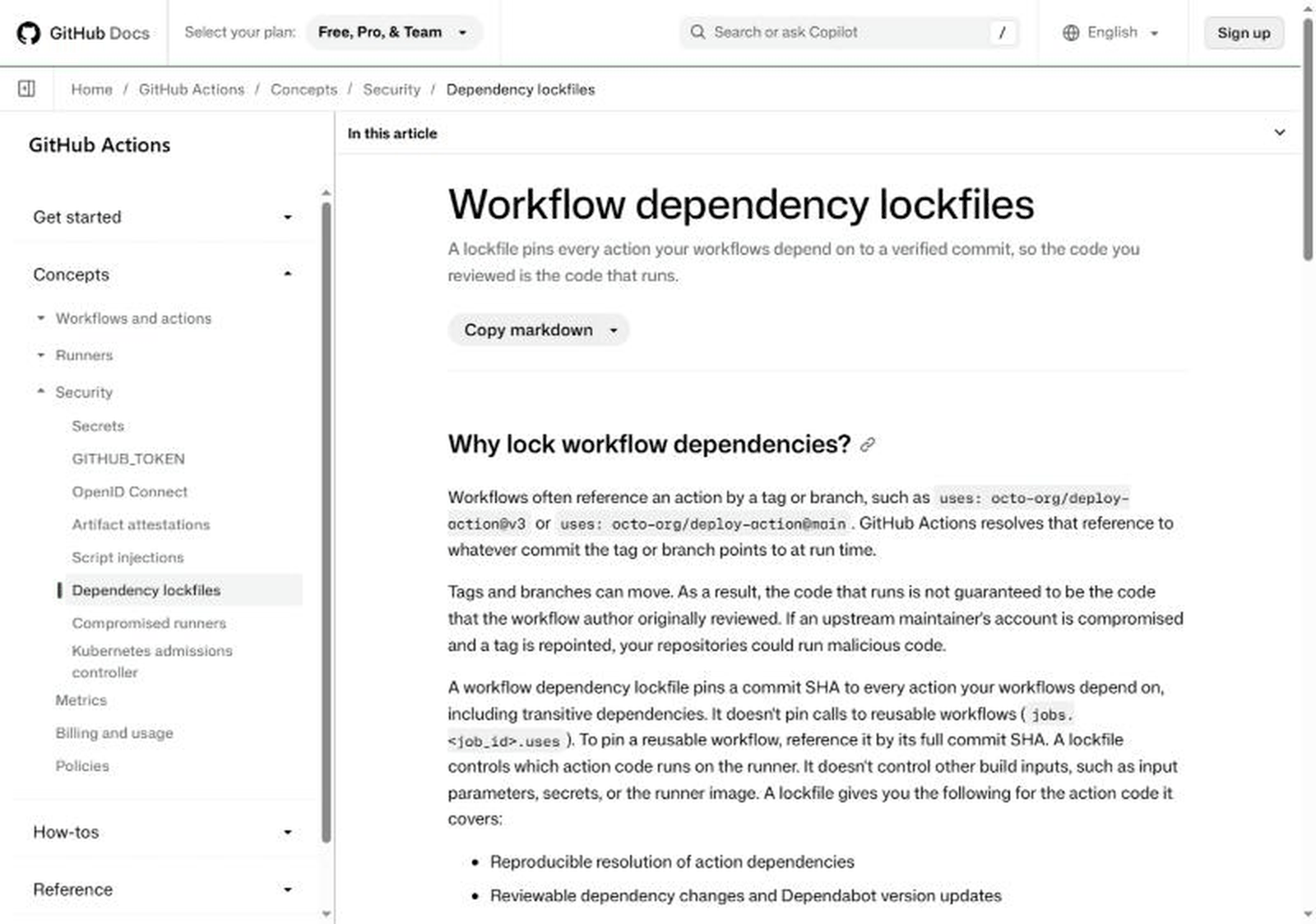
GitHub Actions workflows usually reference other people’s code with lines such as uses: actions/checkout@v7.0.1. A version tag like that is a pointer, and pointers can move. GitHub’s documentation now describes a feature called workflow dependency lockfiles: a file at .github/workflows/actions.lock, generated by a GitHub CLI extension called gh actions-lock, that records the exact commit every action resolves to, so the code that runs is the code that was reviewed. On November 11, 2026, Python core developer Hugo van Kemenade wrote a short walkthrough of switching his own repositories over, and the post reached the Hacker News front page on November 12 (the story page showed 217 points when we looked).
For a small team the practical meaning is simple. If your repository runs third-party actions, you can now keep readable version tags in your workflow files and still have a machine-checked record of the exact commits behind them. The catch is that the lockfile only helps if somebody reads the diff when it changes, and the documentation says so directly.
Timeline
- Before this change: in Hugo’s post, the previous advice is to pin third-party actions to a full commit SHA instead of a tag, because tags are mutable and an attacker who controls the upstream repository can point a previously safe tag at malicious code.
- November 11, 2026: Hugo van Kemenade publishes “Lock your GitHub Actions”, opening with the sentence “GitHub Actions now supports workflow lockfiles.”
- November 12, 2026: the post is on the Hacker News front page. We read GitHub’s concept page, the how-to page for creating a lockfile and the administrator page for enforcing lockfiles, and captured three screenshots.
- What we could not find: a dated GitHub changelog entry announcing the feature. None of the three documentation pages we read carried a launch date we could cite, so we do not state one.
What GitHub’s documentation says
The concept page opens with a one-line summary: a lockfile pins every action your workflows depend on to a verified commit, so the code you reviewed is the code that runs. It then explains the problem in plain terms. Workflows often reference an action by a tag or a branch. GitHub resolves that reference to whatever commit the tag or branch points to at run time. Tags and branches can move, so the code that runs is not guaranteed to be the code that the author originally reviewed. If an upstream maintainer’s account is compromised and a tag is repointed, your repositories could run malicious code.
According to the same page, the lockfile lives at .github/workflows/actions.lock, is generated by gh actions-lock, a GitHub CLI extension, and “should never be edited by hand.” It has two sections. The workflows section records which dependencies each onboarded workflow uses. The dependencies section records, for each reference, the tag or branch it was resolved from (ref), the exact commit (commit) and the numeric owner_id and repo_id of the source repository. The page says GitHub Actions uses those two identifiers at run time to confirm that the repository behind the name is still the one you locked.
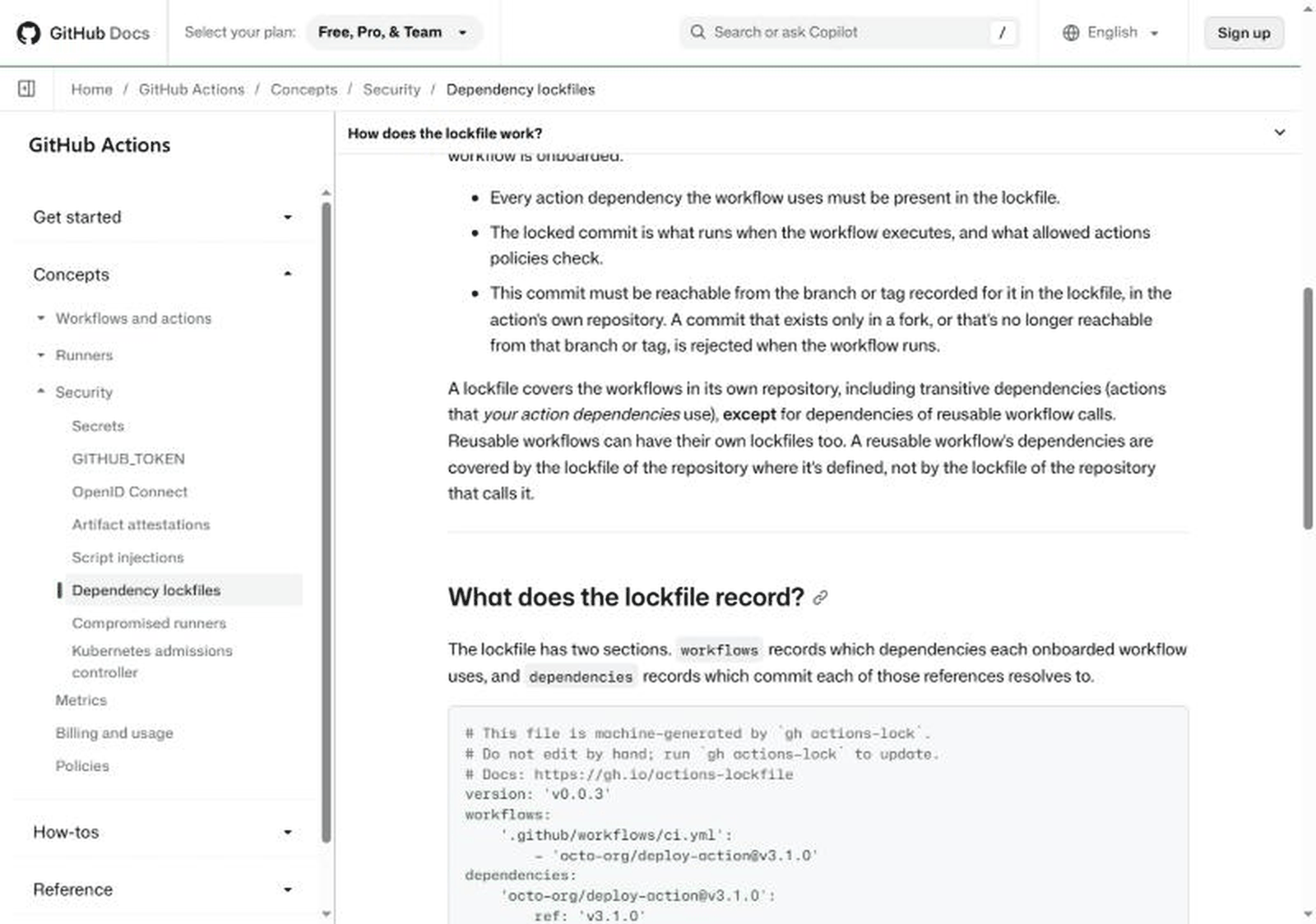
Four limits are stated on the page, and they matter more than the headline:
- A lockfile “doesn’t pin calls to reusable workflows” (the
jobs.<job_id>.usesform). To pin a reusable workflow you reference it by its full commit SHA. - It controls which action code runs on the runner. It does not control other build inputs such as input parameters, secrets or the runner image.
- Locked commits must be reachable from the branch or tag recorded for them in the action’s own repository. A commit that exists only in a fork, or is no longer reachable, is rejected when the workflow runs.
- For repositories that adopt a lockfile, SHA pinning inside workflow files is no longer necessary, according to the page, which gives three reasons: transitive dependencies are covered, workflow files are easier to read, and the lockfile records the source repository’s identity.
What the how-to and enforcement pages add
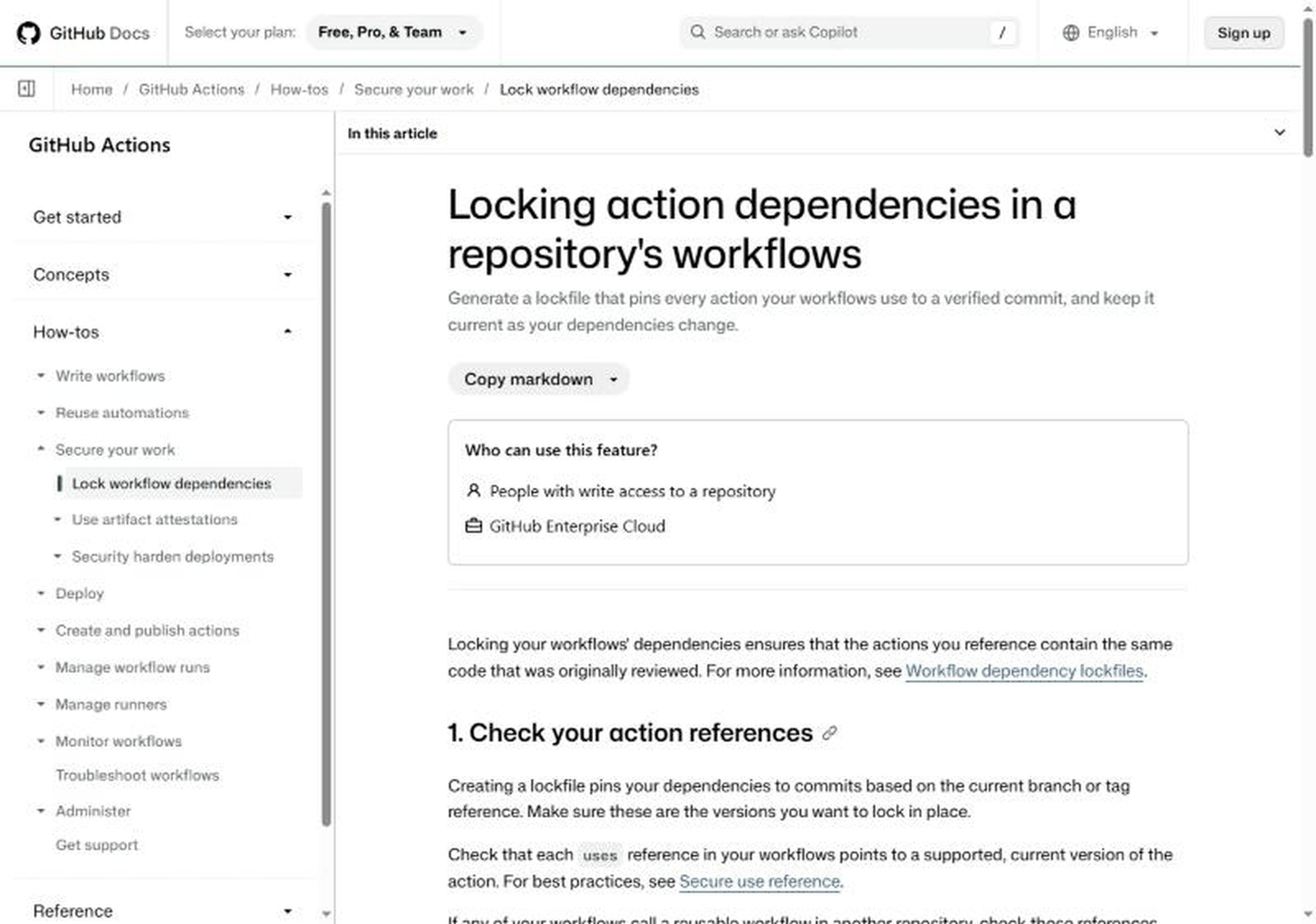
The how-to page lists five steps: check your action references, install the extension with gh extension install github/gh-actions-lock, run gh actions-lock from the repository root, review the full diff and commit, and keep the lockfile current. It says people with write access to a repository can create a lockfile. It also warns that the extension “changes more than the lockfile”: it rewrites uses references to the specific version it resolved, so @v3 can become @v3.1.0, which makes the reference more specific without changing the commit it resolves to.
Three details from those pages are easy to miss:
- Allowlists change meaning. If your repository, organization or enterprise only allows specified actions, the page says that after a workflow is onboarded the allowlist is checked against locked commit SHAs instead of tags. Entries pinned to a tag, such as
actions/checkout@v6, “no longer match” and you need a wildcard or the full commit SHA. Check this before committing, or your workflows can stop running. - Moved references. A branch or partial version such as
mainorv3keeps its locked commit and the extension reports a ref-moved warning; advancing it is a deliberate step withgh actions-lock --relockafter you check upstream history. A full version tag such asv3.1.0must point at its locked commit, otherwise you get an error. A rewritten history, for example after a force-push, needs--accept-moved, and the page says not to use that option in automation. - Local actions. The extension never locks a
./path action, because that runs whatever is checked out in the runner’s workspace. If a local action uses other actions, the extension reports an error and writes nothing until you migrate with--migrate-local-actionsor choose--ignore-local-actionsand accept the trade-offs the page spells out.
The enforcement page is aimed at repository administrators, organization owners and enterprise owners. It describes a “Require lockfile” policy that blocks runs of targeted workflows that are not onboarded to the repository’s lockfile, recommends piloting it first, and states that the Evaluate mode for policies is only available on GitHub Enterprise Cloud. It suggests adding .github/workflows/actions.lock to a CODEOWNERS file so the team responsible for build security is asked to review every change, because, in its words, a lockfile is only a security control if someone reads the diff.
What Hugo van Kemenade’s post adds
The blog post is a practical report, not a specification. The author shows an existing lint workflow where actions are pinned to full SHAs with version comments, runs the extension, and shows the result: the workflow goes back to readable tags (actions/checkout@v7.0.1 and j178/prek-action@v3.1.0) and the lockfile records the commits. He states that Renovate and Dependabot “already support lockfiles” and adds “Remember to use cooldowns”, meaning a delay before adopting brand-new releases. He also adds a separate job to the same workflow that runs gh actions-lock --verify so CI fails if the lockfile is out of sync, installs the extension with --pin v0.4.1 and notes that this pin will itself need updating, which he calls a problem for another time. Finally he mentions the zizmor security linter, saying versions before v1.32.0 tell you to hash-pin actions and v1.32.0 is the first to support lockfiles.
Our own arithmetic (labelled as ours)
These figures are our own counts from the examples printed on the pages above, not statistics published by GitHub or the blog author.
| What we counted | Result (ours) |
|---|---|
uses: lines in the author’s final workflow (lint job plus lockfile job) |
3 lines, 2 distinct actions, because actions/checkout@v7.0.1 appears twice |
Entries in the author’s sample actions.lock |
2 dependencies, 1 workflow |
| Fields recorded per dependency (ref, commit, owner_id, repo_id) | 4 fields, so 8 recorded values for the 2 dependencies, against 2 SHA comments in the old style |
Length of each recorded commit in the sample (the text after sha1-) |
40 hexadecimal characters, which is the full-length SHA GitHub has historically recommended |
| Review burden, rule of thumb | One diff line per changed commit; a changed owner_id or repo_id is described by GitHub as rare and worth investigating |
The point of the count is not that eight values is better than two. It is that the new record carries identity (owner and repository IDs) that a SHA comment never did, and it carries it in a format tools can read.
Claimed versus what we could verify
| Claim | Source | Our status |
|---|---|---|
GitHub Actions supports workflow lockfiles at .github/workflows/actions.lock |
GitHub Docs, blog post | Verified on three GitHub Docs pages (screenshots above) |
| Lockfile covers transitive dependencies, not reusable workflow calls | GitHub Docs concept page | Verified by reading the page |
| Dependabot regenerates the lockfile entry in the same pull request | GitHub Docs how-to page | Verified in the documentation; we did not trigger a Dependabot update |
| Renovate supports lockfiles | Blog post only | Not verified by us |
| zizmor v1.32.0 is the first version to support lockfiles | Blog post only | Not verified by us |
| Which plans can use it | Docs plan picker shows Free, Pro and Team; how-to pages list GitHub Enterprise Cloud | Unclear. The enforcement policy and its Evaluate mode are described as Enterprise Cloud. Check your own plan page |
| A launch date | None found | Not stated |
| It prevents a compromised action from running | Implied by the docs | Not tested. The docs claim reproducible resolution and reviewable changes, not immunity |
Who is actually affected
Anyone whose repositories use third-party actions in workflows, which includes most open-source projects and a large share of small-company repositories that build and deploy with GitHub Actions. People who publish actions are affected differently: they are the “upstream” in the scenario the docs describe, and their tags are what consumers lock. Teams that already pin everything to full SHAs gain readability and transitive coverage. Teams that use floating tags such as @v4 gain the most, because their current setup lets a moved tag change what runs without any commit in their own repository.
If you run no GitHub Actions workflows, none of this applies. If your actions all come from your own repositories, the main benefit is the audit inventory.
Why this one is getting attention
Supply-chain risk through build pipelines is a familiar worry. A build runner usually holds credentials: deploy tokens, package publishing rights, cloud keys. That is why a change in how a tag resolves is worth a security review even if the action is “just a linter”. Our earlier note on the Apache vulnerability disclosure of the same week, Apache 2.4.71 and CVE-2026-119618, is a different kind of story, but it shares one lesson: when a fix or a control exists, the useful question is who is responsible for turning it on and checking it stayed on.
Checklist for repository owners
- List every
uses:line across.github/workflows/. Decide which ones you actually need. - Replace floating references such as
@mainwith a specific version before locking, because the lockfile pins whatever the reference points to today. - Enable Dependabot for GitHub Actions first, as the how-to page recommends, so updates keep arriving with matching lockfile entries.
- Install the extension and run it on a branch, not directly on your default branch.
- Read the whole diff. Workflow files change too, not only the lockfile.
- If you use an allowlist of actions, update it to wildcards or full SHAs before merging, because tag-pinned entries stop matching once a workflow is onboarded.
- Add the lockfile to CODEOWNERS and require a review for changes to it.
- Add a CI job that runs
gh actions-lock --verify, as the author did, and plan how you will update the pinned extension version in that job. - Do not edit the lockfile by hand and do not use
--accept-movedin automation. - Remember what is not covered: reusable workflow calls, secrets, inputs and the runner image.
What to watch next
- A dated GitHub changelog or announcement, and any statement about which plans get which parts of the feature.
- Whether other linters and update tools document support, since two of the claims above come from a single blog post.
- Newer versions of the
gh-actions-lockextension. The blog post pinsv0.4.1and the sample lockfile header saysversion: 'v0.0.3', so the format is young. - How teams handle the first moved tag after adopting lockfiles. The documentation spells out the procedure; the real test is whether people follow it under time pressure.
For readers who maintain developer tooling and hosting, our recent checklist for a similar “read the primary page first” situation is Val Town shutting down in January 2027, and our developer-pricing note Gemini Decisions API: price, limits and a developer checklist.
Frequently asked questions
Is a lockfile the same as pinning to a full SHA
No. According to GitHub’s documentation, a lockfile also covers transitive dependencies (actions that your actions use) and records the identity of the source repository, and it lets workflow files keep readable version tags. SHA pinning inside the workflow file only covers the lines you wrote.
Does a lockfile make a compromised action harmless
The documentation does not claim that. It says the lockfile gives reproducible resolution, reviewable changes and an inventory. If you lock a version that was already malicious, the lockfile locks the malicious commit. The control works when the first review is real and later changes are read.
Who can create a lockfile
The how-to page says people with write access to a repository. Enforcing the policy across repositories is described for repository administrators, organization owners and enterprise owners.
Will my workflows break after I lock them
They can, in a few cases the documentation lists: an allowlist entry pinned to a tag no longer matches, a local action that uses other actions produces an error, and a tag that moved produces an error until you re-resolve it. Test on a branch.
Does it cover reusable workflows
Calls to reusable workflows are not pinned by the lockfile. A reusable workflow’s own action dependencies are covered by the lockfile of the repository where it is defined, so that repository needs its own lockfile.
Is this available on every plan
We could not settle that from the pages we read. The plan picker on the concept page shows Free, Pro and Team, while the how-to and enforcement pages list GitHub Enterprise Cloud in their availability boxes, and the Evaluate mode is described as Enterprise Cloud only. Check the plan information in your own account.
Sources and method
- GitHub Docs, “Workflow dependency lockfiles” (docs.github.com, Actions, Concepts, Security). Read November 12, 2026.
- GitHub Docs, “Locking action dependencies in a repository’s workflows”. Read November 12, 2026.
- GitHub Docs, “Enforcing lockfiles for action dependencies”. Read November 12, 2026.
- Hugo van Kemenade, “Lock your GitHub Actions”, hugovk.dev, November 11, 2026.
- Hacker News front page, November 12, 2026, for the discussion context.
Method: we opened each page, read it in full, captured the three screenshots above in a clean browser window without interacting with any banner or sign-in prompt, and quoted only short phrases. We did not install the extension, run it or test any workflow. Numbers in the arithmetic table are our own counts from printed examples.
Risk note
This article is a summary of public documentation and one blog post. Documentation can change after we read it, and features and plan availability may differ for your account. We have not tested the tool and make no promise that locking your workflows will prevent any particular attack. For security decisions in your organization, read the current GitHub documentation yourself and, where needed, ask a qualified professional. Nothing here is financial, legal or investment advice.