PostgreSQL 19 Is Out and PostgreSQL 14 Is Already Unsupported: What to Check Before You Upgrade
Published November 21, 2026. A news analysis built from the PostgreSQL 19 release notes (Appendix E.1 of the PostgreSQL 19 documentation), the PostgreSQL “Versioning Policy” page, WordPress.org’s “Requirements” page, and our own screenshots. This article contains no affiliate links and we have no commercial relationship with the PostgreSQL project or any host or database vendor named in it. We did not install or benchmark PostgreSQL 19; every figure marked “ours” is our own arithmetic.
The short version
- The release: the release notes give a release date of November 19, 2026 for PostgreSQL 19. The project’s versioning page lists the current minor release as 19.0, with a final release date of November 19, 2031.
- The date that moved first: the same page shows PostgreSQL 14 with a final release on November 12, 2026 and “Supported: No”. As of November 21 that was nine days ago (our arithmetic).
- What is new: a REPACK command that replaces VACUUM FULL and CLUSTER, with a CONCURRENTLY option that avoids blocking reads and writes; a pg_plan_advice module for controlling planner decisions; faster foreign-key checks; logical replication changes; and a WAIT command for read-your-writes consistency on standbys.
- What can bite: the release notes list a long set of incompatibilities. The ones that change behaviour most are JIT now disabled by default, max_locks_per_transaction doubled to 128, MD5 password warnings, removal of RADIUS authentication, and a removed io_workers setting.
- Not for WordPress: WordPress runs on MySQL or MariaDB. This matters for the other applications you may host.
The date that moved first: PostgreSQL 14 is out of support
PostgreSQL publishes a support table. In it, each major version is supported for about five years from its first release, ending with a “final release”. The table we read on November 21 shows PostgreSQL 14 as no longer supported, with its final release on November 12, 2026, and PostgreSQL 15 as the oldest supported version.
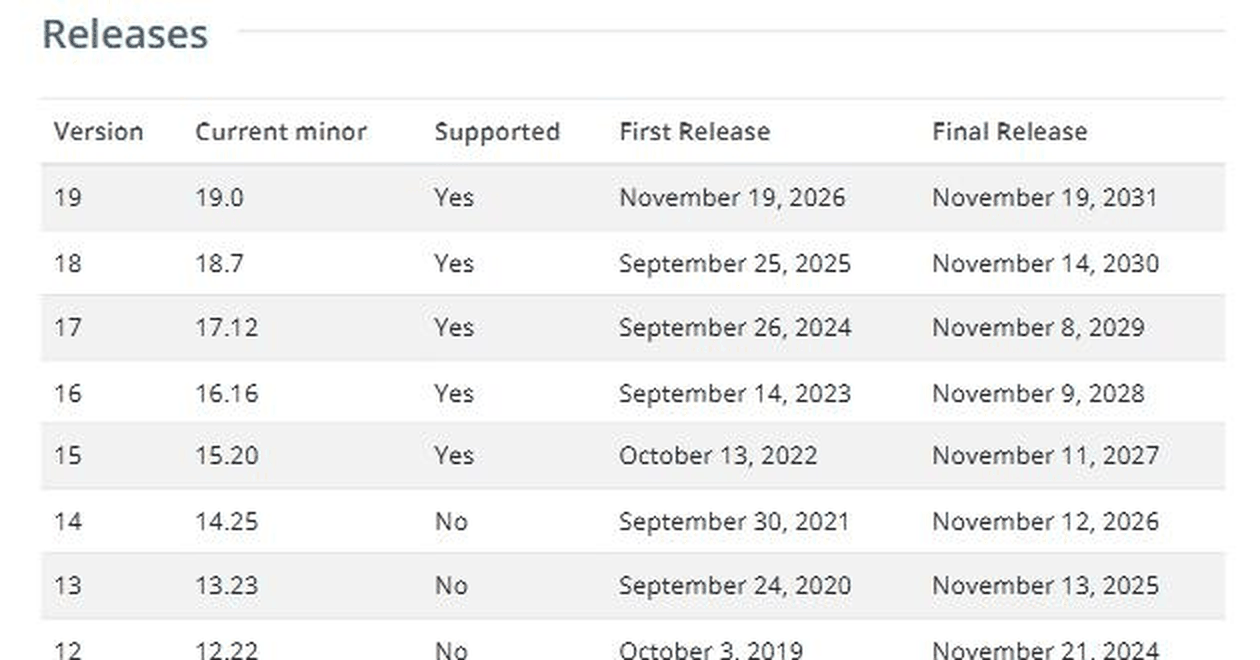
| Version | First release | Final release | Supported? | Days to final release from Nov 21, 2026 (ours) |
|---|---|---|---|---|
| 19 | Nov 19, 2026 | Nov 19, 2031 | Yes | 1,824 |
| 18 | Sep 25, 2025 | Nov 14, 2030 | Yes | 1,454 |
| 17 | Sep 26, 2024 | Nov 8, 2029 | Yes | 1,083 |
| 16 | Sep 14, 2023 | Nov 9, 2028 | Yes | 719 |
| 15 | Oct 13, 2022 | Nov 11, 2027 | Yes | 355 |
| 14 | Sep 30, 2021 | Nov 12, 2026 | No | -9 (already passed) |
Two readings (ours). If you run PostgreSQL 14 you are already on a version that no longer receives fixes, so the question is when to move, not whether. If you run 15, you have a little under a year of fixes left, which is enough time to plan a test-and-migrate cycle but not enough to ignore it.
What is new in 19
The “Overview” section of the release notes lists the headline changes.
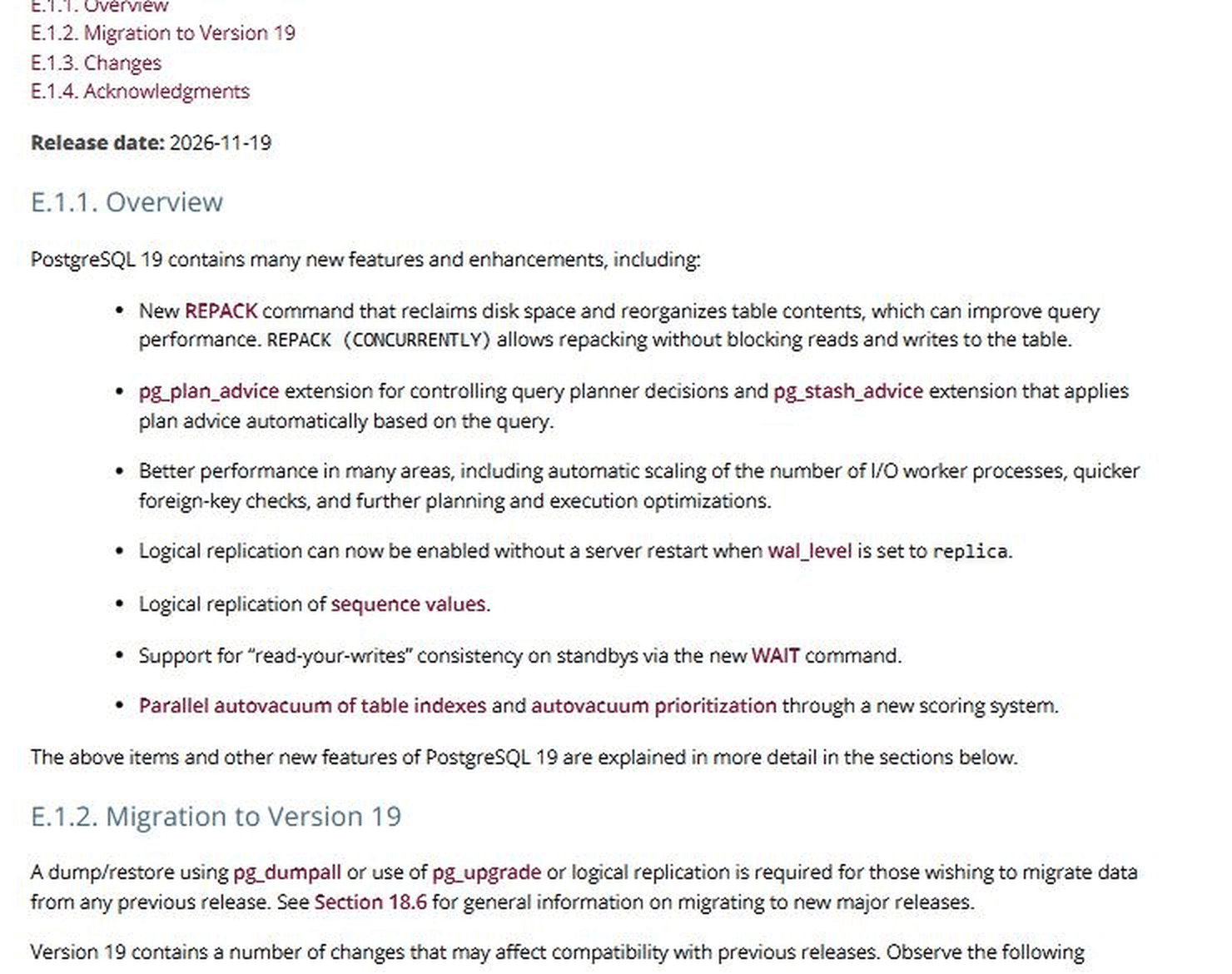
- REPACK. A new command reclaims disk space and reorganizes table contents. The detailed notes say it replaces VACUUM FULL and CLUSTER, which did similar things under confusing names; the old commands are kept for compatibility. With the CONCURRENTLY option it can rebuild a table without taking an access-exclusive lock, so reads and writes continue. A new server variable, max_repack_replication_slots, was added for it.
- Plan advice. A pg_plan_advice module is meant to stabilize and control planner decisions, and a pg_stash_advice extension lets you attach advice to a specific query id, so a bad plan can be steered without changing application code (our reading).
- Performance work. The overview names automatic scaling of the number of I/O worker processes, quicker foreign-key checks and further planning and execution optimizations. The detailed optimizer notes list many join and subquery rewrites, such as converting more NOT IN and LEFT JOIN patterns to anti joins.
- Replication. Logical replication can be enabled without a restart when wal_level is replica, sequence values can now be replicated logically, and a new WAIT command supports read-your-writes consistency on standbys.
- Maintenance. Autovacuum can process table indexes in parallel and prioritizes work through a scoring system.
The notes describe these changes; they do not give benchmark figures for them, and we did not measure any. Treat “better performance” as a claim to test on your own workload.
What can break: the incompatibilities
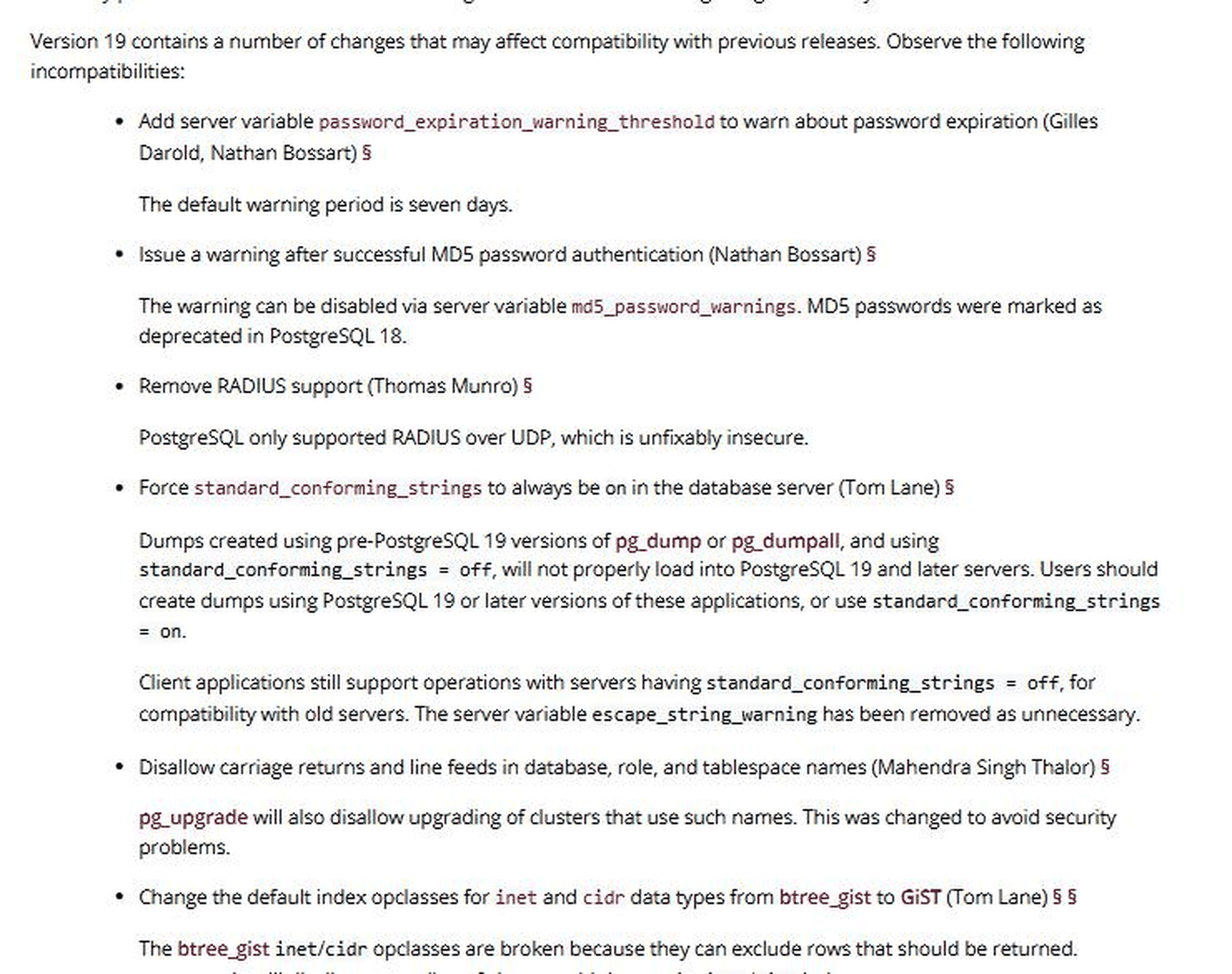
The “Migration to Version 19” section opens with the rule that matters most: moving from any earlier release requires a dump and restore with pg_dumpall, pg_upgrade, or logical replication. It then lists the changes that may affect compatibility. We split them into the ones that can change behaviour or block an upgrade, and the ones that mostly affect monitoring and extension code.
| Change in PostgreSQL 19 | What the notes say | What to check (ours) |
|---|---|---|
| MD5 password warnings | A warning is issued after successful MD5 authentication; MD5 passwords were marked deprecated in 18. It can be disabled with md5_password_warnings. | Find roles that still use MD5 and move them to SCRAM before log noise or policy reviews find them. |
| Password expiration warning | New password_expiration_warning_threshold, default seven days. | Expect new warnings for roles with expiry dates. |
| RADIUS removed | PostgreSQL only supported RADIUS over UDP, described as unfixably insecure. | If pg_hba.conf uses radius, plan a replacement before you upgrade. |
| standard_conforming_strings always on | Dumps made by pre-19 tools with it off will not load properly into 19. | Make dumps with the version 19 tools, or set it on first. |
| Names with CR or LF | Disallowed in database, role and tablespace names; pg_upgrade refuses clusters that use them. | Search your catalogs for such names before you start. |
| inet and cidr with btree_gist | The old opclasses are broken; pg_upgrade refuses clusters with such indexes. | Find and rebuild those indexes with the new default operator class. |
| json_array() with no rows | Now returns an empty JSON array instead of NULL. | Check application code that treats NULL as empty. |
| READ ONLY and postgres_fdw | Transactions pass READ ONLY and DEFERRABLE status to postgres_fdw sessions. | A read-only transaction can no longer modify rows through foreign tables. |
| Setting or behaviour | What the notes say | What to check (ours) |
|---|---|---|
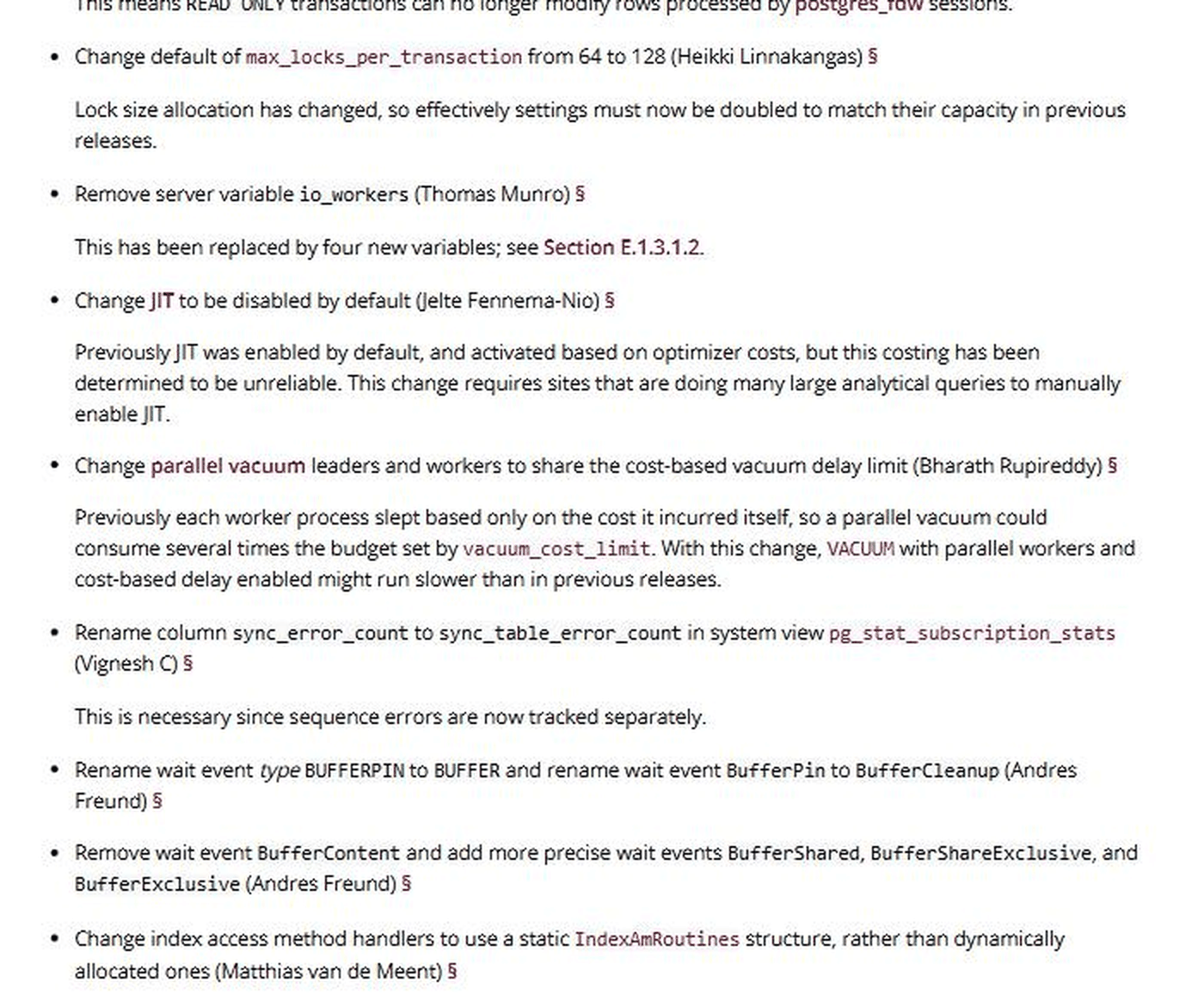
| max_locks_per_transaction | Default changes from 64 to 128 because lock size allocation changed; settings effectively must be doubled to match old capacity. | If you set it explicitly, double it to keep the same capacity; if you rely on the default, the new default of 128 is the doubled setting. |
| io_workers | Removed and replaced by four new variables. | Remove it from configuration files and read the new variables in the notes before starting the server. |
| JIT | Disabled by default because the cost estimates were found unreliable. Sites with many large analytical queries must enable it manually. | Compare analytical query timings with JIT on and off. |
| Parallel vacuum | Workers now share the cost-based vacuum delay limit, so a parallel vacuum may run slower than before. | Re-time your vacuum windows. |
| Monitoring names | A column in pg_stat_subscription_stats is renamed, and several wait events are renamed or split. | Update dashboards and alert queries that reference them. |
| Full text search and pg_trgm | Character classification now follows the database locale provider. After pg_upgrade the notes recommend reindexing full text search and pg_trgm indexes and recomputing stored tsvector values for affected databases. | Applies if your locale provider is not libc. |
| MULE_INTERNAL encoding | Removed. Databases that use it must be dumped and restored with another encoding. | Check database encodings. |
The notes also remove an optimizer hook, change index access method handlers, make psql’s crosstab view honour the null setting, and change how the fuzzystrmatch functions treat non-ASCII characters. Those mostly concern extension authors and people who parse psql output.
What to check before you upgrade
- Know your version. Run SHOW server_version on each server, including the forgotten ones behind small apps. Anything on 14 or earlier needs a plan now.
- Choose the migration path. The notes allow dump and restore, pg_upgrade or logical replication. Logical replication is the usual choice when you cannot afford long downtime; the notes say nothing about which is best for you, so try the path on a copy first.
- Run the pre-checks. pg_upgrade refuses some clusters outright (names with line breaks, inet and cidr btree_gist indexes), so run its check mode on a copy.
- Diff your configuration against the notes. Search postgresql.conf for io_workers, max_locks_per_transaction and jit, and search pg_hba.conf for radius and md5.
- Test your workload. Run your real queries and your vacuum and maintenance jobs on 19.0. Pay attention to analytical queries (JIT) and to anything that used VACUUM FULL or CLUSTER, which you may want to move to REPACK.
- Check your extensions and managed service. Confirm that each extension you use has a PostgreSQL 19 build, and, if you use a managed database, that your provider offers 19. We did not check any extension or provider.
- Do not wait for a perfect moment. In our judgment, a new major release’s first minor version is a reasonable time to test and a poor time to move critical production, so schedule the migration from a supported older version rather than from a panic. Move PostgreSQL 14 sooner, since it is already out of support.
Why a WordPress site owner might care
WordPress.org’s “Requirements” page recommends PHP 8.3 or greater and MariaDB 10.11 or greater or MySQL 8.4 or greater. PostgreSQL is not on the list, so a standard WordPress install is not affected by this release. It matters for the other software people host beside it: applications that use PostgreSQL as their database, internal tools, analytics and automation platforms. If you host such software, ask your provider which PostgreSQL version it runs.
What we could not confirm
- Any performance or stability claim. We did not install or benchmark PostgreSQL 19, and the release notes give descriptions rather than figures.
- Whether your extensions and managed-database providers support 19.
- Whether 19.0 has known problems. A first minor release often gets fixes; we did not look at the bug tracker.
- The full list of changes. We read the overview, the migration section and parts of the detailed notes, not every entry.
- The best migration path for your system.
Frequently asked questions
When was PostgreSQL 19 released?
The release notes give November 19, 2026, and the versioning page lists 19.0 as the current minor release.
Is PostgreSQL 14 still supported?
No. The versioning page lists 14 as not supported, with a final release on November 12, 2026.
Can I upgrade directly from my version to 19?
The notes say moving from any previous release needs a dump and restore, pg_upgrade or logical replication, and they list incompatibilities to check.
What happened to VACUUM FULL and CLUSTER?
The notes say REPACK replaces them as the unified command and that the old commands are retained for compatibility.
Does this affect WordPress?
Not directly. WordPress.org’s requirements list MySQL or MariaDB.
Where are the sources?
The PostgreSQL 19 release notes and the “Versioning Policy” page on postgresql.org, and the “Requirements” page on WordPress.org. All screenshots are ours, taken on November 21, 2026.