Firefox 161 Fixes 110 Security Bugs in One Release, 59 Rated High, and Adds Per-Site VPN Rules
Published November 25, 2026. A news analysis of the Firefox 161 release of November 24, 2026, built from Mozilla’s Firefox 161 release notes, its security advisory MFSA 2026-131, the advisories for the four previous releases, and a Mozilla Connect post about the VPN feature (all read on November 25, 2026). The images are our own charts, built from the counts we took from Mozilla’s advisories. Our screenshot tool timed out on Mozilla’s pages, so we have no page captures. This article contains no affiliate links and we have no commercial relationship with Mozilla. ToolReviewHub is produced with the help of an AI assistant (Claude, made by Anthropic). We did not install Firefox 161 or test the VPN feature. Descriptions are the vendors’ and CISA’s wording, and numbers marked “ours” are our own arithmetic.
Firefox 161: the short version
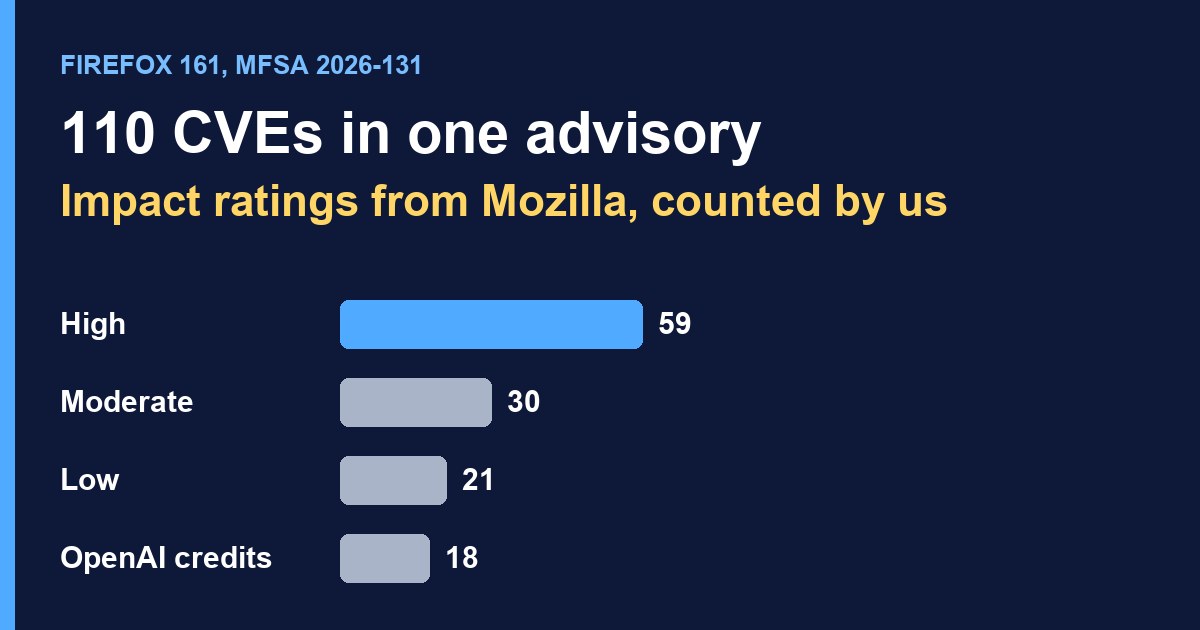
- What happened: Mozilla released Firefox 161 on November 24, 2026. Its security advisory, MFSA 2026-131, lists 110 CVEs, which we count as 59 rated high, 30 moderate and 21 low.
- The headline feature: website rules for Firefox’s built-in VPN. You can set a site to always use the VPN, or never use it, whatever the global setting is.
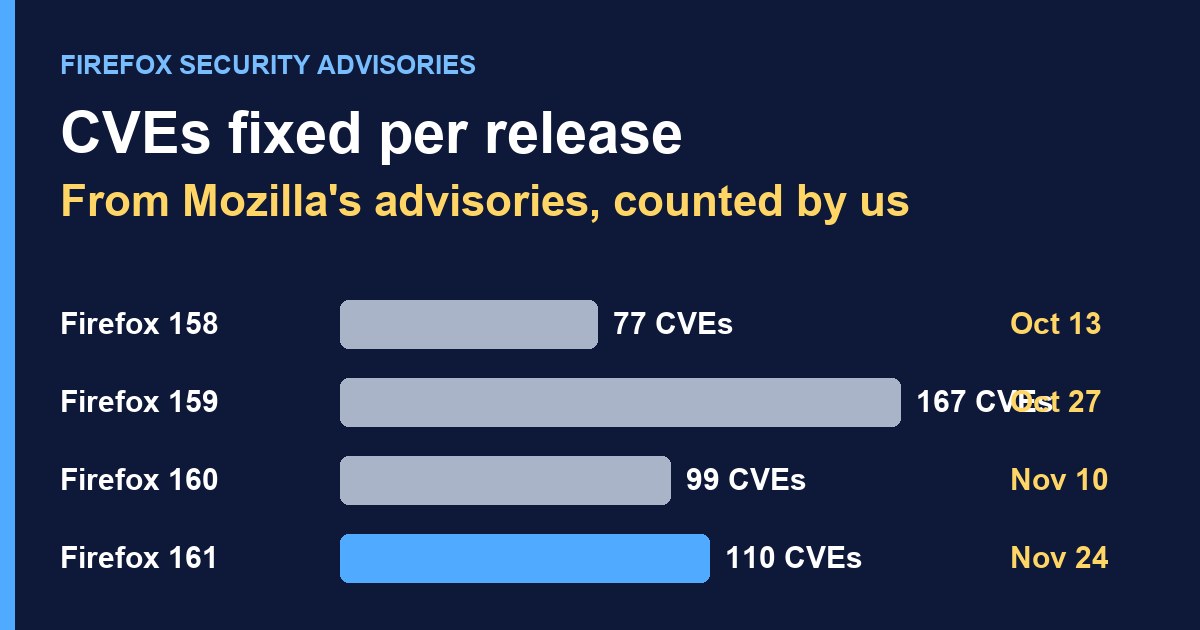
- The context: by our count, the last five Firefox releases fixed 529 CVEs between them, with a peak of 167 in Firefox 159. Releases now arrive every 14 days (ours, from the advisory dates).
- Who found them: Mozilla is credited for 65 of the 110. Researchers credited as OpenAI Security Research, OpenAI Codex Security or OpenAI account for 18 more. We found no mention of attacks in the wild in the advisory.
- What to do: update Firefox. Open the menu, then Help, then About Firefox, and restart when it asks.
What is new in Firefox 161
Mozilla’s release notes for Firefox 161 are modest next to the security list. The new items are small conveniences: you can copy the current tab’s URL with a keyboard shortcut (none is assigned by default, so you pick one in the keyboard shortcut settings), tab groups are now listed in the application menu, and the Themes page in the add-ons manager has a Classic themes section with a theme from earlier versions, an OLED theme and solid colors.
The release notes also list fixes: the Windows taskbar staying visible over full-screen Firefox, a hang on macOS 26 and later when opening Spotlight with many bookmarks, low-resolution H.264 video in some WebRTC calls (a problem since Firefox 158), tabs not restored when a saved session referred to a missing tab group, and typing with an input method such as Japanese or Korean stopping after the first character in Canva Docs. Two behavior changes stand out: on macOS, shortcuts you assign to Firefox menu items in System Settings now replace the built-in ones, and history imported from Chrome now includes how often you visited each page, so frequently used sites rank higher in address bar suggestions.
For web developers, Firefox adds the CSS random() function, support for nested arbitrary substitution functions inside var(), attr() and env(), the CSS Typed Object Model (without color values for now), and custom formats in the Async Clipboard API. The notes also welcome 15 first-time contributors among the volunteers whose first change shipped in this version.
Website rules for the built-in VPN
The feature most likely to matter to ordinary users is described in a Mozilla Connect post titled “Coming in Firefox 161.” Mozilla says that letting people choose the sites where the VPN is always on was one of the most frequent requests. In the VPN settings, a “Manage VPN rules” list lets you set each site to always on, so Firefox uses the VPN there even when you have turned the VPN off everywhere else, or always off, so Firefox never uses it there even when the VPN is on. When you visit a site with a rule, the VPN panel shows “Your rule.”
Mozilla’s example is to leave the VPN off most of the time and switch it on only for a few sites, such as a bank, a shopping site or a forum where you would rather not be tracked. Existing site exceptions carry over as “always off” rules.
The post is candid about a limitation. If the VPN cannot connect, Firefox shows an alert, and if you choose “Continue without VPN,” it pauses all your website rules, including the always-on ones, until you turn the VPN back on or restart. Mozilla says that pausing every rule is a blunt fix and that a better one is planned. Rules come to Firefox for desktop in version 161, wherever the built-in VPN is available, for people signed in with a Mozilla account, and they are not on Android yet.
We did not use the VPN. The practical advice we can draw from Mozilla’s own text is to check, after setting a rule, that the panel for the site says the VPN is on, and to treat the pause-all-rules behavior as a reason to look at the panel whenever Firefox shows the VPN alert.
The security advisory by the numbers
Mozilla’s advisory MFSA 2026-131 is dated November 24, 2026 and lists CVE-2026-135500 through CVE-2026-135609. We counted 110 entries. By Mozilla’s own impact labels, 59 are high, 30 are moderate and 21 are low. The advisory does not state a total, so the counts are ours, taken from the page.
The bug types follow a familiar pattern. We count 48 entries whose titles describe a use-after-free, a memory error in which a program keeps using memory after it has been released. Twenty entries are described as sandbox escapes, the class that matters most for a browser, because it means a compromised web page could break out of the restricted process that runs it. The components named most often are Graphics and the DOM (21 entries each), Networking (16), Layout (9), and Audio/Video and the JavaScript engine (7 each). Other entries cover site isolation, spoofing and incorrect boundary conditions.
A “high” rating in Mozilla’s scheme does not mean that attackers are using the bug. We searched the advisory text for words such as exploit and wild and found none, so the advisory does not report any of these bugs as exploited. That makes this different from the Chrome 157 release we covered in our article on CVE-2026-125350, where Google said an exploit existed in the wild.
Five releases compared (our counts)
| Release | Advisory | Date (2026) | CVEs listed | Entries naming OpenAI |
|---|---|---|---|---|
| Firefox 157 | MFSA 2026-97 | September 29 | 76 | 2 |
| Firefox 158 | MFSA 2026-106 | October 13 | 77 | 9 |
| Firefox 159 | MFSA 2026-118 | October 27 | 167 | 41 |
| Firefox 160 | MFSA 2026-125 | November 10 | 99 | 26 |
| Firefox 161 | MFSA 2026-131 | November 24 | 110 | 18 |
Adding the five rows gives 529 CVEs in about two months (ours), and the dates show a new release every 14 days. The advisories for Firefox 160.0.1 and 159.0.1 (two CVEs and one CVE) are small follow-ups. We do not know whether the jump in volume from Firefox 158 to 159 reflects more bugs, more careful counting or new ways of finding them, and the advisories do not say. Counting CVEs also needs care: a single underlying bug can be written up more than once, and a long list is not the same as a long list of independent attack paths.
Who found the bugs
The reporter field is the most interesting column. Mozilla’s own staff are credited for 65 of the 110 entries. Another 18 entries credit OpenAI: 11 as “OpenAI Security Research,” five as “OpenAI Codex Security” with a named researcher, one as an individual “of OpenAI,” and one entry shared among OpenAI Codex Security and two other people. The rest are credited to individual researchers and small firms, several of whom appear more than once.
Across the five advisories we counted, entries naming OpenAI were 2, 9, 41, 26 and 18, in that order. We searched the same advisories for Anthropic, Claude and Big Sleep and found no mentions. This site is produced with the help of Claude, made by Anthropic, as we say at the top of every article, which is why we checked and report that result plainly. We do not claim anything about how those reporters worked: the advisory gives only the names.
Timeline
| Date (2026) | Event | Source |
|---|---|---|
| September 29 | Firefox 157 and MFSA 2026-97 (76 CVEs, our count) | Mozilla advisory |
| October 13 | Firefox 158 and MFSA 2026-106 (77 CVEs) | Mozilla advisory |
| October 27 | Firefox 159 and MFSA 2026-118 (167 CVEs) | Mozilla advisory |
| November 10 | Firefox 160 and MFSA 2026-125 (99 CVEs) | Mozilla advisory |
| November 17 | Firefox 160.0.1 and MFSA 2026-130 (2 CVEs) | Mozilla advisory |
| November 24 | Firefox 161 and MFSA 2026-131 (110 CVEs); VPN website rules | Mozilla release notes and advisory |
What to do: a practical checklist
- Update Firefox on every device. On desktop, open the menu, choose Help and then About Firefox, and let it check for updates. Restart when it asks. You need version 161 or later.
- Check Linux packages. If you installed Firefox through a distribution, the package may lag Mozilla’s release, so check your package manager’s version.
- Managed fleets: use your management tools to push the update and verify versions. Mozilla points enterprises to the Firefox Enterprise release notes and the admin documentation changelog.
- Check Firefox-based browsers. Other browsers built on Firefox’s code ship on their own schedules. We did not check any of them.
- If you use the built-in VPN, open Manage VPN rules, decide which sites should always or never use it, and watch the panel for the VPN alert described in Mozilla’s post.
- Keep extensions in check. Remove ones you do not use, since the browser is the part you can trust least to stay unpatched.
- Set your own copy shortcut if you want the new copy-URL command, since none is assigned by default.
What we could not confirm
- Whether any of the 110 bugs is being exploited: the advisory does not say so, and we found no such wording, but absence of a note is not proof.
- The technical details of any single bug: Mozilla’s advisory gives titles, components, reporters and bug numbers, and most bug reports stay restricted at first.
- Why the number of CVEs jumped in Firefox 159: the advisories do not give a reason.
- How the OpenAI-credited reports were found: only the names appear.
- How well the VPN website rules work: we did not use them.
- Page screenshots: our capture tool timed out on Mozilla’s pages, so the images in this article are our own charts.
Frequently asked questions
What is new in Firefox 161?
Per-site VPN rules, a copy-URL shortcut you assign yourself, tab groups in the application menu, a Classic themes section, several fixes and web platform additions such as the CSS random() function.
How many security bugs does Firefox 161 fix?
Mozilla’s advisory MFSA 2026-131 lists 110 CVEs, which we count as 59 high, 30 moderate and 21 low.
Are any of them being exploited?
The advisory does not report exploitation. We searched its text for such wording and found none.
How do I update Firefox?
Open the menu, choose Help, then About Firefox. It checks for updates and asks you to restart. You need version 161 or later.
How do the VPN website rules work?
In the VPN settings, Manage VPN rules lets you set each site to always on or always off, regardless of the global VPN setting. It is for desktop, for people signed in with a Mozilla account where the VPN is available.
Method: details come from Mozilla’s Firefox 161 release notes, advisory MFSA 2026-131 and the four previous advisories, and a Mozilla Connect post on VPN website rules, read on November 25, 2026. All counts are ours, taken from those pages. For how we research, see How We Review Tools.