Intellemo Product Updates: URL to Video, Voice Cloning, Video Editor, Captions and 10 More Features, What Each One Does
Updated November 19, 2026. A news analysis built from the “Product news” section of Intellemo’s partner portal (a page that requires a partner login), Intellemo’s public pricing page and our own earlier review of the product. Disclosure: the owner of this site has an account in Intellemo’s affiliate program, which pays commission on referred customers. This article contains an affiliate link, labelled and marked sponsored, and we may earn a commission if you sign up through it, at no extra cost to you. The research and drafting tools we use for these articles include Claude from Anthropic. We did not test the features described below for this article, so what follows is Intellemo’s own description, organized and put in context. Separately, on November 19 we made three short test videos with Intellemo, which are described in our Intellemo review. This is not purchasing advice.
Visit Intellemo
Affiliate link: we may earn a commission if you sign up, at no extra cost to you.
The short version
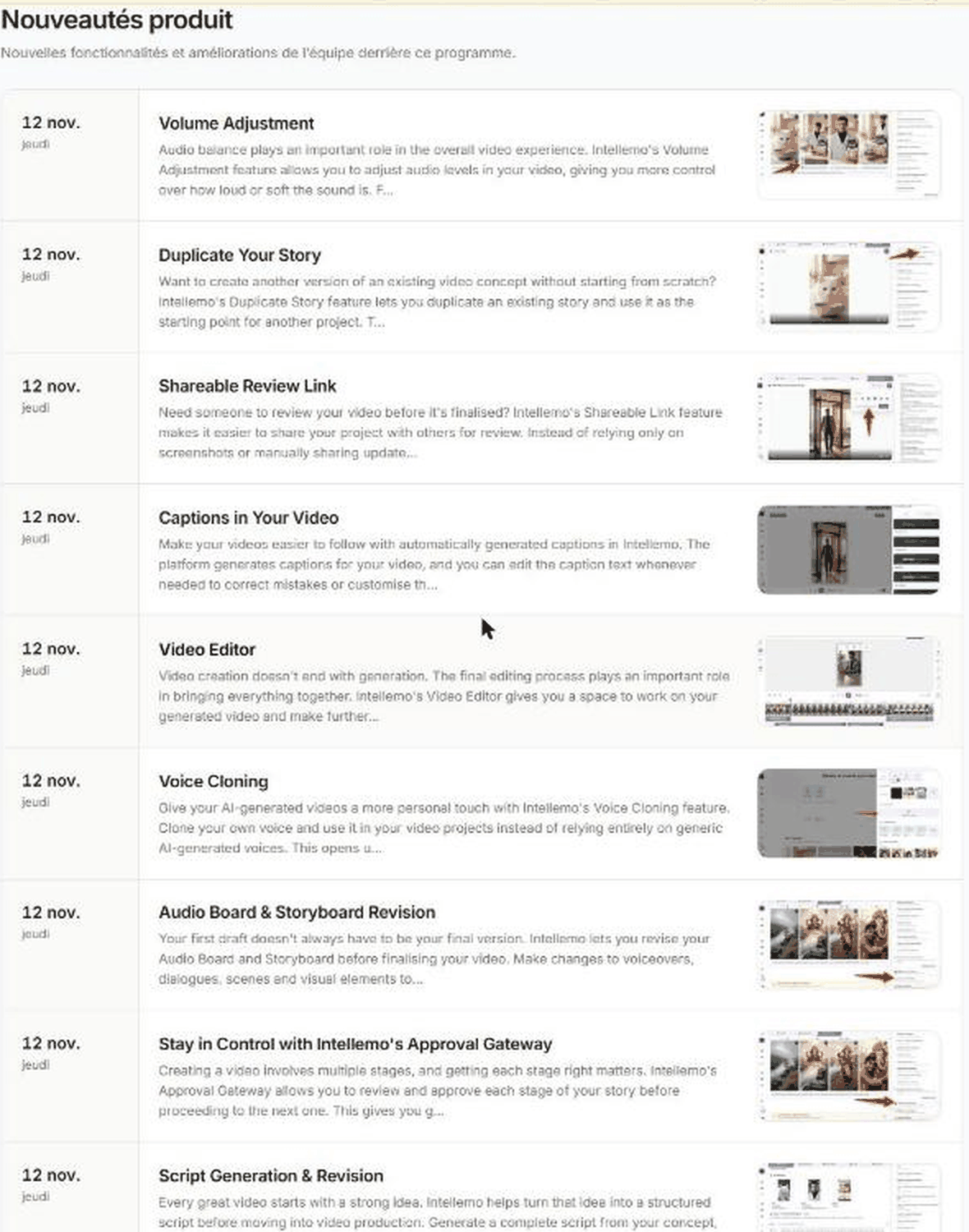
Intellemo’s partner portal lists 14 entries under “Product news”, described by the portal as new features and improvements from the team behind the program. Twelve are dated November 12, 2026 and two are dated November 11. They cover how you start a video (a script, a product, a web page URL or a song), how you keep characters and products consistent, how you approve work before paying for generation, and how you finish a video with an editor, captions, volume control and voice cloning, plus two collaboration features: duplicating a story and sharing a review link.
The entries are short marketing descriptions. None of them gives a price, a limit, a supported language, a file format or the plans a feature is available on, and the portal does not say whether each item is newly released or newly documented, only the date it was posted. Treat this as a map of what Intellemo says the product can do, and test the features that matter to you before you buy capacity.
Watch Intellemo’s Own Tutorial
For a look at the product in action, Intellemo publishes a full step-by-step tutorial on YouTube. It is a good companion to the feature list below.
Video: Intellemo AI Full Tutorial | Create Cinematic AI Videos Step by Step, published by Intellemo on YouTube. This is the company’s own video, so treat it as a product demonstration, not an independent test. We have not verified every claim in it.
The 14 entries, grouped by what they do
1. Starting a video
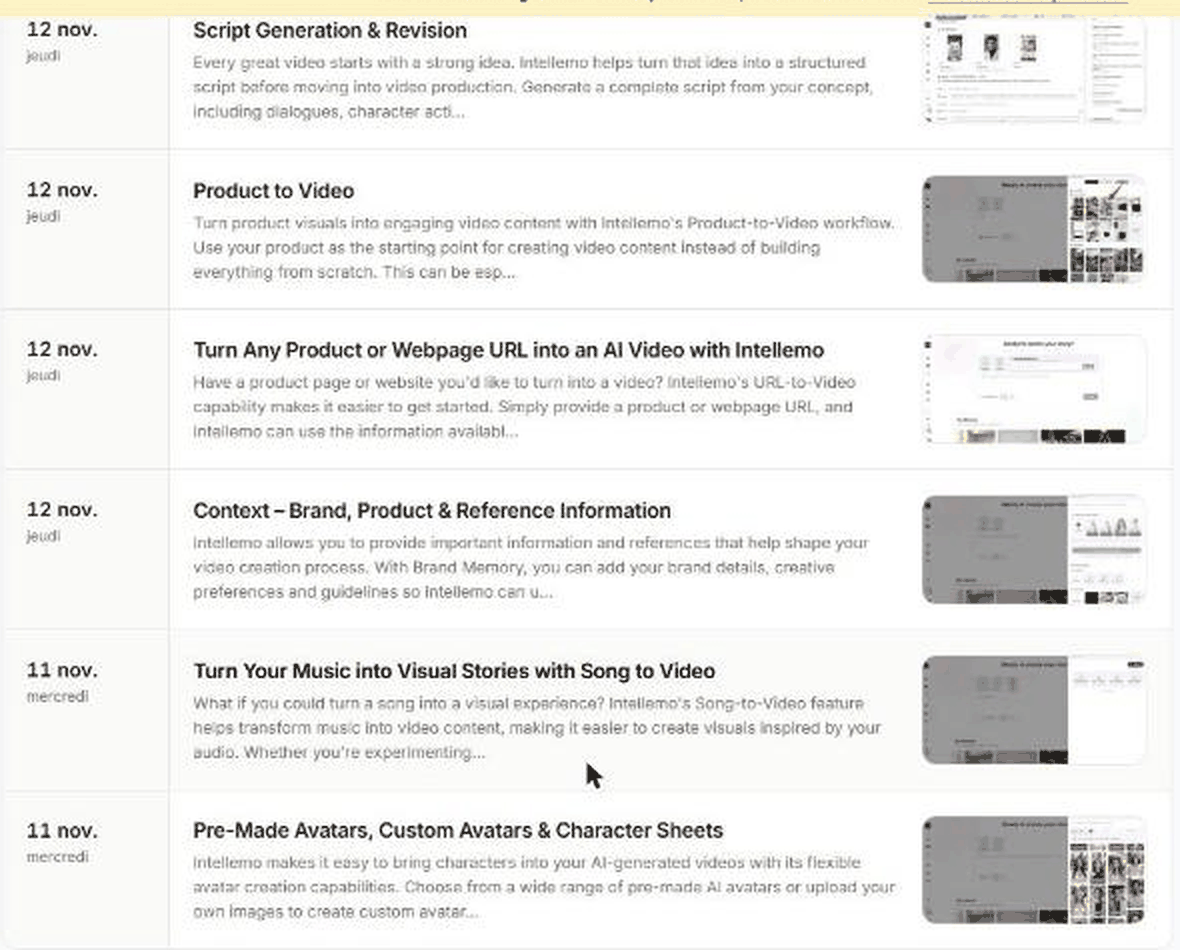
- Script Generation and Revision (Nov 12). You give a concept and Intellemo drafts a structured script with dialogue, character actions, scenes and story progression. You can edit it yourself or ask for revisions before moving to the next stage. Intellemo’s stated benefit is a structured foundation before you invest time in production.
- Product to Video (Nov 12). You start from product visuals rather than a blank prompt, aimed at brands, marketers, e-commerce businesses and agencies making product advertisements.
- URL to Video (Nov 12). You provide a product or web page URL and Intellemo uses the information on that page as the starting point. The entry says this saves gathering information by hand.
- Song to Video (Nov 11). You use a song as the starting point and Intellemo builds visuals inspired by the audio, aimed at music-driven content and visual concepts.
2. Keeping characters, products and brand consistent
- Pre-Made Avatars, Custom Avatars and Character Sheets (Nov 11). You can pick from a library of ready-made AI avatars or upload your own images to create custom ones, customize characters, and use Character Sheets to fix a character’s appearance across scenes. The stated goal is consistency even when the same character appears in several shots.
- Context: Brand, Product and Reference Information (Nov 12). Brand Memory stores brand details, creative preferences and guidelines. Product Sheets hold product references to keep a product recognizable across scenes and shots.
3. Control before you pay
- Approval Gateway (Nov 12). You review and approve each stage of a story before the next one starts.
- Audio Board and Storyboard Revision (Nov 12). You can change voice-overs, dialogue, scenes and visual elements on the audio board and the storyboard before the final video is generated.
4. Finishing the video
- Video Editor (Nov 12). A space to keep adjusting the generated video before sharing, so generation is not the last step.
- Captions (Nov 12). Captions are generated automatically and the text can be edited to fix mistakes or change wording.
- Volume Adjustment (Nov 12). You can change how loud or soft the audio is.
- Voice Cloning (Nov 12). You can clone your own voice and use it in videos instead of a generic AI voice.
5. Working with others
- Duplicate Your Story (Nov 12). Start a new project from an existing story, useful for testing variations of an advert or reusing a structure.
- Shareable Review Link (Nov 12). Share a link so clients or teammates can review the project instead of looking at screenshots.
How the features fit together: a workflow sketch
This sketch is ours, assembled from the descriptions, and we have not run it. For a product video, you would start from a product page URL, add Brand Memory and a Product Sheet, let the script generator draft the story, edit the script, review the audio board and storyboard, approve each stage, generate clips, then use the editor for captions and volume, optionally with a cloned voice, and finally send a review link to a client or duplicate the story to test a second version. It is a plausible path for a small marketing team, and the approval steps match the billing logic described in our Intellemo review: you can review the script, audio and storyboard before paid generation starts.
What it could cost
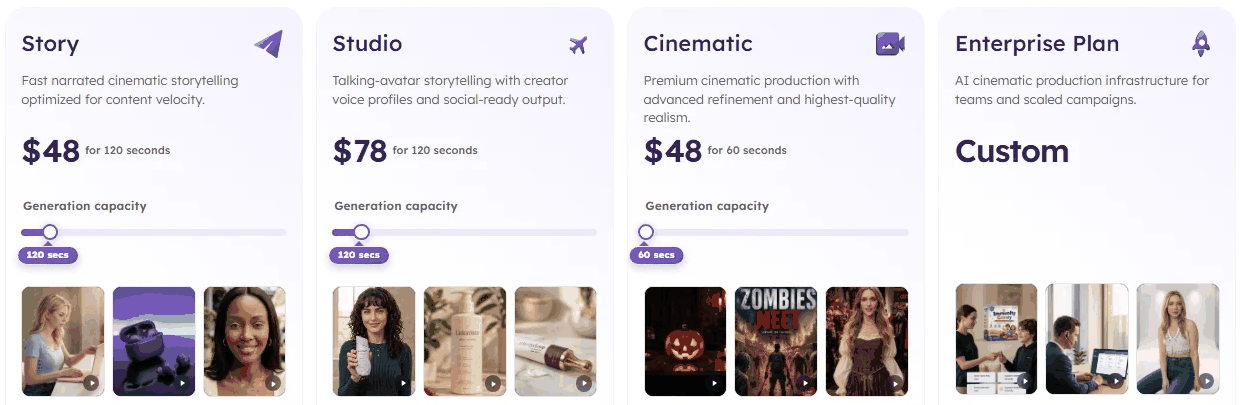
The partner portal says Intellemo measures usage in video seconds and that customers can start with a free storyboard before purchasing video generation. On the public pricing page, Story is $48 for 120 seconds, Studio is $78 for 120 seconds and Cinematic is $96 for 120 seconds, each with up to eight 15-second videos and 30 days of validity.
One discrepancy worth knowing: when we read the page, the Cinematic card showed $96 for 120 seconds, while another view of the same page that we were shown displayed Cinematic as $48 for 60 seconds with up to four 15-second videos. The default capacity differs between views. Confirm the capacity and price at checkout.
None of the 14 entries says whether the editor, captions, volume control, voice cloning or avatars use seconds or cost extra. Intellemo’s pricing page says images and audio are unlimited within the workflow, and its billing policy says paid generation, regeneration and revisions can use usage. Ask support, or read the checkout estimate, before you assume a finishing feature is free.
What the entries do not say
- Availability by plan. Which of these features are on Story, Studio and Cinematic, and which need Enterprise.
- Limits. Maximum video length for URL to Video and Song to Video, the number of avatars or Character Sheets, caption languages and export formats.
- Voice cloning safeguards. The entry says you can clone your own voice. It does not describe consent checks, verification or how voice data is stored. Clone only your own voice, and read Intellemo’s terms and privacy policy first.
- URL to Video sources. The entry says Intellemo uses information from the page. It does not say how it handles images, logos or text you do not own, so check you have the rights to anything you feed in.
- Quality. None of the entries shows output or claims a measured result, and we did not generate anything.
What to check before you buy
- Run the free storyboard first. Use the stage that costs nothing to test script generation, URL to Video and Product to Video on your own product.
- Test the approval steps. Confirm that you see an estimated cost before clip generation starts and what a revision costs in seconds.
- Check character and product consistency. Use a Character Sheet or Product Sheet in a three-shot test and look for drift between shots.
- Try the finishing tools on a short clip. Check caption accuracy, volume control and export quality, and whether the editor changes your remaining seconds.
- Check the voice-cloning terms. Make sure you understand consent, data retention and commercial use before you upload a voice sample.
- Read the refund rule. Intellemo’s policy says paid generation is generally non-refundable once started. Our review summarizes the billing rules.
- Disclose AI video. Check the advertising platform’s rules and local requirements for labelling AI-generated content, especially with cloned voices or avatars.
What we could not confirm
- That any of the 14 features works as described, or how well, because we did not test them.
- Whether the features are new releases or recently documented ones. The portal gives posting dates of November 11 and 12 only.
- Plan availability, limits and extra costs for the features.
- Whether the pricing page default for Cinematic differs by visitor, location or date, which we saw in two different views.
Frequently asked questions
What is new in Intellemo?
According to its partner portal, the product news includes URL to Video, Product to Video, Song to Video, avatars with Character Sheets, Brand Memory and Product Sheets, an Approval Gateway, audio board and storyboard revision, a video editor, captions, volume adjustment, voice cloning, duplicating stories and shareable review links.
Does Intellemo have a free tier?
The partner portal says customers can start with a free storyboard before buying video generation. The public pricing page lists only paid plans, and Intellemo’s policy says free features can change at any time.
Where are the sources?
The “Product news” section of Intellemo’s partner portal (login required), Intellemo’s public pricing page at intellemo.ai/pricing and our own Intellemo review.
Visit Intellemo (affiliate link)
Affiliate link: we may earn a commission if you sign up, at no extra cost to you.
More Intellemo Guides
- Intellemo review: features, pricing, pros and cons
- Intellemo modes compared: what each of the four video modes does
- Step-by-step tutorial: make an animated video in Intellemo