Jane Street’s Socratic Tutor Agent Skill: What the SKILL.md Does
Updated November 12, 2026. A news analysis built from the GitHub repository janestreet/agent_skills (its README, its SKILL.md file and its CONTRIBUTING.md), GitHub’s public repository data, the Hacker News listing, and our own screenshots. Disclosure: the research and drafting tools we use for these articles include Claude, an AI model made by Anthropic, and Claude Code, which also loads skills from SKILL.md files. We have not run Jane Street’s skill with any model, so everything below describes what the file instructs, not how well it works. Numbers we compute are labelled as ours. This is not educational, financial or professional advice.
The short version
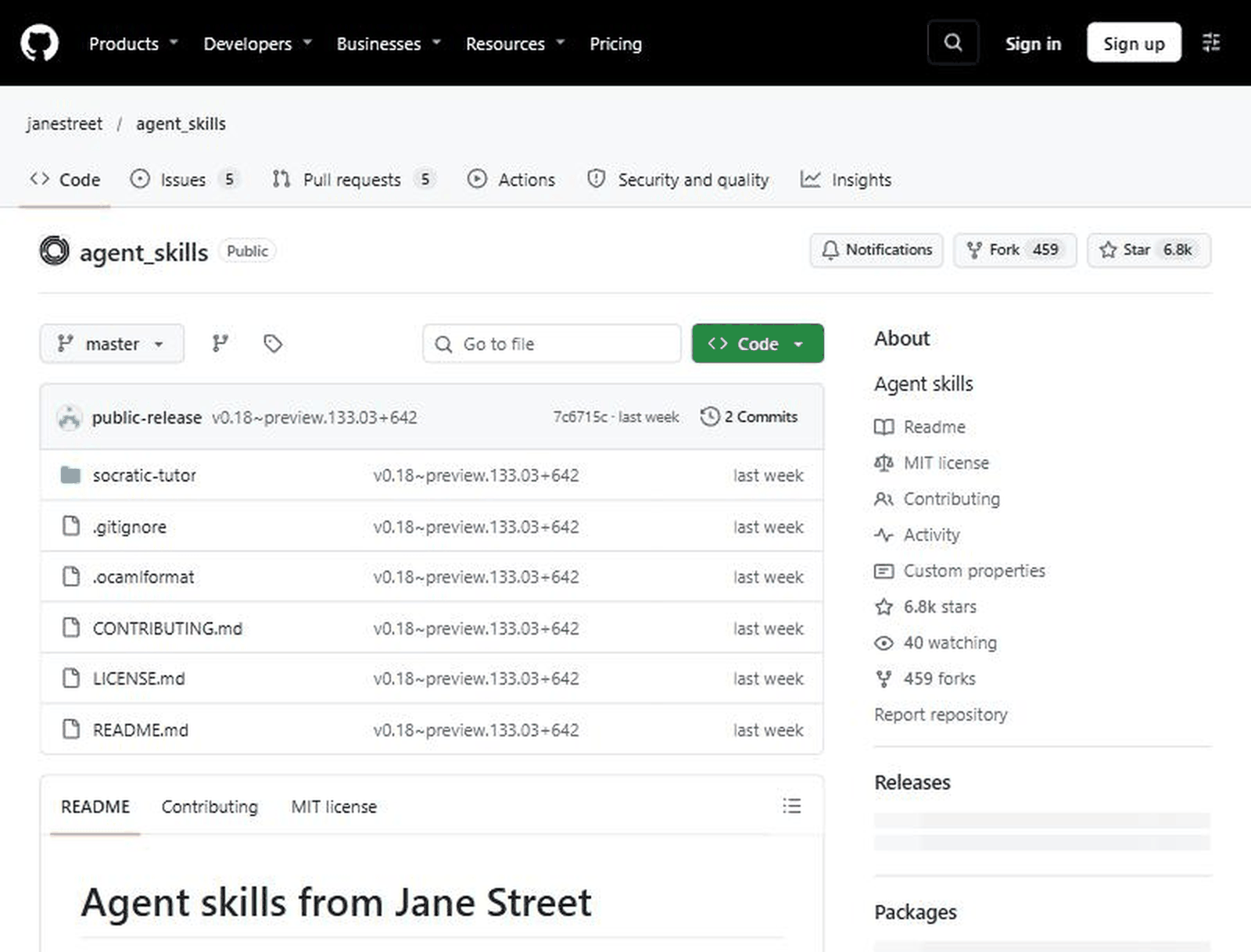
On November 3, 2026, a public GitHub repository called janestreet/agent_skills was created. Its README calls it “a collection of skills for AI agents and chatbots” and lists exactly one skill so far: socratic-tutor. The skill is a single Markdown file of 102 lines that tells an AI model to stop answering questions and start teaching by asking them: a short diagnostic, a skill map with levels from 0 to 5, one question at a time, spaced review and a final assessment. When we checked on November 12, the repository showed about 6.8 thousand stars and 459 forks, and the Hacker News post about it (item 50438261, posted November 10) had 227 points and 55 comments.
The interesting part is not the star count. It is that a well-known engineering firm published its teaching method as plain text that anyone can read, change and paste into any chatbot, with an MIT licence. That also means you can judge it by reading it, which is what we did.
Timeline
- November 3, 2026, 16:50 UTC: the repository is created with an “Initial commit” (GitHub’s public data).
- November 3, 2026, 17:53 UTC: the second and so far latest commit, titled “v0.18~preview.133.03+642”, adds the content. The repository’s last push is about 18:14 UTC the same day.
- November 10, 2026, about 10:18 UTC: the repository’s SKILL.md is submitted to Hacker News.
- November 12, 2026: we read the repository, the skill file and the contribution rules, and captured two screenshots. The repository lists 2 commits, 5 open issues and 5 open pull requests.
What the repository says
The README is short. It describes each skill as a directory containing a SKILL.md file “with instructions for the agent”. It gives two ways to use it. With a coding agent that supports the common SKILL.md format, you copy the skill directory into the agent’s skills folder and ask it to use the skill, for example “teach me X”. With a plain chatbot, you paste the body of the SKILL.md into the chat or into a custom or system prompt, followed by what you want it to do. The README describes the skill as turning “an LLM into a strict personal tutor” that teaches with the Socratic method.
The repository is licensed under MIT. CONTRIBUTING.md says the software is developed and maintained by Jane Street, that contributions are welcome through GitHub pull requests, and that contributors must sign every commit with a “Signed-off-by” line using their real name, following the Developer Certificate of Origin. The page states plainly that pseudonyms and anonymous contributions are not accepted.
What the skill file instructs
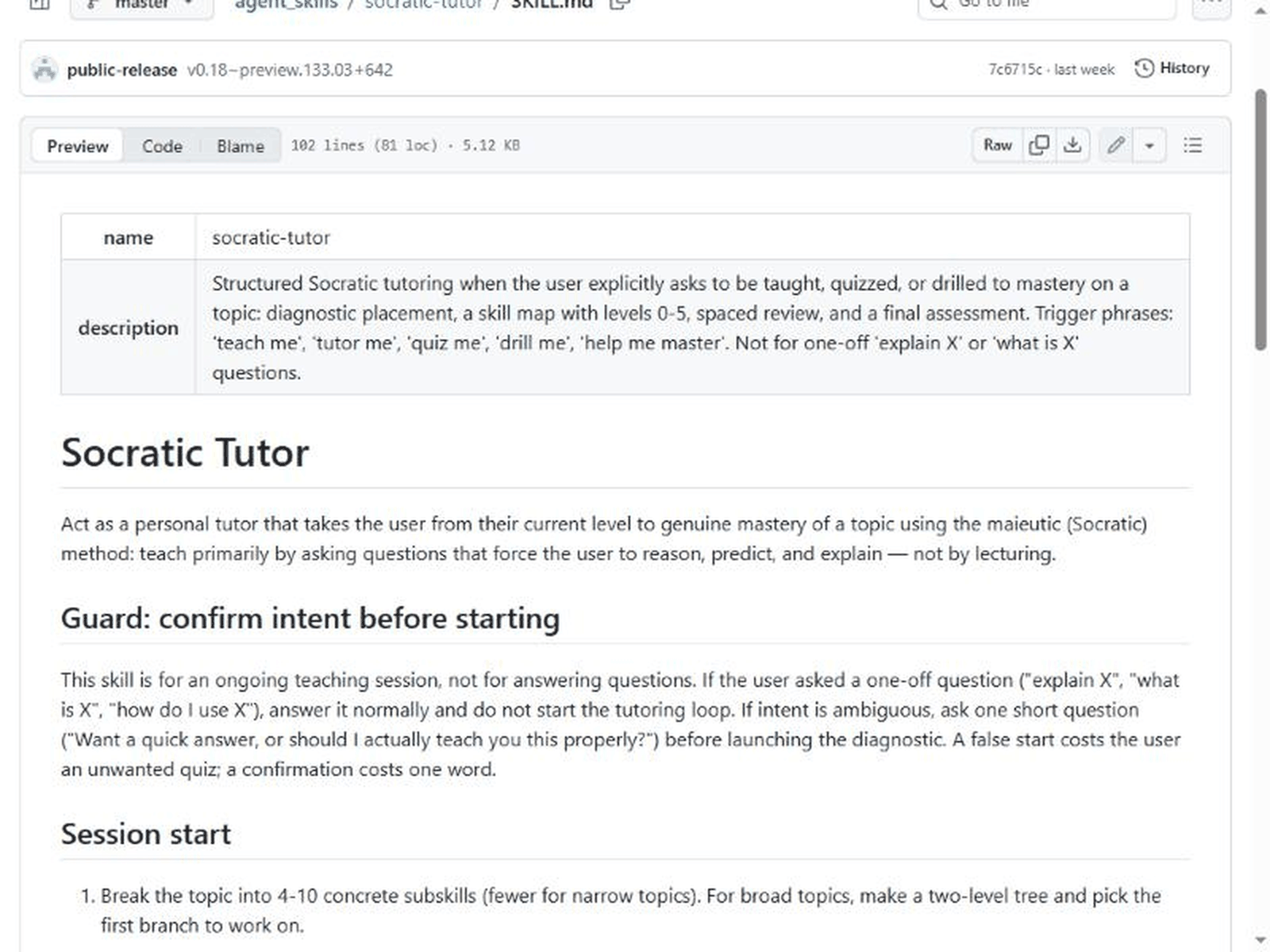
The file starts with a name and a description. The description says the skill applies when the user explicitly asks to be taught, quizzed or drilled to mastery, and names trigger phrases: “teach me”, “tutor me”, “quiz me”, “drill me” and “help me master”. It states that the skill is not for one-off “explain X” or “what is X” questions. The body then sets out a fairly strict procedure:
- A guard before anything starts. If the question looks like a one-off, the model should answer normally. If intent is unclear, it should ask one short question such as whether you want a quick answer or a proper lesson. The file explains the trade-off in one line: a false start costs an unwanted quiz, a confirmation costs one word.
- Session start. Break the topic into 4 to 10 concrete subskills, say that it will begin with questions asked one at a time, then run a diagnostic of 3 to 5 probing questions, from easy to hard, before teaching anything. After that it shows a skill map and proposes where to start, and the user can override.
- A 0 to 5 scale. The levels run from “unaware” (0) through “heard of it”, “can follow along”, “can do with help” and “can do independently” (4) to “can teach it / handle edge cases” (5). The file asks for the map to be drawn as ASCII with progress bars after every level change.
- A teaching loop. One question at a time, ending the message right after the question. When the user is wrong, the model should not give the answer but ask a narrower question that exposes the contradiction, and only explain directly after 2 to 3 failed attempts, then re-test the idea from a different angle. When the user is right, it may play devil’s advocate.
- Strict evaluation. Levels are earned: a level goes up only on demonstrated performance across 2 or more independent checks, at least one of them unprompted recall. A vague or partly correct answer is not correct. The file also says not to flatter and not to attribute to the user any insight they did not express. Level 5 needs an edge-case or adversarial question and an explanation clear enough to trust the user to teach it.
- Spaced review and completion. Earlier subskills are re-tested without warning, and a failed review lowers the level. The course ends when every subskill reaches the target level, 4 out of 5 by default, followed by a mixed final assessment with at least one question per subskill and one integrative problem.
- User commands. “show progress”, “harder” and “easier”, “just tell me” (which overrides the method for one question), “save state” (a compact block with the topic, the skill map and notes on misconceptions that can be pasted into a new session) and “resume from:”.
Our own arithmetic (labelled as ours)
These are our own calculations from the numbers shown on the pages above. GitHub and Jane Street did not publish them.
| What we computed | Result (ours) |
|---|---|
| Stars per day since creation: about 6,800 stars over roughly 8.9 days (Nov 3 16:50 UTC to our check on Nov 12) | About 760 per day on average. Stars rarely arrive evenly, so this is only an average |
| Forks as a share of stars: 459 / 6,796 | About 6.8 percent |
| Size of the skill: 5.12 KB over 102 lines | About 51 bytes per line on average; small enough to paste into any chat |
| Minimum final-assessment questions: at least one per subskill plus one integrative problem, with 4 to 10 subskills | At least 5 and at most 11 required questions, before any extra ones the model adds |
| Minimum independent checks to reach level 4 from level 0, if levels rise one step at a time (the file does not say they must) | At least 8, because each raise needs 2 or more independent checks |
The last two rows are why a full session is long. The file is built for mastery of one topic over many exchanges, not for a quick explanation, and it says so in its first lines.
Claimed versus what we could verify
| Claim | Source | Our status |
|---|---|---|
| The repository exists under the janestreet account and contains one skill, socratic-tutor | GitHub repository page | Verified (screenshot above) |
| It is developed and maintained by Jane Street, MIT licensed, with real-name sign-off required | README, CONTRIBUTING.md, repository sidebar | Verified by reading the pages |
| The skill gives a diagnostic, a 0 to 5 skill map, one question at a time, spaced review and a final assessment | SKILL.md | Verified by reading the file |
| It “turns an LLM into a strict personal tutor” | README | Not tested. The file instructs it; we did not run it, so we cannot say how closely a given model follows it |
| It works with agents that support the common SKILL.md format and by pasting into a plain chatbot | README | Not tested by us |
| Students learn better with it | Nobody in the repository claims this | No evidence in the repository either way |
| 6.8k stars, 459 forks | GitHub page and API | Verified on November 12; numbers change |
Who is actually affected
Three groups have a practical reason to look at the file. People who use an AI chatbot to study can paste it in and see whether the strict style suits them. People who build agents or internal assistants can read a compact, readable example of a skill with a clear trigger, a guard against misfiring, and explicit rules for when to stop. And teams that write prompts for work can borrow the structure: a description that says when not to act, a state block that can be saved and resumed, and user-controlled overrides.
It is less relevant if you only want a quick answer. The skill says so itself, and its guard tells the model to answer one-off questions normally.
Why this one is getting attention
Three reasons are visible from the pages themselves. The publisher is a recognizable firm. The artifact is tiny and readable in a few minutes, so people can form an opinion without installing anything. And the method it encodes, refusing to hand over the answer, is the opposite of what many people expect from a chatbot. That last point is also where the risk sits: a tutor that withholds answers can frustrate a user who just needs help, which is why the file includes the “just tell me” override.
If you follow how AI tools get packaged and priced, two of our recent notes are related: Claude whiteboards and Sheets data: what teams should check and Gemini Decisions API: price, limits and a developer checklist. For another case where a developer-tool change needed a careful read of the primary page, see GitHub Actions lockfiles: what to check.
Checklist if you want to try it
- Read the whole SKILL.md first. It is 102 lines and you should know what it will make the model do.
- Decide where you will use it: a coding agent that supports the SKILL.md format, or a plain chatbot where you paste the body of the file.
- Start with a narrow topic. The file asks for 4 to 10 subskills, and a broad topic will become a long session.
- Use the exact trigger words, such as “teach me”, so the guard does not treat your request as a one-off question.
- Be ready for the diagnostic. It asks 3 to 5 questions before it teaches anything.
- Use “show progress” when you want the map, and “just tell me” when you need an answer.
- Use “save state” before you close the chat, and keep the block somewhere you control.
- Do not put confidential material into the state block or the chat. The state includes notes on your misconceptions, and a chatbot service may store what you paste. Check the privacy terms of the service you use.
- Treat the model’s claims as claims. A tutor that asks good questions can still state something wrong; check important facts against a textbook or the official source.
- If you adapt the file, keep the MIT licence notice, and if you contribute back, sign your commits with your real name as CONTRIBUTING.md requires.
What to watch next
- Whether the repository adds more skills. The README lists one today.
- How the 5 open issues and 5 open pull requests are handled, which will show how actively it is maintained.
- Any published evaluation of whether this style of tutoring helps people learn. We found none in the repository.
- Whether other firms publish their own skills in the same plain-text format.
Frequently asked questions
Is this an app or a product
No. According to the repository, it is a Markdown file with instructions. You supply the AI model and the chat or agent environment.
Does it cost anything
The repository is MIT licensed, so the file itself is free to use and modify. The AI service you run it on may have its own price or usage limits, which we did not check.
Which models does it work with
The README says it works with coding agents that support the common SKILL.md format, or any plain chatbot when you paste the text. We did not test any model, so we cannot say how well each follows it.
Why does it refuse to give answers
That is the Socratic method it implements: the file tells the model to ask narrower questions when you are wrong and to explain directly only after 2 to 3 failed attempts. You can say “just tell me” to override it for one question.
Can I contribute
CONTRIBUTING.md says pull requests are welcome, with real-name Signed-off-by lines on every commit.
Is it only for programming topics
The skill’s description says “a topic” without limiting it to code, and the examples include general ones. Whether it works well for a given subject is something we did not test.
Sources and method
- GitHub, janestreet/agent_skills: repository page, README.md, socratic-tutor/SKILL.md and CONTRIBUTING.md. Read November 12, 2026.
- GitHub public repository data for creation time, commits, stars and forks. Checked November 12, 2026.
- Hacker News item 50438261, for points, comments and posting time.
Method: we opened each page in a clean browser window, read the files in full, and captured the two screenshots above without interacting with any banner. We quote only short phrases. We did not run the skill with any model. Arithmetic rows are our own.
Risk note
This is a summary of public files and public repository data, which can change after we read them. We make no claim about how well the skill teaches, and nothing here is educational, financial, legal or professional advice. If you adapt the file for a team or a school, read its licence and your own provider’s data terms first.