Creatify Max, YouArt, S.Space and Filament: Four More New AI Tools, What They Cost and What to Check
Published November 23, 2026. A news analysis built from the official pages of Creatify, YouArt, S.Space and Filament (Galaxy), read on November 23, 2026, plus the vendors’ own launch material and the Product Hunt weekly ranking for November 12 to 19, 2026 as summarized by the Shareuhack roundup. The screenshots are ours. This article contains no affiliate links and we have no commercial relationship with any company named here. ToolReviewHub is produced with the help of an AI assistant (Claude, made by Anthropic), and several of these products work with Claude, so we say so up front. We did not sign up for, install or test any of these tools: everything below is what the vendors’ own pages say, and numbers marked “ours” are our own arithmetic.
The short version
- What we looked at: the other four products from the top ten of Product Hunt’s week of November 12 to 19, 2026, after our first article on RankSpot, Rakazo, Plurai and HiringNow. They are Creatify Max (an AI ad teammate, third with 427 upvotes), YouArt Desktop App (an AI agent that operates video software, seventh with 355), S.Space (a shared workspace for people and their agents, ninth with 340) and Filament by Galaxy (an open-source data replication engine, tenth with 319). Upvote counts come from the Shareuhack roundup, not our own count.
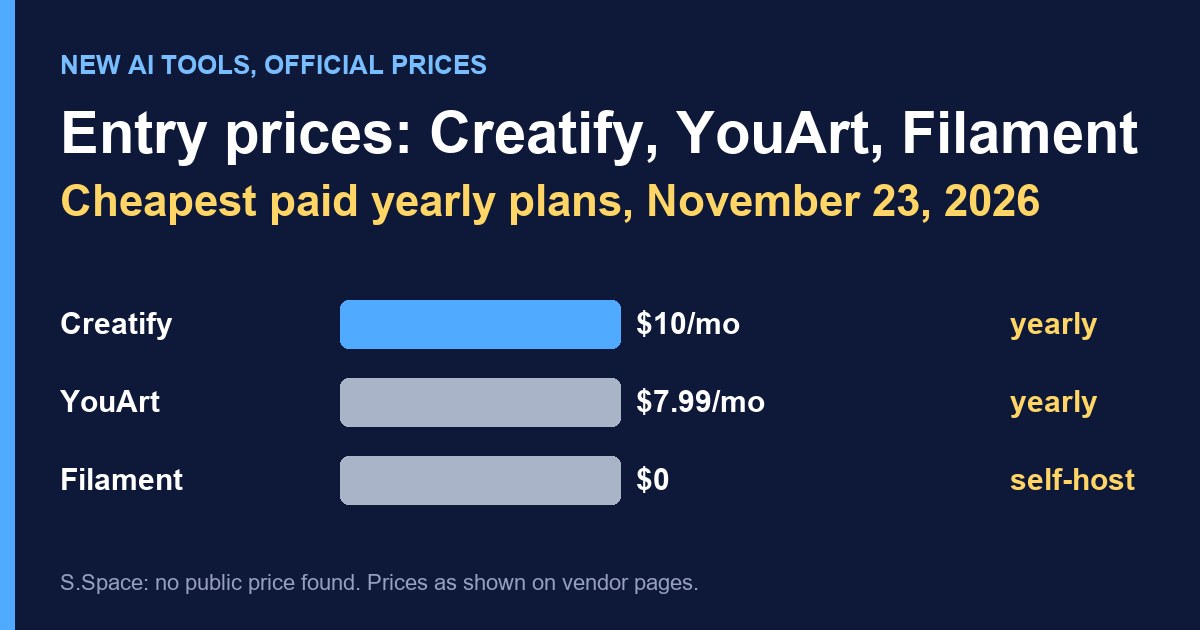
- Cheapest way in: Creatify’s cheapest paid plan is $10 a month on yearly billing ($15 monthly) and it already includes Max. YouArt’s is $7.99 a month on yearly billing ($11 monthly). Filament is free software under Apache-2.0 that you run yourself. S.Space shows no plan price on the pages we read.
- The number most likely to surprise you: YouArt’s plans page says its Max plan gives “up to about 6,000 seconds” of video a month, while its launch release prices the Seedance 2.5 model at $0.138 per second on that plan. If the whole plan price bought footage at that rate, it would be about 870 seconds, not 6,000 (ours, an estimate, explained below).
- The shared promise is control. Creatify says nothing goes live without a person approving it, YouArt says its agent works “with the user’s permission”, S.Space says “you decide what each agent can do”, and Filament verifies every batch it writes. The fine print is where they differ.
- What we could not do: verify any speed, savings or time-saving claim. Creatify’s “up to 100x faster”, YouArt’s “56% less than fal” and Galaxy’s benchmark are all the vendors’ own figures.
How these four were picked
Product Hunt’s weekly ranking measures attention, not quality, payment or reliability, and the roundup we used says so itself. In our first article we covered four products from that top ten and said we had left Creatify Max and Filament out, and we had not yet read the YouArt and S.Space pages. This article finishes the set: the remaining four products from the top ten that we can read without creating an account. (Two others in the top ten, TheBold and Templify AI, are a fundraising-matching service and an iPhone video-editing app, and fall outside the “agent and developer tool” theme we have followed so far.)
| Product | What it says it does | Product Hunt week rank, upvotes | Entry price on its own page |
|---|---|---|---|
| Creatify Max | An AI teammate that researches competitors, makes ads and sets up campaigns, with you approving each launch | 3rd, 427 | $10/month on yearly billing, $15 monthly; free plan has 10 credits |
| YouArt Desktop App | An AI agent for Mac and PC that works in a project canvas and operates editing software | 7th, 355 | $7.99/month on yearly billing, $11 monthly |
| S.Space | Shared rooms where a team and its AI agents work together | 9th, 340 | No plan price found; marketplace tools show prices |
| Filament by Galaxy | Open-source engine that copies data between databases, warehouses and apps | 10th, 319 | Free, Apache-2.0, self-hosted |
Creatify Max: an ad teammate that asks first
Creatify is an AI video-ad maker, and Max is its new agent layer. Its launch post calls Max “an AI teammate for paid ads”: it scans what competitors are running, compares that with your own best ads, proposes a plan, makes video and image ads, drafts campaigns, and then watches the results on a schedule you set in plain words. The post says it reads results and makes approved changes on Meta, Google Ads, TikTok, Snapchat, Reddit, LinkedIn and OpenAI Ads, uses AppLovin for analysis only, and connects to more than 140 other tools such as Shopify, HubSpot and Google Analytics. It can also run inside Slack.
The design choice that matters is the approval card. According to the post, every launch, budget move or pause arrives as a card showing the numbers behind it, nothing touches your ad account until a person clicks Approve, and the card records who did. You can later let one trusted routine act on its own while everything else keeps asking. That is the right shape for a tool that can spend your money, and it is also where the risk sits: the more routines you free, the more the safety depends on your rules.
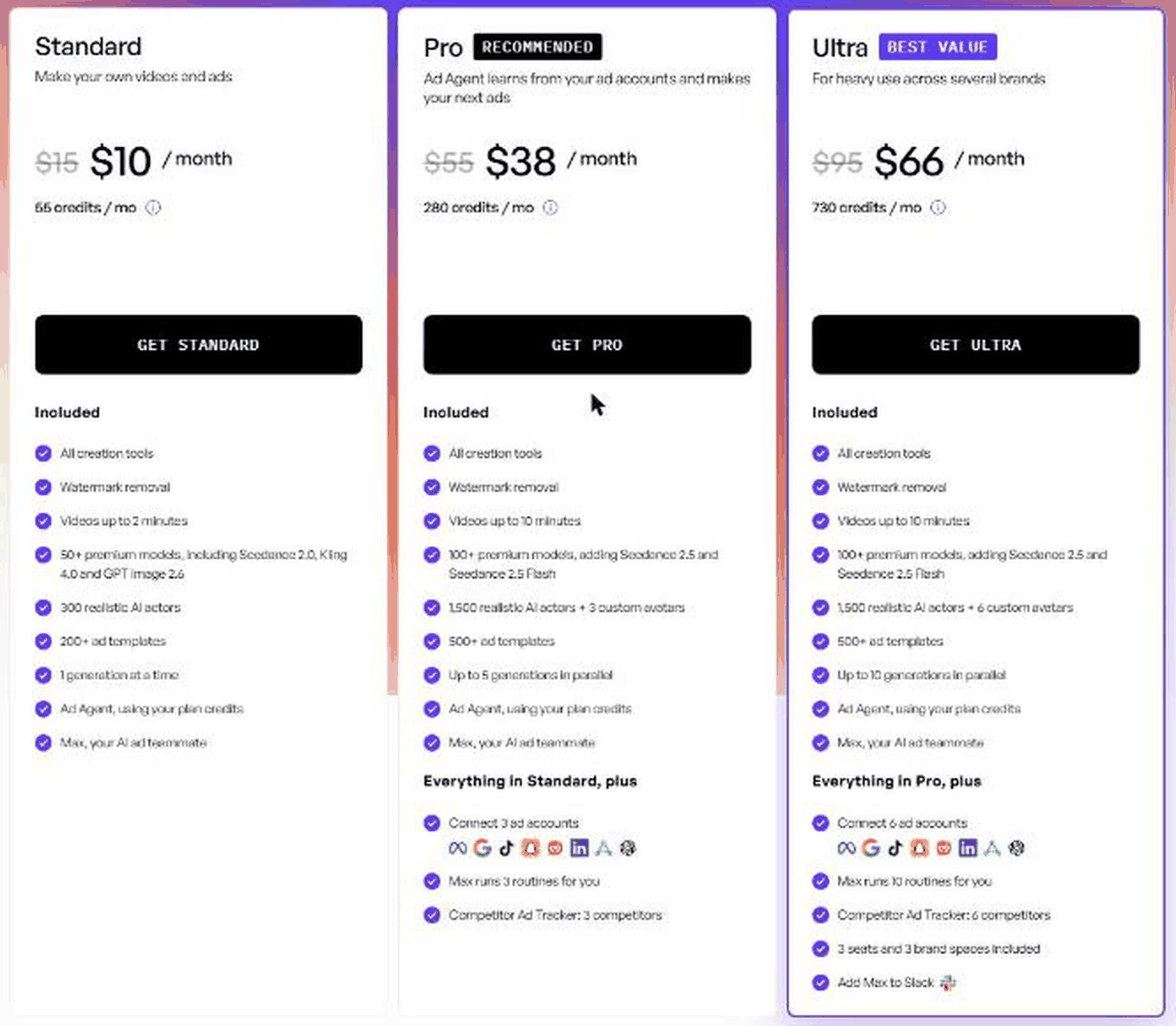
| Plan | Yearly billing (per month) | Monthly billing | Credits a month | Ad accounts, routines | Seats |
|---|---|---|---|---|---|
| Free | $0 | $0 | 10 | Not stated in the comparison we read | Not stated |
| Standard | $10 | $15 | 55 | 1 account, 1 routine | 1 |
| Pro | $38 | $55 | 280 | 3 accounts, 3 routines, 3 competitors tracked | 1 |
| Ultra | $66 | $95 | 730 | 6 accounts, 10 routines, 6 competitors tracked, Slack | 3 |
| Business | From $136 | From $195 | 1,500 to 6,100 | 10 accounts, unlimited routines | 10 |
One detail is easy to get wrong. “Max” is the name of the agent, and the pricing page lists “Max, your AI ad teammate” as included on every paid plan, Standard too. A third-party summary we came across described a “Max plan” at $66 a month; on the official page that $66 is the Ultra plan on yearly billing. Where the page shows a higher struck-through price, that is the monthly-billing price.
What a month of credits buys (our arithmetic)
The page gives a “what a month of credits makes” table, and credits are shared by the agent and the creation tools. Dividing the plan price by those counts shows how the price per output changes:
| Output at the spec shown | Standard ($10) | Pro ($38) | Ultra ($66) |
|---|---|---|---|
| Credits per dollar | 5.5 | 7.4 | 11.1 |
| Seedance 2.0 video, 720p, 5 seconds (clips a month) | 7, about $1.43 each | 36, about $1.06 each | 94, about $0.70 each |
| Veo 3.1 video, 720p, 4 seconds | 3, about $3.33 each | 17, about $2.24 each | 45, about $1.47 each |
| GPT Image 2.6, 1K image | 110, about $0.09 each | 560, about $0.07 each | 1,460, about $0.05 each |
Two things follow. First, the cheap plan is cheap because it is small: 55 credits is seven short video clips of one model. A team that wants to test several ad variants a week will run into that quickly, and the page notes that unused credits roll over for one extra month only. Second, the price per credit drops by about half from Standard to Ultra (about $0.18 to about $0.09, ours), so the best value per credit is on the plan you may not need. The yearly discount is real: the page says 30%, and on the prices shown it works out to $60, $204 and $348 a year on Standard, Pro and Ultra (ours).
What to check. The Max launch post does not say how many credits a research scan, a launch or a routine uses, only that Ad Agent usage draws on your plan credits, so we cannot estimate a monthly bill for an agent that runs in the background. The post’s speed claims (up to 12x faster research, 100x faster creative, 5x faster campaign setup, 20x faster reporting) are labelled as Creatify’s own estimates, and its example of Max catching a Google campaign the team thought was paused comes from Creatify’s own performance team. Before granting broad ad permissions, start with one low-budget campaign, keep every launch on manual approval, and write your budget cap into Max’s rules. Shareuhack reports a $15.5 million Series A for Creatify announced in 2025, which we did not verify.
YouArt Desktop App: an agent that clicks through your editing software
YouArt describes itself as a creative platform backed by Y Combinator, and its Desktop App launched on November 13, 2026 for Mac and PC. According to the launch release, it keeps footage, scripts, brand assets and generated clips on one canvas with comments and version history, can pull client feedback from Slack or Gmail onto the exact shot it refers to, and, with the user’s permission, can operate Adobe After Effects, Premiere Pro, DaVinci Resolve, CapCut and Blender by navigating menus, clicking and entering commands. Product Hunt’s one-line version, as quoted by Shareuhack, is “a Codex for creative teams.”
The idea is different from a clip generator. Instead of asking a model for a video, you let an agent drive the software you already use, so your projects, templates and plugins stay. The release also says the app lets you bring your own API keys for providers such as Higgsfield, fal and BytePlus, with “smart routing” that picks the cheapest provider for the model you choose, and includes built-in browser tabs where you can see when the agent is operating a page and take over. Note that this is a company press release distributed through a wire service, so it is the vendor speaking, not an independent report.
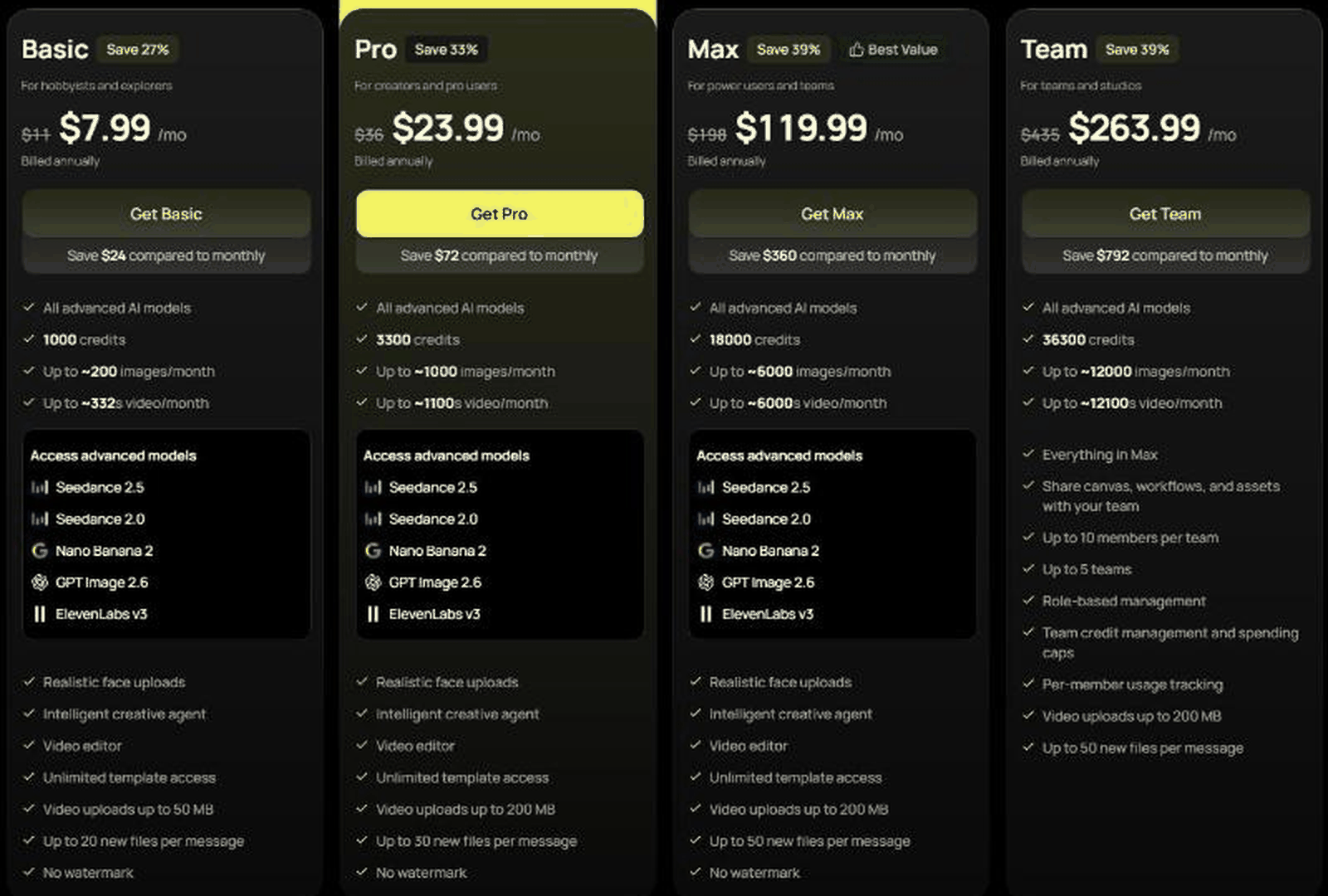
| Plan | Yearly billing (per month) | Monthly billing | Credits | “Up to” output the page lists | Our price per 1,000 credits (yearly) |
|---|---|---|---|---|---|
| Basic | $7.99 | $11 | 1,000 | About 200 images or 332 seconds of video | $7.99 |
| Pro | $23.99 | $36 | 3,300 | About 1,000 images or 1,100 seconds | $7.27 |
| Max | $119.99 | $198 | 18,000 | About 6,000 images or 6,000 seconds | $6.67 |
| Team | $263.99 | $435 | 36,300 | About 12,000 images or 12,100 seconds; up to 10 members | $7.27 |
All four plans list the same model set (Seedance 2.5 and 2.0, Nano Banana 2, GPT Image 2.6 and ElevenLabs v3), no watermark and an intelligent creative agent. They differ by credits, upload limits (50 MB on Basic, 200 MB above) and files per message. Team adds shared canvases, role-based management, team credit management with spending caps and per-member usage tracking. Because Team is $263.99 for 36,300 credits against $119.99 for 18,000 on Max, Team costs about 2.2 times as much for about 2.0 times the credits (ours): it buys seats and controls, not cheaper credits.
The numbers that do not line up neatly (our arithmetic)
- “Up to” is doing a lot of work. The plans page says Max gives “up to about 6,000 seconds” of video a month. The release says Seedance 2.5 at 720p costs $0.208 a second pay-as-you-go and $0.138 a second on the Max yearly plan. If the plan’s whole price of $119.99 bought footage at $0.138 a second, a month would be about 870 seconds of that model, roughly one seventh of the headline figure (ours, and it assumes the $0.138 rate applies to the plan’s full credit allowance). The 6,000 seconds must therefore refer to a much cheaper model or setting. The page does not say which, so treat the headline as a ceiling.
- Per-second prices become per-clip prices quickly. At $0.208 a second a 5-second clip is about $1.04 and a one-minute sequence made only of such footage is about $12.48. On the Max plan rate those become about $0.69 and $8.28 (ours). If you keep one take in three, multiply by three. Generation costs are a good reason to plan the edit before you generate.
- The “Save $X” badges do not match a simple calculation. For Max the page says “Save $360 compared to monthly”. Twelve times the gap between $198 and $119.99 is $936. The same check gives $36 against a stated $24 on Basic, $144 against $72 on Pro and $2,052 against $792 on Team (ours). The page does not explain its basis, so do your own sum from the monthly and yearly prices before choosing a billing period.
What to check. The plans page we read is YouArt’s membership page (“workflow, creative agent with premium models in one membership”). It does not say whether the Desktop App uses exactly these plans or the separate pay-as-you-go rate in the release, so confirm that on the vendor’s pages before paying. Letting an agent click through Premiere or CapCut also means it can open, change and export your project files, so keep a copy, work on a duplicate project first and ask where your footage and project files go when the agent works on them. The release names the editing applications it supports; we did not see a list of operating-system versions or hardware requirements on the pages we read.
S.Space: one room for people and their agents
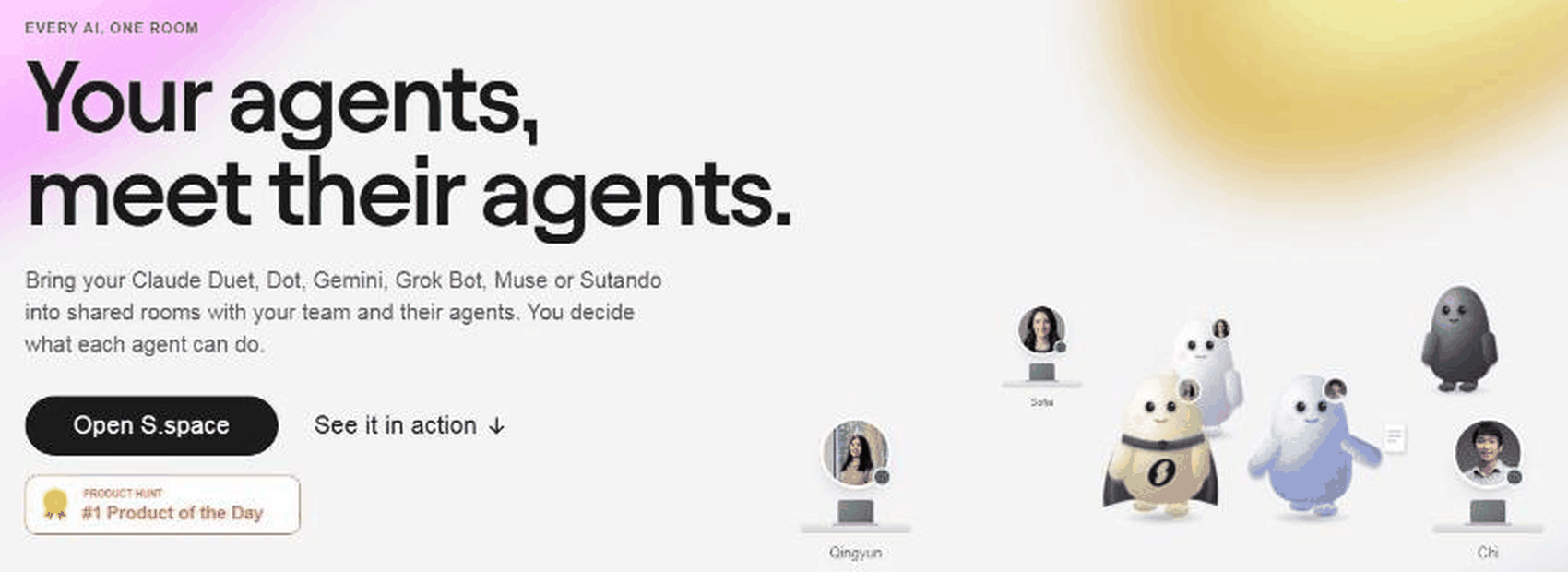
S.Space’s homepage headline is “Your agents, meet their agents.” The pitch is a shared room where a team chats with its AI agents, and where agents from different makers, even ones owned by different people, can see the same conversation. It lists Claude Duet, Dot, Gemini, Grok Bot, Muse and Sutando, and says you decide what each agent can do. Work can be handed to an agent from a phone, Slack, Discord, Telegram or WhatsApp, and the result lands back in the room. The demo conversation on the homepage, which involves a customer follow-up and a $15 million fundraise, is sample content, not a customer story.
The documentation is more concrete than the homepage. Setup is one download, one sign-in (Apple, Google or email) and a short guided first run on your Mac; the download link we saw is a Mac installer, and we did not see a Windows or Linux download. “Sutando” is S.Space’s own agent: it runs on your Mac inside the app, the docs say it requires Claude Code or Codex, and there is one Sutando per Mac. The docs also describe a marketplace of skills and cloud tools where “the price is on every card”: a skill can be installed for a one-off price, a cloud tool is “billed per use” once activated, and when Sutando sets up a whole use case it asks before anything that costs credits.
| Question | What the vendor’s pages say |
|---|---|
| What does a plan cost? | We found no plan price on the homepage or the “Settings, updates and plan” docs page. Marketplace items show prices on their own cards, which we did not browse. |
| Which computer? | Mac, per the setup guide and the download link we saw |
| Which agents? | Sutando (needs Claude Code or Codex), plus Dot, Grok Bot and Muse, which run in their own apps |
| Who is in control? | “You decide what each agent can do”; the docs say Sutando asks before anything that costs credits when it sets up a use case |
What to check. The most useful thing in the docs is also the one to read twice. During setup an optional card offers to import your past Claude Code conversations. The docs say it reads conversation text under ~/.claude/projects, never tool output or files, is read-only, runs only if you click Import, and that the text is processed by Anthropic’s Claude API, which the docs say does not train on it. Conversations that look personal are held back, and nothing is saved until you approve a digest of projects, decisions and people. Those are the vendor’s statements, we did not test them, and the choice is a real one: past coding sessions often contain names, internal project details and sometimes secrets. A reasonable default is to skip the import until you have read what is in your own history. The unanswered commercial question is the plan price; a workspace where “every person gets their own agent” can cost very different amounts depending on whether you pay per person, per agent or per credit, and the pages we read do not say. One review we found elsewhere describes it as priced per person, but that was not on the vendor’s own pages, so we treat it as unconfirmed.
Filament by Galaxy: boring infrastructure with an open license
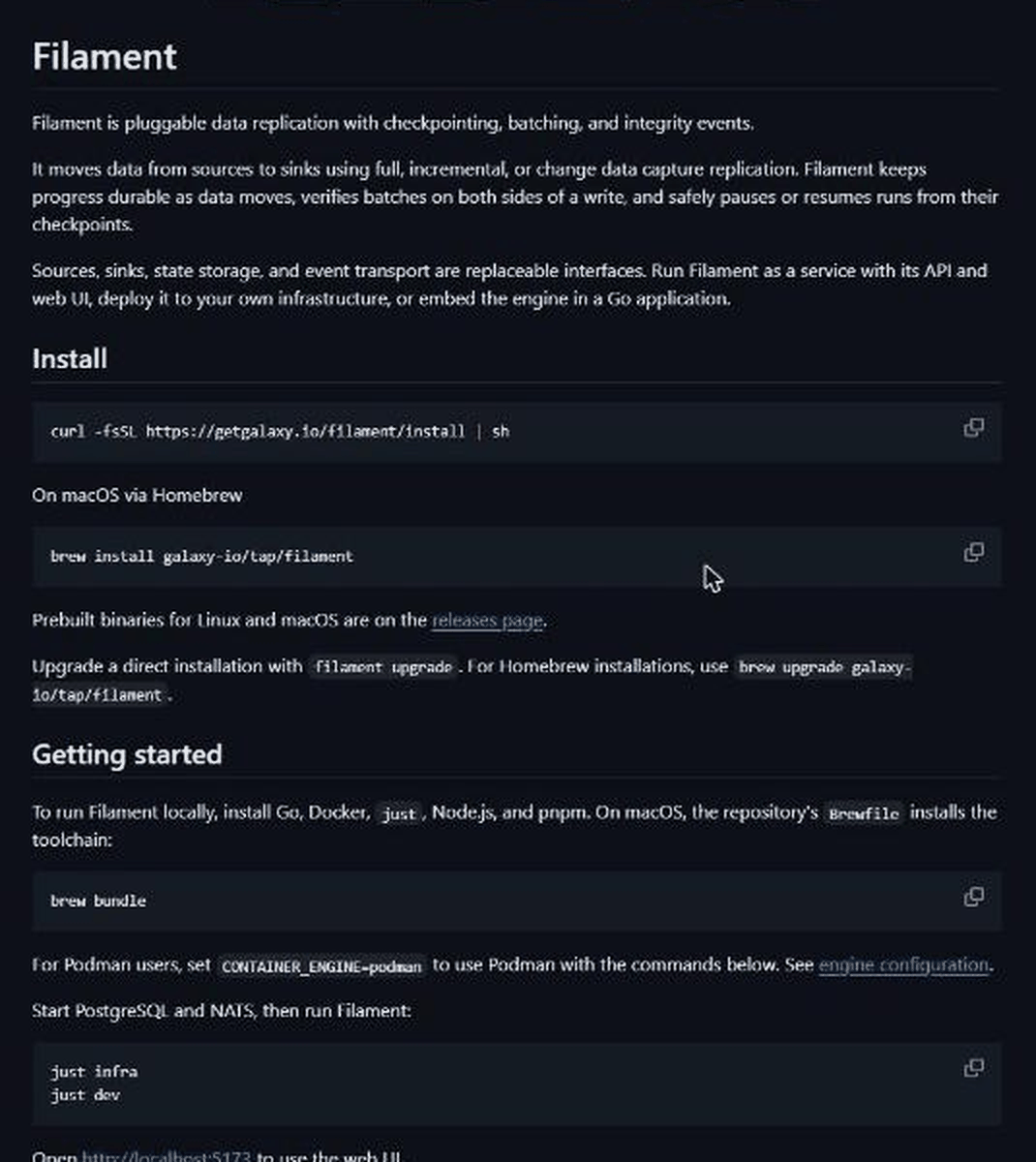
Filament is the odd one out, and for that reason the easiest to judge. It is not an agent. It is a data replication engine: you connect a source (the vendor’s launch post names Postgres, MySQL and SaaS tools such as Stripe, GitHub, Notion, Linear, Slack and PostHog) to a destination (ClickHouse, Apache Iceberg, S3 and others), and choose whether to copy everything, copy only what changed, or stream changes from the database’s change log. The repository README says it keeps progress durable, verifies batches on both sides of a write, and can pause and resume from checkpoints. It is written in Go with a React and TypeScript web interface and licensed Apache-2.0.
| Fact | What we saw |
|---|---|
| License | Apache-2.0 |
| Price | Free to run; Galaxy sells a separate context-management product |
| Repository size | 341 stars, 49 forks, 56 open issues, created June 30, 2026, last updated November 22, 2026 (GitHub, November 23) |
| Latest release | v0.52.0; the launch post says it is pre-1.0 and that some connectors are early |
| How to run it | Install script, Homebrew, a Docker image, a Helm chart for Kubernetes, or one-click deploys on Railway, Render and DigitalOcean |
| Open-sourced | September 4, 2026, per Galaxy’s launch post |
The launch post gives the reasoning in plain terms: its authors say a managed replication vendor charging by the row asked them to leave when their data volume grew, so they built their own engine and later released it. “Pricing by the row is backwards,” the post argues. That is a vendor’s position, but it explains why the license and the self-hosting story are the point of the release. The post also claims a published benchmark in which Filament moved 298 million rows of New York taxi data from Postgres to Postgres in under two minutes, more than four times faster than piping pg_dump into psql, and won five of six scenarios (in the sixth another tool was 13% faster using fifteen times the CPU). Under two minutes for 298 million rows is at least about 2.5 million rows a second (ours). Galaxy says it published the harness so others can rerun it; we did not.
What to check. The README’s first install line pipes a script from the internet into a shell, which is common for developer tools but worth reading before you run it, or you can use Homebrew or the Docker image. The one-click DigitalOcean deployment uses an all-in-one image with a SQLite datastore, and the README itself shows a warning about it, so treat it as a trial setup, not production. At 341 stars the project is young and small, with a version number below 1.0, so ask the questions you would ask of any new data tool: which connectors are marked early, how schema changes are handled, and who is on call when a pipeline stalls at 3 a.m. The Product Hunt framing, “move data through a terminal or agent,” is Shareuhack’s summary; the launch post says the repository ships a skill so a coding agent can write a connector from an API’s documentation, which is a convenience, not a replacement for reviewing the connector it writes.
What the four have in common
1. Credits and “up to” figures are the new fine print. Creatify prices in credits shared by the agent and the creation tools. YouArt prices in credits and “up to” outputs. S.Space charges per use for cloud tools. In each case the monthly price is easy to read and the real cost depends on a rate you only learn by using the product. Ask for the credit cost of one typical task before you compare plans.
2. Approval is a feature and a setting. Creatify’s approval card, YouArt’s permission prompts and S.Space’s “you decide what each agent can do” all put a person in the loop, and all let you relax that later. The safe habit is the same everywhere: start with the strictest setting, read the log of what the agent did, and loosen one routine at a time.
3. Control now comes in three forms. Creatify and YouArt are hosted services, S.Space runs an agent on your own Mac with a hosted workspace, and Filament is software you run wherever you like. For anything touching customer data, ad accounts or project files, where the work runs and who can read the logs matters at least as much as the plan price.
4. Attention is not adoption. The four sit between third and tenth on Product Hunt’s weekly list. Upvotes tell you the launch was noticed. Filament’s 341 GitHub stars is a better measure of developer interest than its 319 upvotes, and neither says how many teams run it in production.
Checklist before you connect anything
- Start on the free tier or a trial and use data you could afford to lose.
- Find the credit cost of one real task (a video clip, an ad launch, a routine run) and multiply by your weekly volume.
- Keep every action that spends money or sends something on manual approval for the first month.
- Check what leaves your device: project files, ad-account data, conversation history or database rows.
- Work on a duplicate of any project file an agent can edit.
- Read the billing page for both periods and do your own yearly-versus-monthly sum.
- Know how you stop and reverse a failed run before you start a large one.
What we could not confirm
- That any of the four works as described: we did not create an account, install or run them.
- Creatify’s speed multipliers, the credit cost of Max’s routines, and its $15.5 million Series A (Shareuhack reports it; we did not verify).
- YouArt’s “56% less than fal” and “55% less than Higgsfield” price comparisons, whether the Desktop App uses the membership plans we captured, and what its “up to” output figures assume.
- S.Space’s plan pricing, its data handling beyond what the docs state, and whether it supports anything but a Mac.
- Filament’s benchmark results, which we did not rerun, and how many of its connectors are production-ready.
- Product Hunt rankings, which come from the Shareuhack roundup, and any funding or company detail not on the vendors’ own pages.
Frequently asked questions
Is Creatify Max a separate product I pay for?
On Creatify’s pricing page Max is listed as included on every paid plan, with limits on ad accounts and routines that rise with the plan. Agent usage draws on your plan credits.
Does YouArt Desktop App cost more than the YouArt plans?
We could not tell. The plans page we captured is a membership page, and the launch release also describes a pay-as-you-go rate of $0.208 a second for Seedance 2.5 at 720p. Confirm which applies to the app before you pay.
Is S.Space free?
We found no plan price on its homepage or its settings documentation. Some marketplace tools show their own prices, and cloud tools are billed per use, according to the docs.
Is Filament really free?
The software is Apache-2.0 and free to run. You still pay for the servers, the databases it connects, and the time to operate it, and Galaxy sells other products separately.
Which of the four is the lowest risk to try?
Filament on a test database is the most contained, since it only moves data you point it at and runs on your own hardware. The agents that act on ad accounts, project files or conversation history deserve a stricter trial: small budgets, duplicates of your files and manual approval.
Method: figures come from the vendors’ public pages and Filament’s public GitHub repository on November 23, 2026, plus the launch posts and press release named above; our screenshots show the pages that day. Product Hunt data is from the Shareuhack weekly roundup. Calculations marked “ours” divide the prices shown by the quantities shown and exclude taxes, retries and rollover. For how we research, see How We Review Tools.