Signal Blocks OS-Level AI Agents From Reading Its Screen: What It Covers, What It Misses and What You Can Do
Published November 21, 2026. A news analysis built from Signal’s blog post “Signal is Serious About Protecting Your Privacy” (November 20, 2026), the Electronic Frontier Foundation’s post on excluding apps from Siri AI (October 2026), Google’s blog post about Gemini Intelligence security and privacy (May 12, 2026), and our own screenshots of each. Disclosure: this story concerns AI assistants made by Apple, Google, Microsoft and Meta, and the research and drafting tools we use for these articles include Claude from Anthropic. Signal and the EFF are advocacy organizations with a stake in the outcome, so we label their statements as theirs. We did not install or test any of the features described, and the steps below are the ones the sources give. This article contains no affiliate links.
The short version
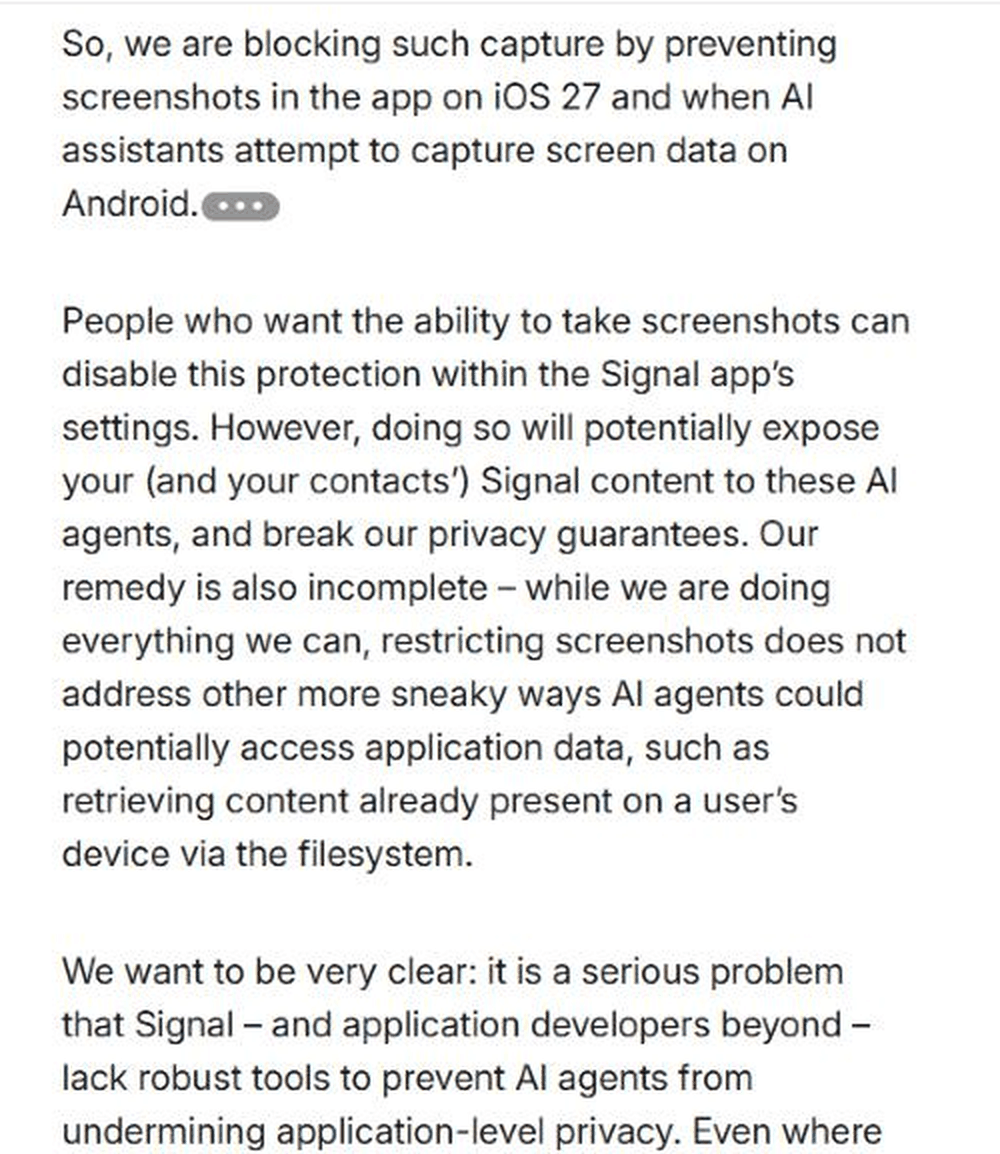
- What Signal says it is doing: it is “restricting the latest AI agents built into mobile operating systems” from capturing and storing Signal data. On iOS 27 it blocks screenshots in the app. On Android it acts when it detects an AI assistant trying to read the screen.
- The reason: OS-level agents such as Gemini Intelligence on Android and Siri’s Onscreen Awareness on Apple devices work by scanning what is on your screen. Signal says that makes message content available to systems outside its control.
- What it does not cover: Signal says its fix is “incomplete”. It does not stop an agent from reading files already on the device, it cannot cover every Android maker’s phone, and it does not block Siri AI on macOS.
- What you can do yourself: Apple’s iOS 27.2 added Settings, Siri, Excluded Apps, and the EFF says excluding an app stops Siri AI’s onscreen awareness from working in it. On Android the controls sit in the Gemini app and are less direct.
- The bigger argument: Signal asks Apple, Google and Microsoft for a documented way for any app to opt out of AI data access. Today the opt-out belongs to the user, not the developer.
What Signal announced
Meredith Whittaker published the post on November 20, 2026. It opens with a statement of intent: “Privacy is our mission”, and says Signal is restricting the latest AI agents built into mobile operating systems from potentially capturing and storing Signal data. It compares the situation with an earlier one: last year Signal used screenshot blocking to stop Microsoft’s Recall from capturing its messages by default on Windows 11. It now says it is taking “similar measures” for agentic systems in iOS 27 and, where it can detect an AI assistant trying to read the screen, on Android.
The post names two systems: Gemini Intelligence with Google Gemini on Android, and Onscreen Awareness with Siri AI on Apple’s platforms. It describes how they work in its own words: to answer questions and do what you ask, these agents “scan” what is on your screen, and in doing so Signal data is captured and made available to whatever local database or remote server the agent is using. Signal says that is outside its control once it happens, and affects everyone in a conversation, not only the person holding the phone.
Signal’s footnote about Recall explains the earlier precedent: Recall captures the screen every few seconds, extracts text with optical character recognition, and builds a searchable on-device database, which Signal says could expose and retain its data indefinitely, including disappearing messages.
How the new protection works, and where it stops
The practical part of the post is short and unusually candid about limits.
| Platform | What Signal says it does | What Signal says it cannot do |
|---|---|---|
| iPhone (iOS 27) | Prevents screenshots inside the app. | Does not stop other ways an agent could reach data, such as files already on the device. |
| Android | Detects when an AI assistant tries to capture screen data and automatically turns on its “Screen security” setting. | For many phone makers it has no reliable way to detect a screenshot attempt, so it targets AI-assistant access instead. It cannot cover every Android version. |
| Mac (macOS 27) | No block. Its advice is to add Signal to Excluded Apps in System Settings, Siri. | It says it cannot reliably block screenshots on macOS, and calls the available APIs a “minefield”. |
Two more details matter for users. The protection can be switched off in Signal’s settings by people who want to take screenshots, and Signal warns that doing so potentially exposes the content of your chats, and your contacts’ messages, to AI agents. And the post says outright that restricting screenshots is not a complete answer.
Signal’s requests to the platform companies
Signal’s larger point is about who has control. It says app developers lack robust tools to stop AI agents from undermining application-level privacy, and that Apple, Google and Microsoft do not provide ways to restrict AI data access “without making drastic compromises” to the core user experience. It asks for two things: an easy, documented way for a developer to opt an app out of AI data access and processing, covering screen reading, filesystem access, notifications, APIs and other OS frameworks; and better documentation of how these agents work. It adds that confidential computing is not a complete answer because it leaves the decision about privacy guarantees with the providers. It also points to third-party agents, naming Meta’s Muse, that use accessibility permissions users are encouraged to grant. Signal says it has spent months on forensic investigation of Android and iOS because of the lack of documentation, and that it is “cautiously optimistic” that Apple and Google are engaging with it.
What Apple and Google give users today
Signal’s request is for a developer opt-out. Users already have some controls, and the EFF has documented them.
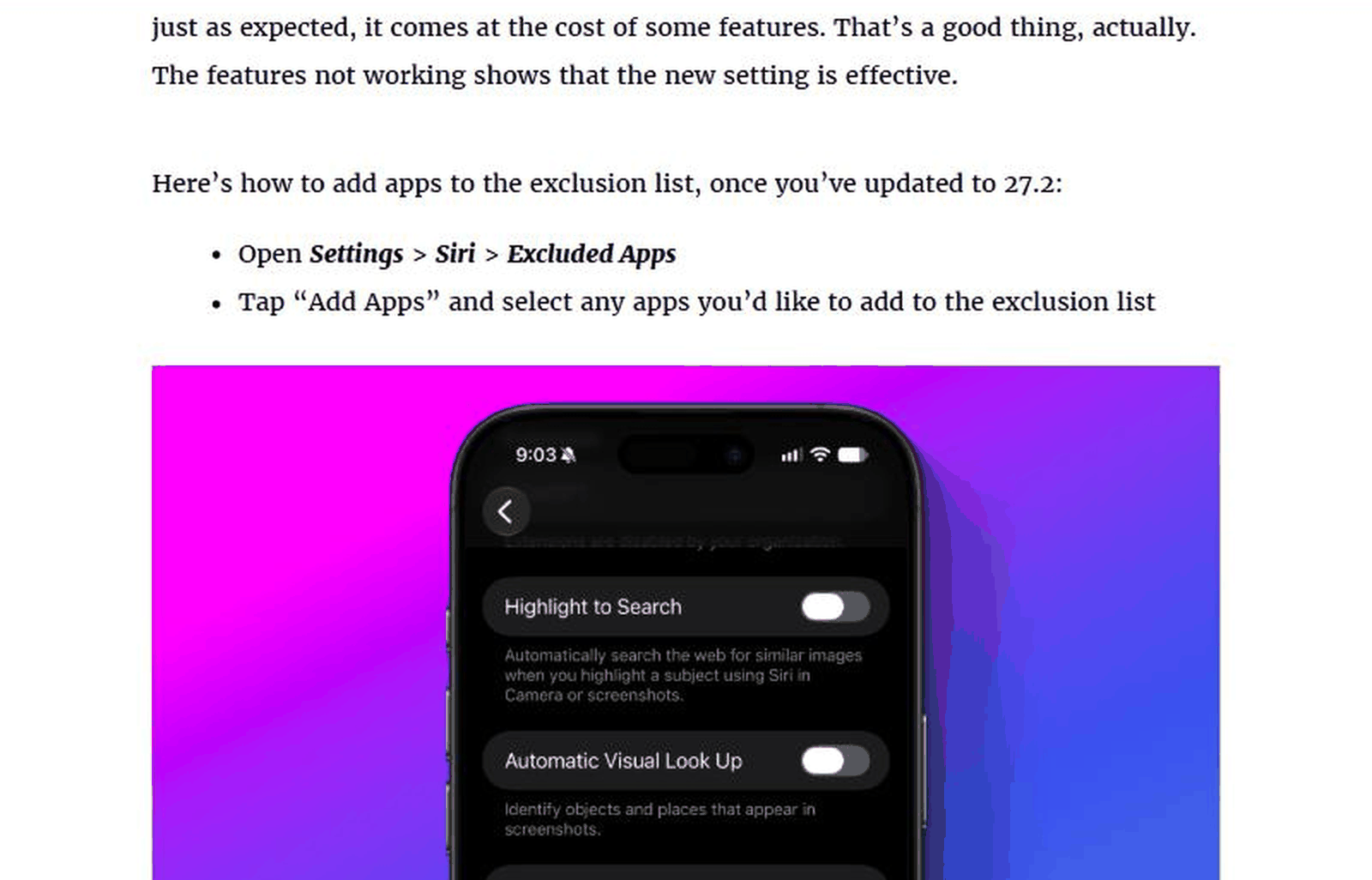
Apple. According to the EFF, iOS 27.2 introduced an “Exclude Apps” setting for Siri AI. After updating, you open Settings, Siri, Excluded Apps, tap Add Apps and pick the apps to exclude. The EFF says that Siri AI then cannot access the contents of the app, and that even the onscreen awareness feature, where you invoke Siri and ask about what you are looking at, will not work in an excluded app. Its example is Signal. The EFF adds that excluding an app means losing features, which it argues shows the setting is effective, and says the controls at launch had been confusing. It would like Apple to go further and offer an on-device-only option.
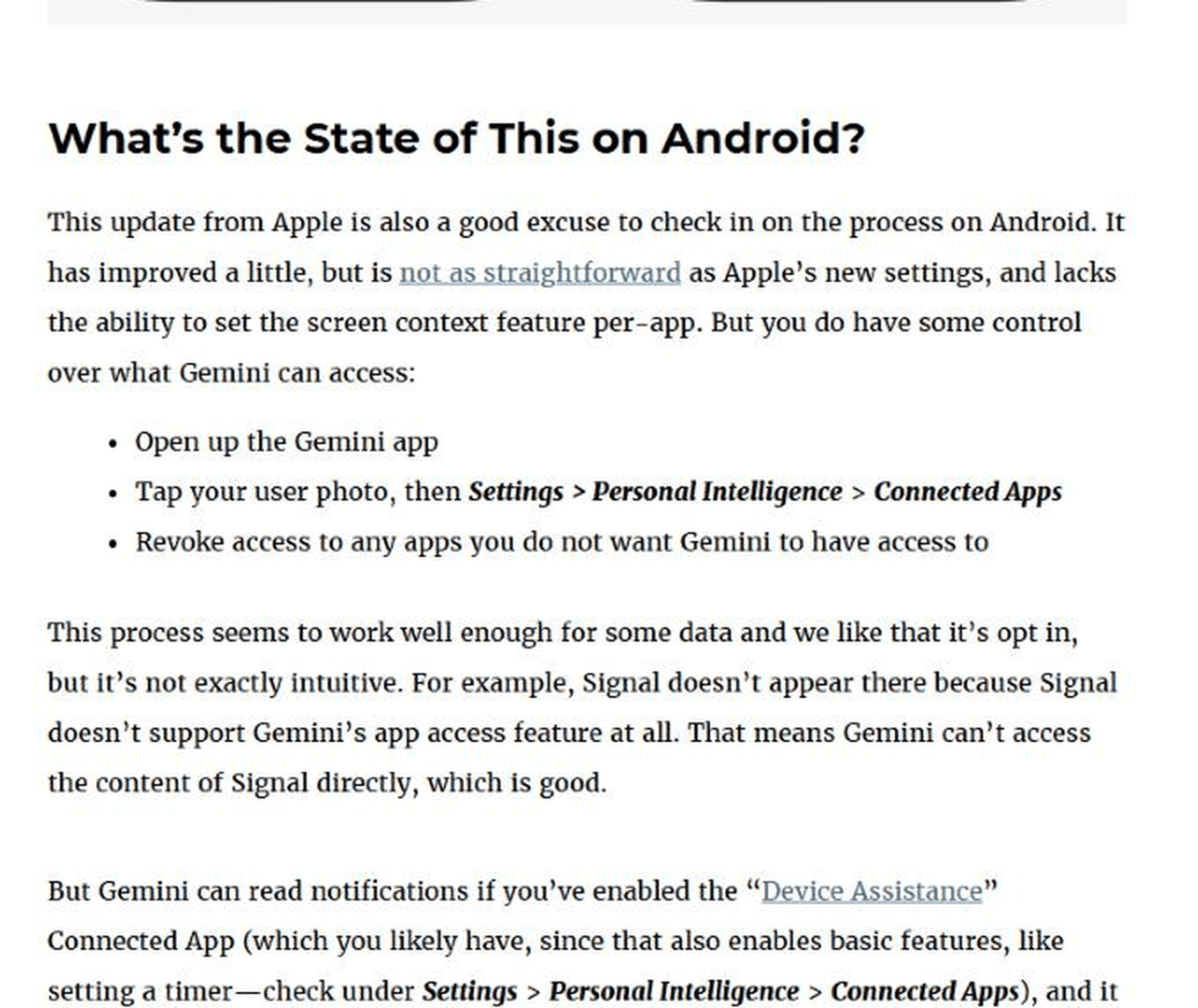
Android. The EFF calls the Android process “not as straightforward” and says it lacks a per-app setting for the screen context feature. It describes this route: open the Gemini app, tap your photo, then Settings, Personal Intelligence, Connected Apps, and revoke access for apps you do not want Gemini to use. Signal does not appear in that list because it does not support Gemini’s app-access feature, which the EFF counts as good. But the EFF warns of two other paths: Gemini can read notifications if the “Device Assistance” connected app is enabled, and it can use screen context unless you turn off “Use screen and app data” under Device controls, Screen context in Gemini’s settings.
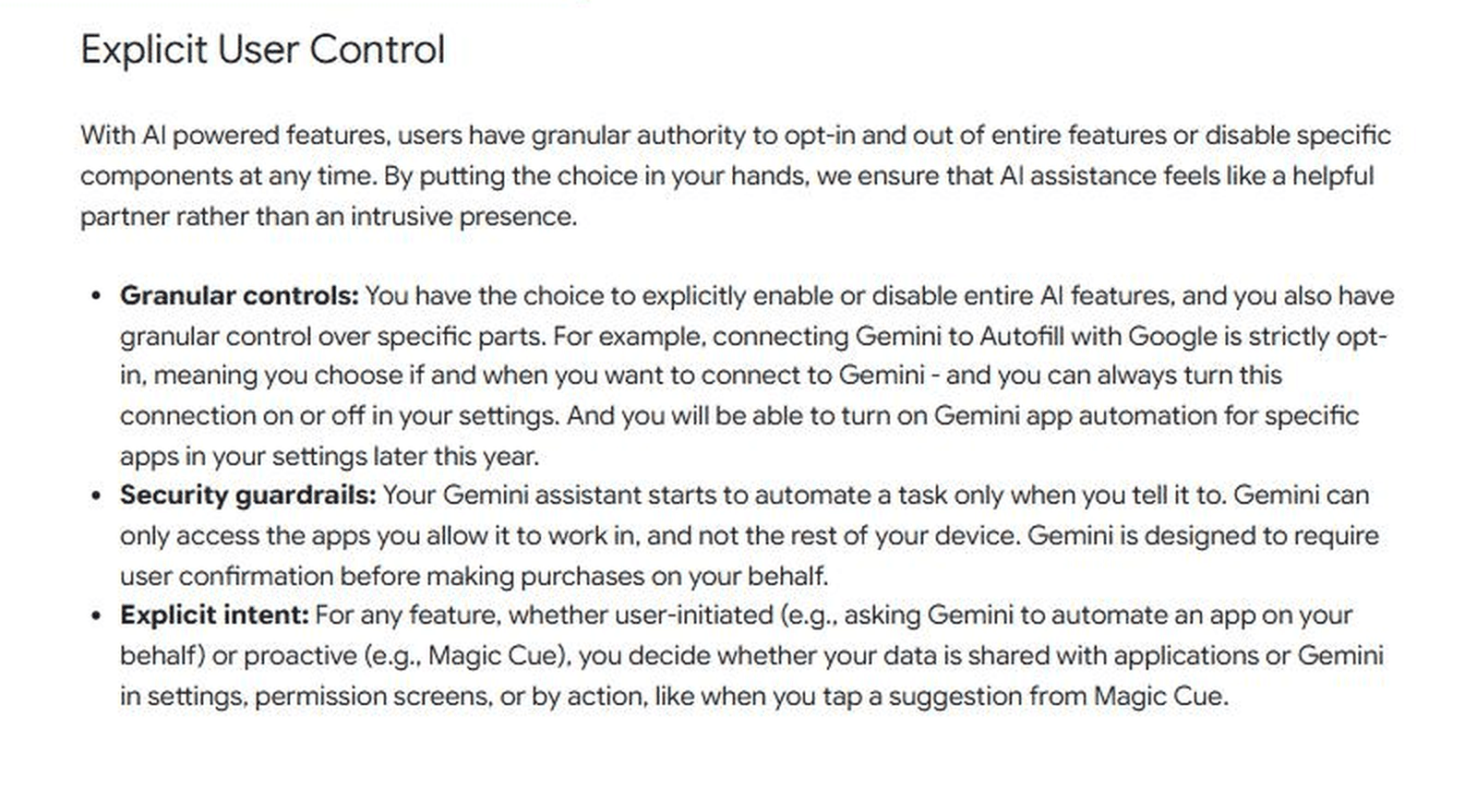
Google’s own account. Google’s post says Gemini Intelligence is built on three principles: explicit user control, comprehensive data protection and operational transparency. It says users can opt in or out of whole features, that Gemini “can only access the apps you allow it to work in”, that per-app control of Gemini app automation will come “later this year”, and that the Android Privacy Dashboard will soon show which AI assistants were active and which apps they used in the last 24 hours. It says Google is working with the developer ecosystem to promote its practices as standards for all AI assistants on Android. We found no developer-side opt-out in the post.
Reading the disagreement
The sources describe the same facts from different positions, and it helps to separate them (our analysis).
- Who decides. Apple’s Excluded Apps and Google’s Connected Apps put the decision with the user. Signal wants the developer to be able to decide for an app that carries other people’s messages. Both can be true: a user may be willing to let an assistant read their own screen, but the other side of a private conversation never agreed.
- Default versus opt-in. Signal’s measure applies by default on the platforms it can cover and can be turned off. The OS settings require the user to find and change them, and the EFF says they have been confusing.
- Trade-off. Blocking AI screen access can also block screenshots, a feature many people use. Signal chose protection over convenience and offers a switch.
- Evidence. Signal says it lacks documentation and had to investigate by experiment. That means some claims about what the agents capture and store are Signal’s findings, which we could not verify.
What to check
- Update the app. Signal’s changes ship through app updates. Update Signal on every device, and check that its screen protection is on unless you need screenshots.
- On iPhone, update to iOS 27.2 or later and look at Settings, Siri, Excluded Apps (the EFF steps). Consider excluding apps that carry private conversations or sensitive data.
- On Mac, follow Signal’s advice: add Signal to Excluded Apps in System Settings, Siri.
- On Android, review the Gemini app’s Connected Apps, and check the Device Assistance connection and the screen-context option the EFF names. Settings may have changed since the EFF wrote, so compare with what your phone shows.
- Review accessibility permissions. Signal notes that some third-party agents use accessibility settings. As general practice, look at which apps hold accessibility permission and remove any you do not recognise.
- For teams, decide whether AI assistants that read the screen are allowed on devices used for confidential or regulated conversations, and write it into the device policy. This applies to any app, not only Signal.
What we could not confirm
- Whether the Signal protection works as described on any given device. We tested nothing.
- What Gemini Intelligence, Onscreen Awareness or Meta’s Muse actually capture, store or send. Signal’s description is its own, and we did not read Apple’s or Meta’s documentation for these features.
- Whether Apple’s Excluded Apps setting blocks every route an agent might use. The EFF description covers Siri AI and onscreen awareness.
- When Google’s per-app controls and the Privacy Dashboard additions will arrive. Google’s post said “later this year” and “soon”.
- Any reply from Apple, Google or Microsoft to Signal’s request for developer opt-outs.
Frequently asked questions
What is Signal blocking?
Signal says it blocks screenshots in its app on iOS 27, and on Android it acts when it detects an AI assistant trying to read its screen. It says users can turn the protection off in settings.
Does this protect my Signal chats from Apple’s and Google’s AI?
Partly, and Signal says so itself. It says the remedy is incomplete, does not cover every Android phone, does not block Siri AI on macOS, and does not stop an agent from reading files already on the device.
How do I keep Siri AI out of an app on my iPhone?
According to the EFF, after updating to iOS 27.2, open Settings, Siri, Excluded Apps, tap Add Apps and select the app.
Can app developers stop OS-level AI agents from reading their apps?
Signal says it lacks robust tools to do so and is asking Apple, Google and Microsoft for a documented opt-out. We found no such developer opt-out in Google’s post.
Where are the sources?
Signal’s blog post (November 20, 2026), the EFF post about excluding apps from Siri AI (October 2026) and Google’s Gemini Intelligence security and privacy post (May 12, 2026). All screenshots are ours, taken on November 21, 2026.