Synology DSM Critical Flaw CVE-2026-120382: Deactivate OAuth Service Now, Fixed Builds Due by November 20
Published November 20, 2026. A news analysis built from Synology’s security advisory Synology-SA-26:21, Synology’s Knowledge Center page for the OAuth Service package, public CVE records, and our own screenshots. This article contains no affiliate links and we have no commercial relationship with Synology. We do not own the affected products, tested nothing, and we do not describe how to trigger the flaw. Every calculation or reading marked “ours” is our own.
The short version
- What Synology says: on November 19, 2026 it published advisory Synology-SA-26:21 for DSM and BeeStation OS. The flaw, CVE-2026-120382, “allows remote attackers to read or write arbitrary files and conduct denial-of-service attacks”.
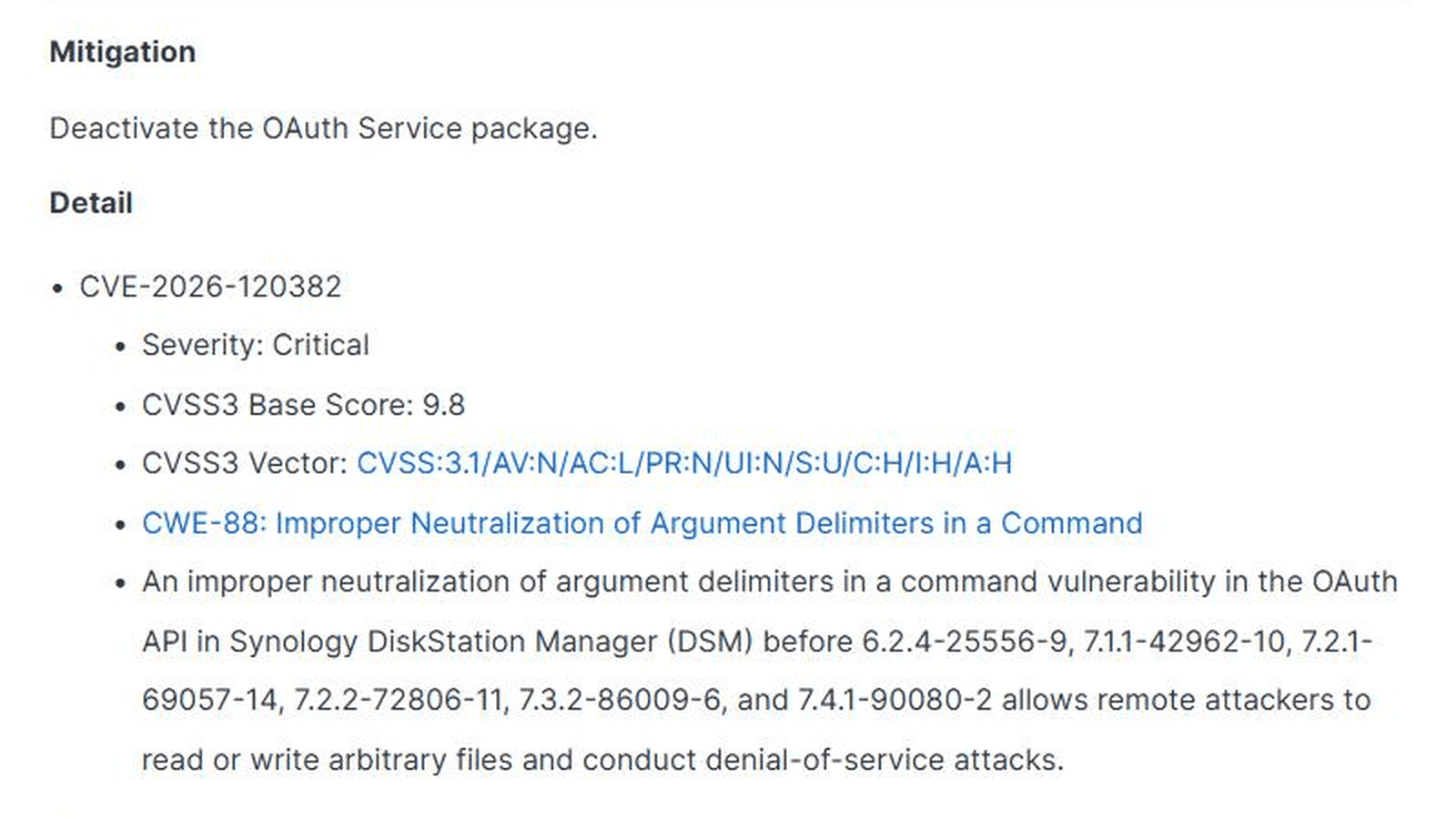
- How serious: Synology rates it Critical, with a CVSS 3.1 base score of 9.8 and a network, low-complexity, no-privileges, no-user-interaction vector.
- The fix is not out for everyone: DSM 7.4 and 7.3 have fixed builds scheduled for release by November 20. DSM 7.2.2, 7.2.1, 7.1 and BeeStation OS 1.5 are marked “OnGoing”.
- The workaround: Synology’s mitigation is to deactivate the OAuth Service package.
- What we do not know: whether the flaw is being exploited. The advisory does not say.
What the advisory says
The advisory is short. It lists severity Critical, status “Ongoing” and a single revision, “Initial public release”, dated November 19. The page shows a publish time of 15:47 and a last update of 15:50, both in UTC+8, so the page was published and then touched up within minutes.
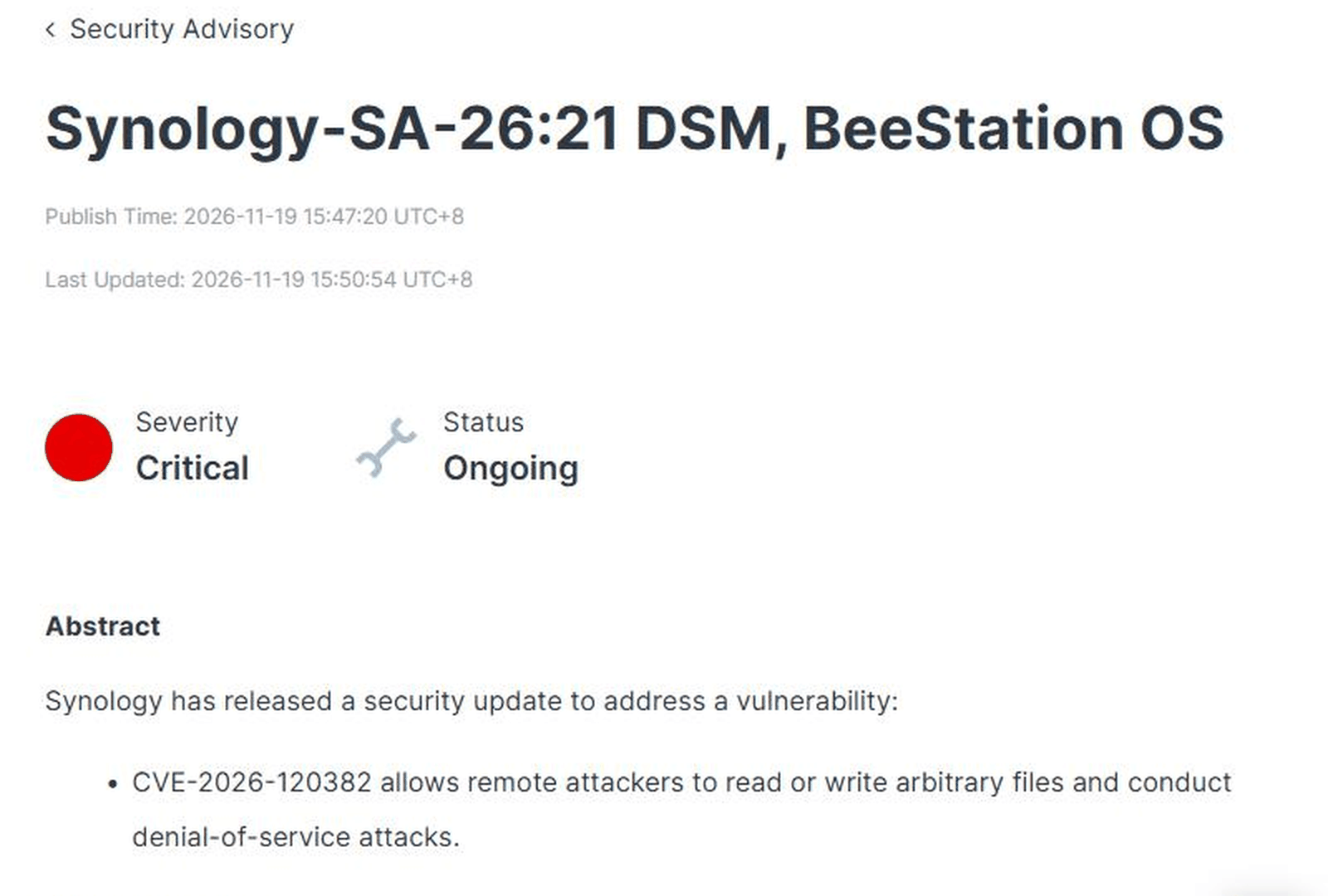
The detail section gives the technical class: an improper neutralization of argument delimiters in a command (CWE-88) in the OAuth API of DiskStation Manager. It lists DSM builds before 6.2.4-25556-9, 7.1.1-42962-10, 7.2.1-69057-14, 7.2.2-72806-11, 7.3.2-86009-6 and 7.4.1-90080-2 as vulnerable, which implies that those builds, or later ones, are the fixed releases for each branch.
How to read the 9.8
CVSS 3.1 builds a base score from eight choices, and the vector Synology lists spells them out. Read left to right (our reading of the standard):
- AV:N, attack vector network: the flaw can be reached over a network, not only from the device itself.
- AC:L, attack complexity low: no special conditions have to line up first.
- PR:N, privileges required none: the attacker does not need an account.
- UI:N, user interaction none: nobody has to click or approve anything.
- S:U, scope unchanged, with C:H, I:H, A:H: high impact on confidentiality, integrity and availability.
With scope unchanged, that combination is the highest base score the formula allows, 9.8. The number describes how bad the flaw is in the worst case the scoring assumes. It does not say that anyone is attacking, that a given NAS is reachable from the internet, or that the OAuth Service is switched on. That is why the practical questions in this article are about your own unit: version, package and exposure.
The impact wording matches the vector. “Read or write arbitrary files” is a confidentiality and integrity impact, and “denial-of-service” is an availability impact. A NAS is usually where documents, photos and backups live, so file access matters more on this class of device than on a device that stores little (our general observation, not a claim from the advisory).
Which products are affected
The “Affected Products” table is the part to read twice.
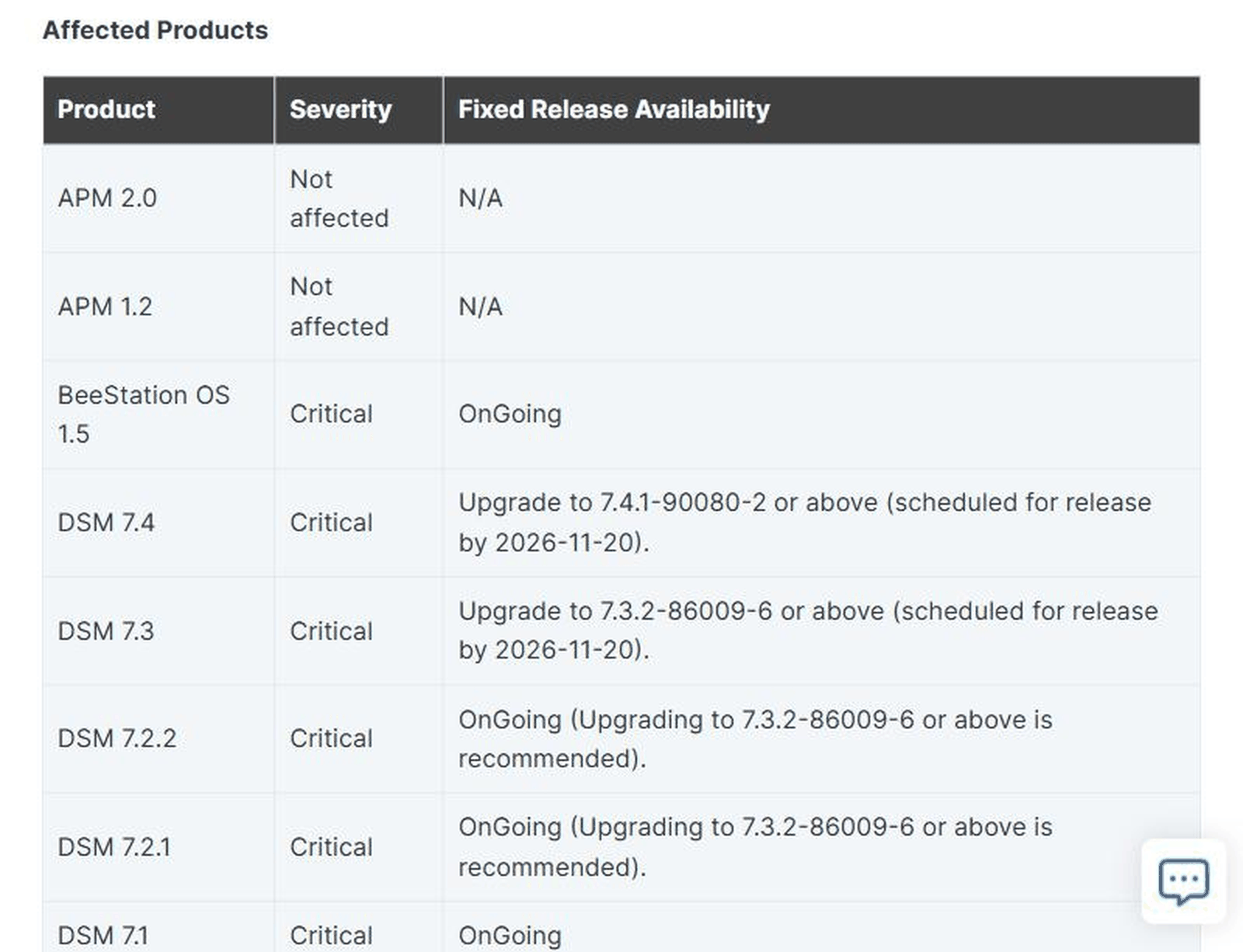
| Product | Rating | Fix status, as listed |
|---|---|---|
| DSM 7.4 | Critical | Upgrade to 7.4.1-90080-2 or above, scheduled for release by 2026-11-20 |
| DSM 7.3 | Critical | Upgrade to 7.3.2-86009-6 or above, scheduled for release by 2026-11-20 |
| DSM 7.2.2 | Critical | OnGoing; Synology recommends upgrading to 7.3.2-86009-6 or above |
| DSM 7.2.1 | Critical | OnGoing; Synology recommends upgrading to 7.3.2-86009-6 or above |
| DSM 7.1 | Critical | OnGoing |
| BeeStation OS 1.5 | Critical | OnGoing |
| APM 2.0, APM 1.2, DSM Enterprise 1.0, SRM 1.3, SRM 1.2 | Not affected | N/A |
Two things stand out. First, “scheduled for release by 2026-11-20” is a plan, not a release. We could not confirm from the advisory page whether the 7.4 and 7.3 builds were available when we read it. Second, the description names DSM 6.2.4-25556-9, but the table has no DSM 6.2 row. The advisory does not say whether DSM 6.2 is affected or receives a fix, so owners of old units should ask Synology rather than assume (our reading).
How to read “scheduled” and “OnGoing”
Synology uses two different status phrases in the table, and they call for different actions.
- “Scheduled for release by 2026-11-20” (DSM 7.4 and 7.3): a fixed build exists in the plan, with a date. Check Control Panel for the update on or after that date, and read the version number before installing: you want 7.4.1-90080-2 or 7.3.2-86009-6 or later.
- “OnGoing” (DSM 7.2.2, 7.2.1, 7.1 and BeeStation OS 1.5): work is in progress, with no date. For 7.2.x Synology adds that upgrading to 7.3.2-86009-6 or above is recommended, which is the only concrete path the advisory gives. For DSM 7.1 and BeeStation OS 1.5, the workaround is the only measure listed.
The advisory’s own top-level status is “Ongoing”, and its revision history has one line. Synology may update the page as builds ship, so re-read it rather than relying on a copy.
What the OAuth Service package is
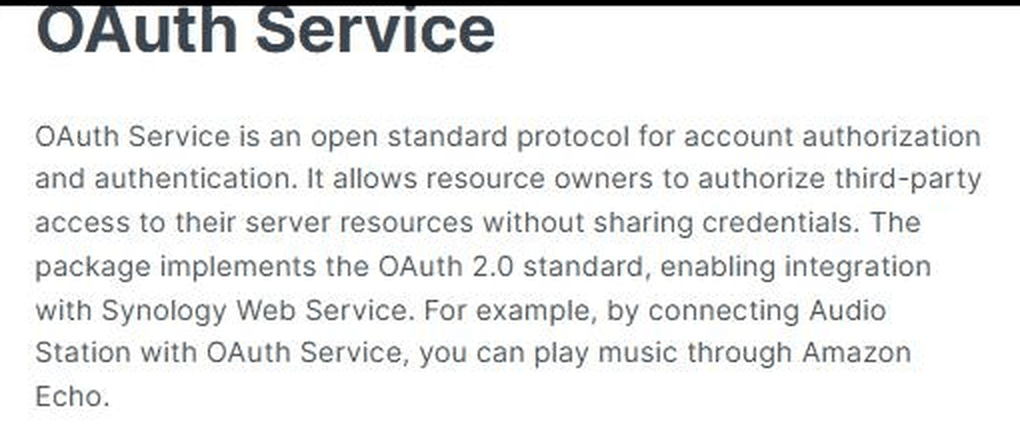
Synology’s Knowledge Center describes OAuth Service as an open-standard protocol package for account authorization. It lets the owner authorize third-party access to resources on the NAS without sharing credentials, and it implements OAuth 2.0. Synology’s own example is connecting Audio Station so music can be played through Amazon Echo. The page also says Dynamic Client Registration, a setting in the package, is “primarily used for integration with AI Console”.
The same page explains how to manage registered applications, authorized tokens and logs inside the package. That is useful here: you can see which applications are registered and which tokens have been authorized, and you can export the package’s log.
What is known, and when
| Date | Event | Source |
|---|---|---|
| Nov 19, 2026, 15:47 (UTC+8), which is 07:47 UTC | Advisory SA-26:21 published; updated at 15:50 | Synology advisory |
| By Nov 20, 2026 | Fixed builds for DSM 7.4 and 7.3 scheduled | Synology advisory |
| Nov 20, 2026, about 03:30 UTC | NVD API returned no record for CVE-2026-120382 | Our check |
| Not stated | Fix dates for DSM 7.2.x, 7.1, BeeStation OS 1.5 | Synology advisory |
A gap between a vendor advisory and a public CVE record is common, but until it closes, the details here rest on one source. That is another reason to treat the advisory page as the live reference.
Why this is worth acting on even without exploitation news
Three facts from the advisory make it worth a few minutes today. The rating is Critical. The vector needs no account and no user action. And the mitigation is simple and available before the patch. If your NAS is only reachable inside your home or office network, the risk is lower than for a unit exposed to the internet, but “lower” is not “none”: anything on the same network, including a compromised laptop, would be in a position to reach it (our reasoning from the vector, since the advisory does not discuss exposure).
For small offices, the cost comparison is lopsided. Stopping one package you do not use costs a few minutes and nothing else. Leaving a Critical remote file-access flaw open until the patch arrives costs nothing today and possibly a great deal later.
What to check
- Find your DSM version. In DSM, open Control Panel and Info Center and compare the version with the table above.
- See whether OAuth Service is installed. Open Package Center and look at the installed packages. The advisory’s mitigation targets this package. If it is not installed, the mitigation does not apply, and whether your unit is still exposed is a question for Synology (our inference; the advisory does not say).
- If you do not use it, deactivate it now. This is Synology’s stated mitigation. In Package Center, stopping a package is the usual way to deactivate it (check Synology’s help for your DSM version).
- If you do use it, expect integrations that rely on it, such as the Audio Station to Amazon Echo example, to stop working. We did not map every package that depends on OAuth Service, so read any dependency warning DSM shows before you proceed.
- Review the package first if you can. Before you stop it, look at the registered applications, the authorized tokens and the log for anything you do not recognise, and export the log.
- Update when the fixed build appears. Back up first, then update through Control Panel. For DSM 7.2.x, Synology recommends moving to 7.3.2-86009-6 or above.
- Reduce exposure meanwhile. As general practice, do not expose the NAS login or services directly to the internet; reach it through a VPN. The advisory does not discuss this, and it is not a substitute for the update.
What we could not confirm
- Whether the flaw is being exploited. The advisory is silent, and we could not read CISA’s known-exploited list.
- Whether the fixed 7.4.1-90080-2 and 7.3.2-86009-6 builds were released on schedule.
- The status of DSM 6.2, which the description names but the table omits.
- An independent CVE record: when we checked on November 20, NVD returned no entry and the CVE.org record was not available, so the 9.8 score is Synology’s own.
- Every package that depends on OAuth Service.
- Anything about the flaw’s mechanics beyond the advisory text. We tested nothing and publish no technical detail.
Frequently asked questions
Is my Synology NAS affected by CVE-2026-120382?
If it runs DSM 7.4, 7.3, 7.2.2, 7.2.1 or 7.1, or BeeStation OS 1.5, Synology lists it as Critical. APM, SRM and DSM Enterprise 1.0 versions in the table are listed as not affected.
Is there a patch?
Synology schedules DSM 7.4.1-90080-2 and 7.3.2-86009-6 for release by November 20, 2026. For 7.2.x, 7.1 and BeeStation OS 1.5 the status is “OnGoing”.
What is Synology’s workaround?
Deactivate the OAuth Service package.
Is the vulnerability being exploited?
The advisory does not say, and we found no independent confirmation.
Where are the sources?
Synology’s security advisory Synology-SA-26:21 and its Knowledge Center page for OAuth Service. Screenshots are ours, taken on November 20, 2026.
More Security and Infrastructure News
- Windows Server 2028 Preview Ships Hardened by Default: What Microsoft Says Changes and What Admins Should Test
- Signal Blocks OS-Level AI Agents From Reading Its Screen: What It Covers, What It Misses and What You Can Do
- Quad9 Leaves France on November 24: What Changes for DNS Users and What to Check Now
- NGINX HTTP/2 Remote Code Execution Flaws: Affected Versions, Fixes and What to Check Today
- PHP 8.6 Is Out and PHP 8.2 Loses Security Support on December 31: What WordPress Site Owners Should Check