AWS Emulator Explained: What It Can and Cannot Test Locally
Updated November 12, 2026. A news analysis built from the aws/aws-emulator repository on GitHub, AWS’s own User Guide pages, the GitHub API, our own screenshots of those pages, and the Hacker News front page. We read documentation and release notes; we did not install or run the emulator. Everything we describe as a capability or limit is AWS’s description, and every number we compute is labelled as ours. This is not purchasing or architecture advice.
The short version
AWS has published an open-source tool called AWS Emulator: a local program that serves an AWS API endpoint so you can run code against emulated AWS resources on your own machine, on a development server or in continuous integration, without an AWS account. The repository says the emulator has no additional service fee, that you pay only for the AWS resources you later deploy on AWS, and that it is meant for building and testing, not for production workloads or security testing. It is released under the CC0 1.0 license (with a vendored directory under Apache 2.0), is written in Rust, and collects anonymous telemetry by default unless you switch it off.
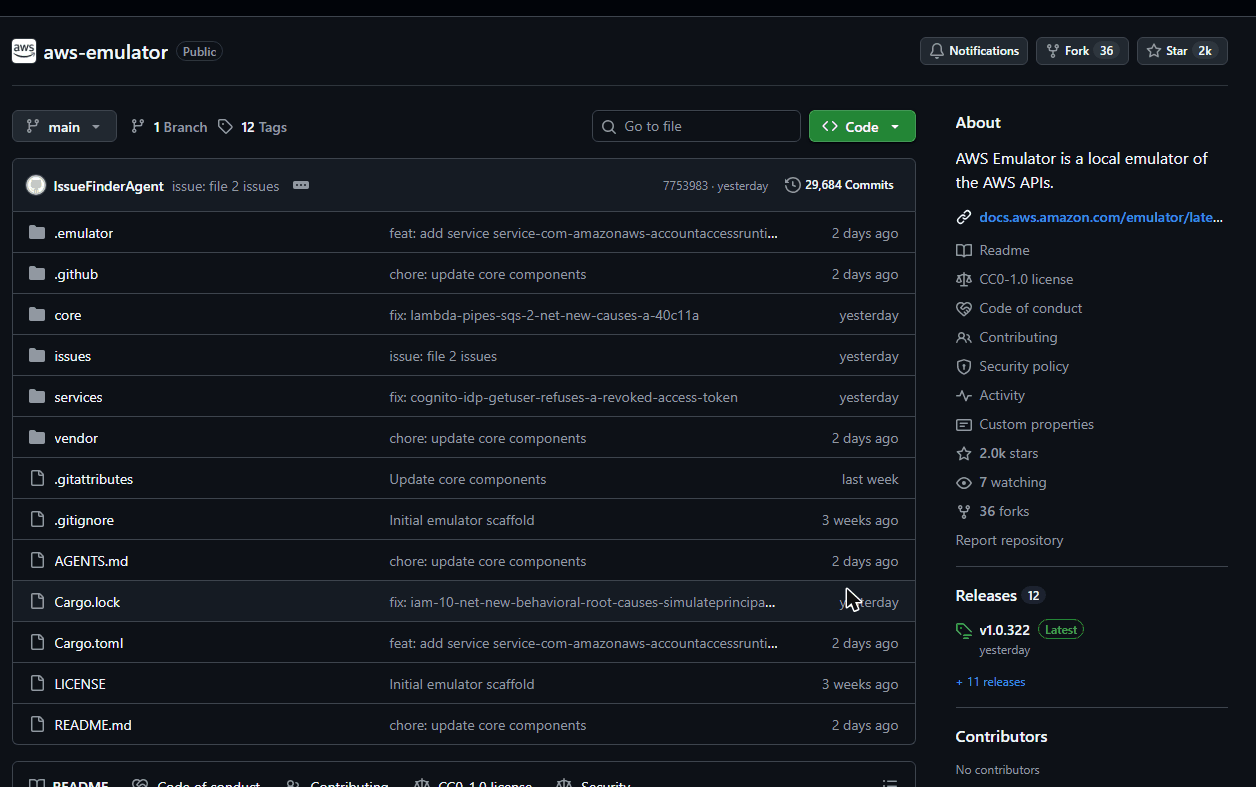
The repository was created on September 11, 2026, and by November 11 it had 12 tagged releases, roughly 2,000 stars and, according to the page we captured, 29,684 commits. The docs say AI agents keep the emulator up to date with AWS, with updates many times a day. That pace is the most unusual part of the story, and it matters for how much you should trust any single snapshot of it. Below we separate what AWS says, what the release notes show, and what remains unknown, then give a checklist for deciding whether it belongs in your test pipeline.
Timeline
- September 11, 2026: the aws/aws-emulator repository is created (GitHub API creation date).
- November 7, 2026: release v1.0.250, the oldest of the 12 releases listed on the releases page.
- November 10, 2026: releases v1.0.290 to v1.0.293 are published during the day.
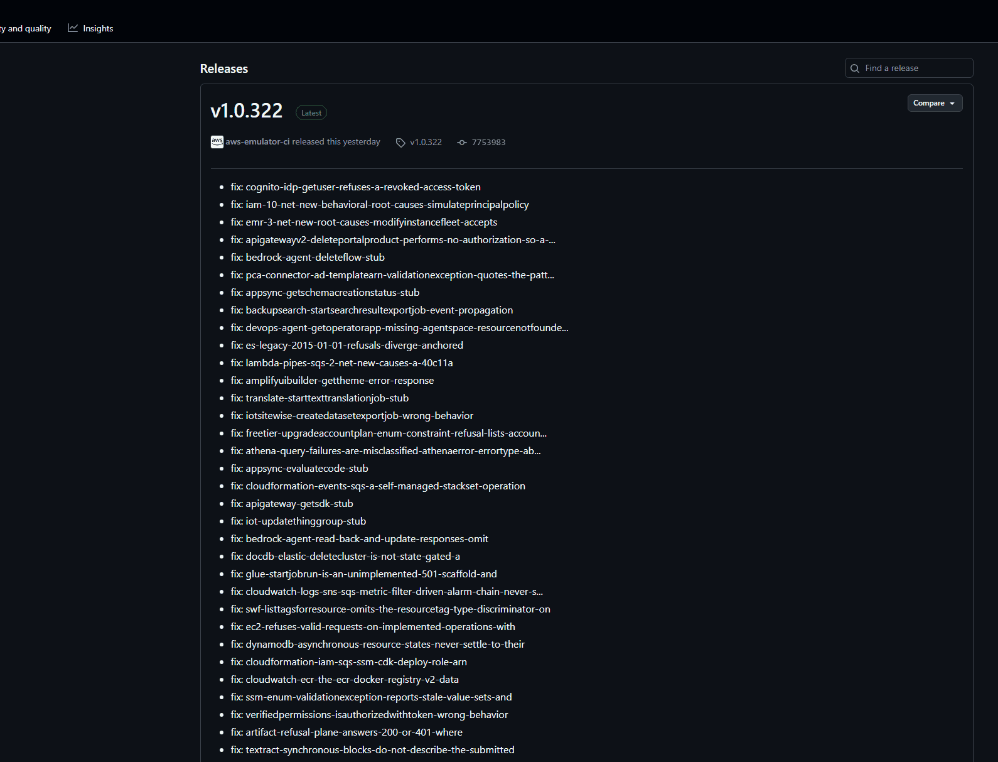
- November 11, 2026: release v1.0.322 is published at 00:32 UTC and the last push to the repository is recorded at the same time.
- November 12, 2026: the project is on the Hacker News front page with 664 points when we looked.
What it is, in AWS’s own words
The README and the User Guide describe a local program with no graphical interface. You start it, set environment variables so that the AWS CLI or an AWS SDK talks to its endpoint, and run your code as usual. In embedded mode, written for Rust tests, you pass the emulator’s HTTP client straight to the SDK client and need no endpoint URL, certificate or environment variable. Each test can get its own isolated emulator instance.
On Linux you install an RPM or Debian package for x86_64 or aarch64 and run the aws-emulator command. On Windows and macOS you run it in a container built from a short Dockerfile. There is also an aws-emulator skill for AI coding agents: the README gives an aws agent-toolkit command to install it and says it needs AWS CLI version 2.35.0 or later. The skill installs, starts and connects the emulator and checks whether your project works on it.
The docs give three use cases: local testing, including calls that cross services; CI/CD integration tests with no AWS account and no AWS resources; and prototyping with AI coding agents. Two worked examples show an S3 bucket being created and listed back, and a DynamoDB CreateTable call with a two-character table name being rejected with the same validation error AWS returns.
The limits AWS publishes about itself
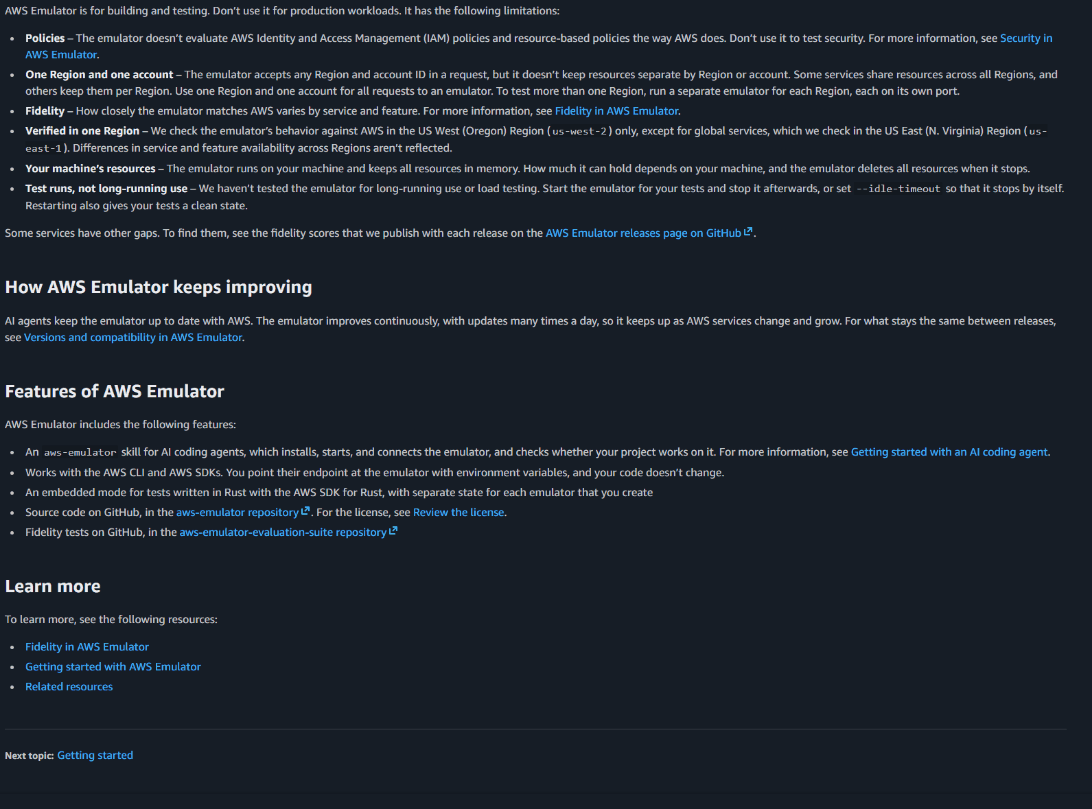
This is the part worth reading twice. The User Guide’s Limitations section lists six items, which we paraphrase:
- Policies: the emulator does not evaluate IAM policies or resource-based policies the way AWS does, so you should not use it to test security.
- One Region and one account: it accepts any Region and account ID but does not keep resources separate by Region or account. To test more than one Region you run a separate emulator for each, each on its own port.
- Fidelity varies: how closely it matches AWS depends on the service and feature.
- Verified in one Region: behavior is checked against AWS in us-west-2, or us-east-1 for global services, so differences in availability across Regions are not reflected.
- Your machine’s resources: everything is kept in memory and deleted when the emulator stops.
- Test runs, not long-running use: AWS says it has not tested long-running use or load testing and suggests starting the emulator for your tests and stopping it afterwards, or using an idle timeout.
The fidelity page adds two more facts. If the emulator has not implemented an operation, it returns HTTP 501 with the error code NotImplemented, so a test that calls it fails right away instead of silently passing. And today, AWS says, the emulator matches AWS most closely for control plane APIs, meaning create, read, update, delete and list operations; fidelity for data plane APIs and for infrastructure-as-code tools such as CloudFormation, Terraform and the AWS CDK varies by service.
How fidelity is measured
AWS defines a fidelity test as a short program that uses an AWS SDK to run a workflow against a service and assert how AWS behaves, including the exact error for invalid calls. A service’s fidelity score is the number of tests the emulator passes out of the total for that service, with the page’s own example being 40 of 50. Scores are published with each release as a scores.json.gz file on the releases page, and the tests live in a separate repository, aws-emulator-evaluation-suite, including tests the emulator does not pass yet. AWS also warns that scores are only comparable when they use the same version of the tests, because later versions add tests and can retire outdated ones. A failing count can therefore rise even while the emulator improves.
We could not open the scores file from our browser session, so we do not quote any score here. If a specific service matters to you, download the file from the release you plan to pin and read that service’s row rather than relying on a headline number.
What the release notes show
The releases page is itself revealing. We counted bullet lines in the notes of the 12 published releases through the GitHub API. Treat the counts as ours and approximate, since we counted lines that start with a dash.
| Release | Published (UTC) | Bullet lines | Lines containing “stub” |
|---|---|---|---|
| v1.0.250 | Nov 7, 09:02 | 1,001 | 331 |
| v1.0.264 | Nov 8, 10:23 | 294 | 37 |
| v1.0.290 | Nov 10, 07:55 | 261 | 50 |
| v1.0.322 | Nov 11, 00:32 | 215 | 44 |
Across all 12 releases we counted 2,026 bullet lines. In the latest release, 44 of 215 lines (about 20 percent, our division) mention a “stub”, for example entries named like a service operation followed by “stub”. We read that as evidence that many operations were still placeholders days ago and are being filled in quickly, but it is our interpretation: the notes do not say what a stub does when called. The version numbers also moved from 250 to 322 in four days, which is 72 numbers, or 18 a day on average (our arithmetic); only 12 of those numbers have published releases, so do not read the version counter as 72 downloads you could pin.
Our own arithmetic (labelled as ours)
| Figure | Result | How we got it |
|---|---|---|
| Days since the repository was created | 62 | September 11 to November 12, 2026 |
| Average commits per day | about 479 | 29,684 commits divided by 62 days; commit counts can include automated commits |
| Average stars per day | about 32 | 1,973 stars divided by 62 days |
| Service folders | about 436 | The services directory listed 438 entries; we excluded two non-service entries (.gitkeep and common) |
| Share of latest-release lines mentioning a stub | about 20 percent | 44 divided by 215 |
| Disk space to build from source | at least 100 GB | README prerequisite, free space for the build directory |
That last row deserves a note. Most people will install a prebuilt package or container, and the README says so. Embedded mode is different: it compiles the emulator into your test binary, so your first test build also builds the service crates, and AWS’s advice is to reuse one build directory across projects, cache it in CI and pin the emulator to a release commit.
Claimed by AWS versus what we could verify
| Statement | Status |
|---|---|
| No AWS account needed and no additional service fee | Stated in the README and User Guide; we did not install it |
| License is CC0 1.0, with vendor code under Apache 2.0 | Stated in the README; GitHub’s API reports CC0-1.0 for the repository |
| Telemetry is on by default and can be turned off | Stated in the README with a flag, an environment variable and a config file; not tested by us |
| The emulator does not send your requests, responses or resource data to AWS | Statement in the User Guide; independent verification would need a network capture |
| AI agents keep it up to date, with updates many times a day | Consistent with 12 releases in five days and the commit history we saw, but the process itself is not visible to us |
| The repository does not take pull requests | Stated in the README |
| It is not for production, load testing or security testing | Stated by AWS |
Telemetry: read this before you put it in CI
The README says the emulator collects and reports usage data to AWS, that telemetry is on by default, and that the records never include what is in your requests or responses, your code, your credentials or personal data. It lists four ways to turn it off: start with the telemetry option set to off, set the EMULATOR_TELEMETRY environment variable to off, add an enabled equals false setting to the config.toml file (in a .aws/emulator folder in your home directory), or use the embedded configuration API. Any unrecognized value turns telemetry off and prints a warning at startup. If you ship a tool that includes the emulator, AWS asks you to tell your users about telemetry and give them a way to disable it.
For a company with a policy on outbound network traffic from build agents, the default matters more than the content of the data. Decide the setting centrally instead of per developer.
What this changes, and what it does not
Local AWS emulation is not a new idea, and third-party tools have existed for years. We are not comparing against them because we did not test any, and the AWS pages do not make a comparison. What is new here is that the vendor itself publishes the emulator, publishes its fidelity tests, and states its gaps plainly. That can help teams that want one source for both the real service and its test double. It also creates a dependency on a project that is two months old, moving at hundreds of commits a day, and that does not accept outside pull requests.
There is also a human factor. When a local emulator returns success for something real AWS would reject, a team learns about the difference in production. When it returns NotImplemented, the team learns during development. The 501 behavior is therefore a useful design choice, but it only protects you for operations the emulator knows it lacks. Operations that exist but behave differently are exactly what the fidelity tests are meant to catch, and AWS says they are not all passing.
Checklist before you adopt it
- List the AWS services your tests touch and check each against the fidelity scores in the release you plan to use.
- Run the official compatibility check. The docs describe a page, “Checking whether your project works with AWS Emulator”, and the agent skill can do this for you.
- Pin a release. With versions moving this fast, a CI job that pulls the newest build can change behavior between runs.
- Decide the telemetry setting and set it in shared CI configuration.
- Keep IAM and security tests on real AWS. AWS says the emulator does not evaluate policies like AWS does.
- Use one Region and one account per emulator, and start one emulator per Region if you test several.
- Do not rely on persistence. Resources live in memory and disappear when the emulator stops.
- On Windows or macOS, plan for Docker. The README documents a Dockerfile rather than a native installer.
- Keep a small suite of tests against real AWS for anything where a wrong answer is expensive, such as billing, permissions and data durability.
What to watch next
- Whether AWS publishes fidelity scores in a form that is easy to compare across releases, and how many services reach high scores on data plane operations.
- Whether the pace of releases settles into a stable cadence, and whether a long-term-support style tag appears.
- Whether IAM policy evaluation, multi-Region and multi-account behavior are added, since they are the main reasons teams still test on real AWS.
- Whether support for CloudFormation, Terraform and the CDK becomes more consistent across services.
- Any change to the telemetry default or to how telemetry is documented.
- Independent hands-on reports from teams that run it in CI for weeks, not only first-day impressions.
For related reading, see our notes on Val Town winding down and migration checklists, on Amazon’s Strands Decider and the 98 percent cost claim and on Claude Whiteboards, Sheets and Data. Browse more in our news section and tool reviews.
Frequently asked questions
What is AWS Emulator?
A local emulator of AWS APIs from AWS that serves an endpoint on your machine, so your AWS CLI or SDK calls go to the emulator instead of AWS, with no AWS account required.
Is it free?
AWS says it has no additional service fee and that you pay only for AWS resources when you deploy on AWS. The license is CC0 1.0.
Can I use it in production?
No. AWS states it is for building and testing and should not be used for production workloads or security testing.
Does it work on Windows and macOS?
According to the README, on those systems you run it in a container built from a Dockerfile. Native packages are documented for Linux.
Does it send my data to AWS?
The User Guide says it does not send your requests, responses or resource data to AWS, but it does send anonymous usage and error data by default, which you can turn off.
Does it check IAM permissions?
No. AWS says it does not evaluate IAM or resource-based policies the way AWS does, so do not use it to test security.
How accurate is it?
It varies by service and feature. AWS publishes a fidelity score per service with each release, defined as tests passed out of tests total. It says control plane APIs match best.
Can I contribute code?
The README says the repository does not take pull requests, but you can report bugs and fidelity gaps in GitHub Issues.
Is this a review?
No. We read AWS’s pages and release notes and did not run the emulator.
Sources and method
- aws/aws-emulator repository and README, github.com/aws/aws-emulator, read November 12, 2026.
- GitHub releases page and API for aws/aws-emulator, read November 12, 2026 (release dates, tags, notes, repository metadata).
- AWS Emulator User Guide: “What is AWS Emulator?” and “Fidelity in AWS Emulator”, docs.aws.amazon.com/emulator/latest/userguide, read November 12, 2026.
- Hacker News front page, November 12, 2026.
Method: we read the README and two User Guide pages in full, queried the public GitHub API for repository metadata and release notes, captured the three screenshots above ourselves, counted bullet lines in release notes with a script, and did all other arithmetic by hand from the numbers shown. We could not read the fidelity scores file because the browser blocked the download, so no scores are quoted. We did not install or run the emulator.
Risk note
Features, defaults and release numbers can change quickly; this project changes several times a day. Check the current README and your own results before relying on anything described here. This article is information, not purchasing or architecture advice. ToolReviewHub may earn commissions from some tools reviewed elsewhere on the site; no affiliate link appears in this article, and the companies named here did not pay for or review it.