WordPress 7.1.5 Security Release: 20 Fixes, 4 Reachable Without a Login, and What Site Owners Should Check
Published November 22, 2026. A news analysis built from primary sources: the WordPress.org news posts for WordPress 7.1.5 (November 18, 2026), 7.1.4 (October 28, 2026) and “Critical PHP Security Release” (October 21, 2026), the WordPress documentation pages for the backport releases, and CISA’s Known Exploited Vulnerabilities (KEV) data as published in CISA’s own GitHub mirror, plus our own screenshots of the release post. WordPress credits Anthropic with reporting two of the twenty fixes in 7.1.5 and two in 7.1.4, and Claude is among the tools we use to help draft articles, so we disclose that connection; it did not change what we reported. This site also runs on WordPress, which we say so you can weigh our view. This article contains no affiliate links. We did not install the release on a test site or try any of the flaws, and the release post gives one line per fix, so we do not describe how to exploit anything. Tallies marked “ours” are our own counts of the release post.
The short version
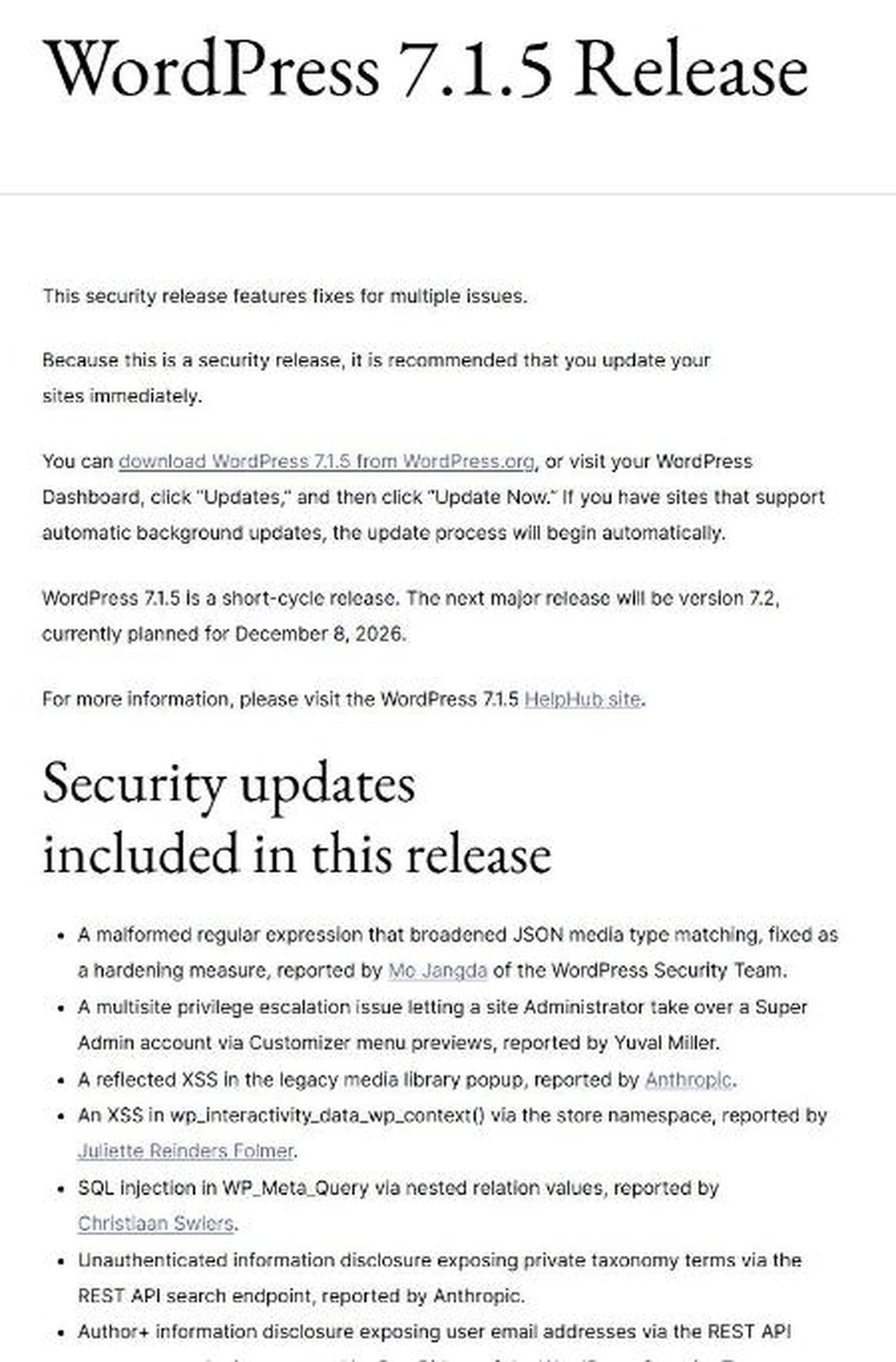
- What happened: on November 18, 2026 WordPress released 7.1.5, a security release that its post says features “fixes for multiple issues” and that site owners should install immediately. By our count the post lists 20 fixes.
- What is reachable without a login: four of the twenty are described as unauthenticated, including a privilege escalation through Template Part block attributes that the post says “could lead to remote code execution.” The others are a stored XSS through shortcode attributes in comments, a denial of service through batched XML-RPC pingbacks, and an information disclosure of private taxonomy terms through the REST API search endpoint.
- Other kinds of fix: two SQL injections, a multisite flaw that lets a site Administrator take over a Super Admin account, and a run of stored and reflected XSS issues in the block editor, Customizer and media code.
- Older branches: WordPress says the fixes are backported to every branch eligible for security fixes (currently through 4.7), and that the backports ship as they become ready. We confirmed that 7.0.9, 6.9.12 and 6.8.13 were released on November 18.
- Exploitation: the release post gives no CVE numbers, so we could not match its 20 items against CISA’s KEV catalog. The catalog’s latest WordPress Core entry, as of its November 20 version, was added on November 3, before this release.
The 20 fixes, grouped
The release post is a plain list of one-line descriptions, each credited to a reporter. We sorted the list two ways. First by who the post says can reach the flaw:
| Who can reach it (as written in the post) | Count (ours) | Examples |
|---|---|---|
| Unauthenticated | 4 | Template Part privilege escalation; stored XSS via shortcode attributes in comments; XML-RPC pingback denial of service; private taxonomy terms via the REST API search endpoint |
| Subscriber+ | 1 | Information disclosure through XML-RPC wp.getComments |
| Contributor+ | 3 | Stored XSS via oEmbed provider responses, the Comment Date block, and media filenames in the block editor |
| Author+ | 2 | User email addresses through the REST API comments endpoint; authorization bypass via comment editing in the admin |
| Editor+ | 1 | Information disclosure via post and template author assignment in the REST API |
| Administrator | 2 | Multisite takeover of a Super Admin account via Customizer menu previews; stored XSS via Customizer previews |
| No privilege level stated | 7 | Two SQL injections, XSS in the interactivity code, the legacy media popup and Openverse metadata, and two hardening changes |
The counts add up to 20 (4 + 1 + 3 + 2 + 1 + 2 + 7). Second, by type of problem, again our reading of the one-line descriptions:
| Type | Count (ours) |
|---|---|
| Cross-site scripting (reflected, stored or in the editor) | 8 |
| Information disclosure | 4 |
| Privilege escalation or authorization bypass | 3 |
| SQL injection | 2 |
| Hardening changes | 2 |
| Denial of service | 1 |
The four that need no login
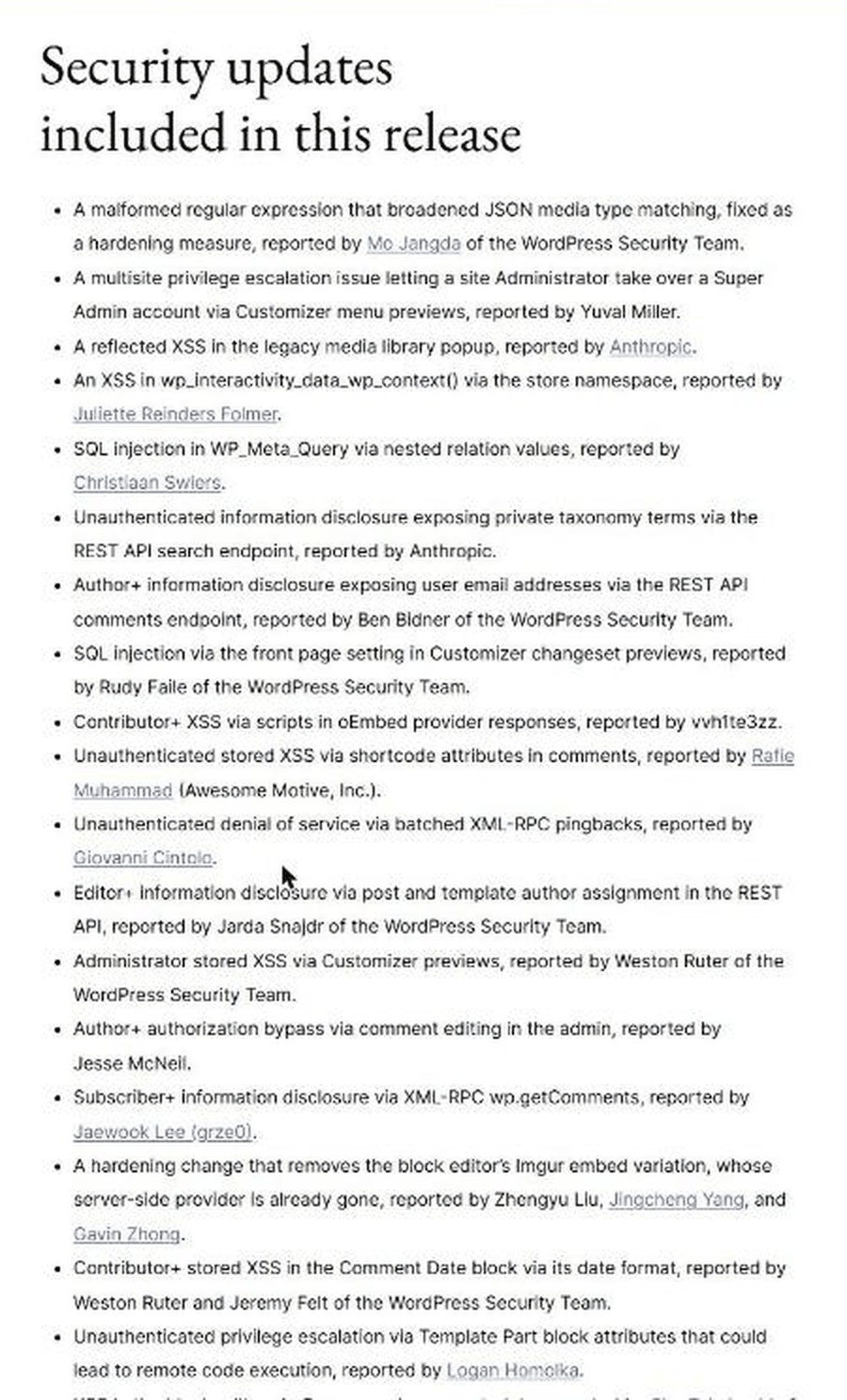
These deserve attention first because the person who can reach them needs no account. The post says little about each, so we describe only what it says:
- Template Part privilege escalation. “Unauthenticated privilege escalation via Template Part block attributes that could lead to remote code execution,” reported by Logan Homolka. This is the most serious-sounding line in the release, and also the one with the fewest details. The post does not say whether it needs a particular theme, plugin or setting, and we could not find out from the post alone.
- Stored XSS via shortcode attributes in comments, reported by Rafie Muhammad of Awesome Motive. Relevant to sites that accept comments from visitors.
- Denial of service via batched XML-RPC pingbacks, reported by Giovanni Cintolo. It concerns XML-RPC, the older remote-publishing interface that many sites no longer need.
- Information disclosure of private taxonomy terms through the REST API search endpoint, reported by Anthropic.
Inside the logged-in flaws
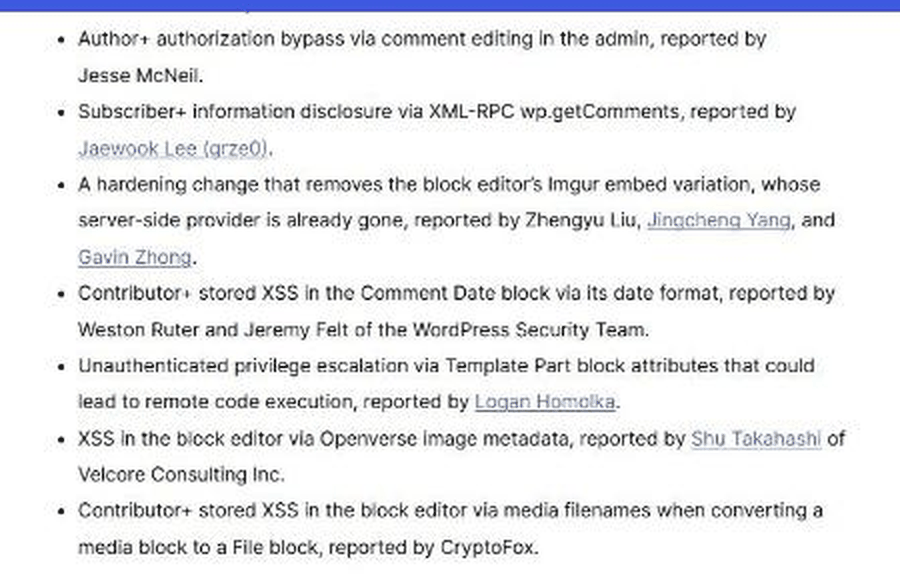
The other sixteen items either need an account of some kind (nine, by our count) or leave the level unstated (seven). Two things stand out. First, a pattern of stored XSS needing only Contributor access: oEmbed responses, the Comment Date block and media filenames. Contributors are often the lowest-trust accounts that sites hand out to guest writers, so any site with open registration or many guest authors should read this group closely. Second, the multisite item: the post says a site Administrator could take over a Super Admin account through Customizer menu previews. On a multisite network where site owners are not the network operators, that is the kind of flaw that matters most.
The two SQL injections are the other pair to note. One is in WP_Meta_Query through nested relation values, the other through the front page setting in Customizer changeset previews. The post gives no privilege level for either, and we do not know whether a default WordPress install exposes them to visitors. We will not guess.
The release cadence
7.1.5 is the fifth 7.1.x release in nine weeks. From the WordPress.org news posts, the dates are:
| Release | Date (2026) | Days since previous (ours) |
|---|---|---|
| 7.1.1 (maintenance and security) | September 17 | – |
| 7.1.2 | September 22 | 5 |
| 7.1.3 (maintenance and security) | October 6 | 14 |
| 7.1.4 (security) | October 28 | 22 |
| 7.1.5 (security) | November 18 | 21 |
From the first to the last is 62 days (ours). Two of those posts are labelled “short-cycle” releases, and the next major version, 7.2, is planned for December 8, 2026; the 7.1.5 post adds that 7.2 RC 2 has been released with all applicable fixes. In between, on October 21, WordPress published a separate “Critical PHP Security Release” notice about two critical PHP vulnerabilities, saying no WordPress update was required and that versions of PHP prior to 8.2 no longer receive security updates. If your host controls PHP, that notice is worth rereading next to this one; we covered PHP’s own timeline in an earlier article.
The previous release, and the exploited list
7.1.4 on October 28 included “a weakness in the WordPress upgrade process which can lead to remote code execution during the upgrade window,” reported by Umut Bayram. CISA’s KEV data lists a WordPress Core vulnerability, CVE-2026-119977, described as a time-of-check time-of-use race condition that could let unauthenticated attackers execute code on the server during the upgrade window through predictable, web-accessible staging paths. It was added on November 3, 2026 with a due date of November 6. The 7.1.4 post does not name a CVE, so matching the two is our inference, based on the similar description and the dates; it is not stated by WordPress or CISA.
CISA’s own website refused our automated request, and we did not work around that. We read the catalog in CISA’s public GitHub repository instead (version 2026.11.20, 1,790 entries). By our count it holds four WordPress Core entries added in 2026: two chained flaws (an SQL injection and an interpretation conflict) added on July 21, a remote file inclusion added on September 25, and CVE-2026-119977 on November 3. Each is described as allowing unauthenticated code execution or as part of a chain that does. None of the four was added after November 3, and none can be tied to the 20 items in 7.1.5, because the post lists no CVE numbers.
The point is not that WordPress is unusually weak; it is that the core software is a very large target and that the project has been shipping fixes quickly. The practical lesson is that “we update WordPress every few months” is no longer a safe policy.
Who gets the fix automatically?
The release post says that sites that support automatic background updates will start the update on their own. That is the default for security releases on a standard install, but several common setups opt out or never receive it:
- sites where automatic updates are disabled in configuration, for example with the
AUTOMATIC_UPDATER_DISABLEDorWP_AUTO_UPDATE_COREsettings; - sites deployed from a repository or managed through Composer, where core is pinned and the team must change the version;
- sites on managed hosting that controls updates and applies them on its own schedule;
- sites on older branches that depend on a backport still being prepared. The post says the backports “are in progress and will ship as they become ready,” and we confirmed only the 7.0.9, 6.9.12 and 6.8.13 pages on WordPress.org, all dated November 18;
- sites that stopped updating because a plugin or theme stopped working with a newer version.
The release post also notes a related certificate change: 1024-bit certificates were removed from the bundled root certificates in WordPress 7.0, and that change has been applied to 6.9.12 and earlier as part of this release. On a very old site this could affect connections to a server that still depends on such a certificate. We did not test it.
What to check, in order
These steps follow the release post and standard WordPress practice. We have not run all of them on every kind of site.
- Look at the version. In the dashboard, open Updates. You want 7.1.5 on the current branch, or the newest release on your branch: 7.0.9, 6.9.12 or 6.8.13 if you have not moved to 7.1. For us, the dashboard showed 7.1.5 on November 22, with plugins and themes up to date and automatic updates on, which is a fact about our own site and not a recommendation for yours.
- Update now if you are behind. The post asks for it immediately.
- Check the PHP version too. The October notice says to look under Tools, Site Health, Info, Server, and notes that PHP before 8.2 gets no security updates from the PHP project.
- Review the people who can log in. Several of the fixes need a Contributor, Author or Editor account. A list of old, unused accounts is a risk that no update removes.
- Decide whether you need XML-RPC. Two of the fixes concern it. Many site owners turn it off if they do not use it; that is a general hardening choice and not a fix, and it can break apps such as mobile publishing tools or some plugins, so test first.
- If you run a multisite network, read the Customizer item closely and review who holds site Administrator roles.
- Keep a rollback. Take a backup before any update, and confirm it restores.
- Check the site after the update. Load the home page, a post, the login page and your forms. A security update that breaks a plugin is still better than an unpatched site, but you should know it quickly.
What we could not confirm
- That the update fixes every item. We did not install it on a test site or try any flaw.
- Whether any of the 20 items is being exploited. The post gives no CVE numbers, so we could not look them up in CISA’s catalog.
- How easy any item is to exploit, or which ones affect a default install. The post gives one line per fix.
- Whether the Template Part item depends on a theme, plugin or setting.
- The release dates and contents of the older-branch backports beyond 7.0.9, 6.9.12 and 6.8.13. We opened those three documentation pages, and the post says other backports are still in progress.
- Whether the 7.1.4 upgrade-window weakness and CVE-2026-119977 are the same issue. We believe so from the descriptions, but neither source says it.
- Whether third-party plugins and themes are affected by related problems. Updates to them are separate.
Frequently asked questions
What is in WordPress 7.1.5?
A security release dated November 18, 2026 with, by our count, 20 fixes: XSS, SQL injection, information disclosure, privilege escalation and authorization issues, a denial of service and two hardening changes.
Is WordPress 7.1.5 a critical update?
The release post says to update immediately and lists an unauthenticated privilege escalation that could lead to remote code execution. It does not use a severity score.
Do I have to do anything if automatic updates are on?
Usually the update arrives on its own, but check the Updates screen to confirm the version. Sites with automatic updates off, pinned core versions or managed hosting may not have it yet.
Which older versions are patched?
WordPress says it backports fixes to all branches eligible for security fixes. We confirmed 7.0.9, 6.9.12 and 6.8.13, all released on November 18.
Is WordPress 7.2 coming soon?
The release post says the next major release, 7.2, is planned for December 8, 2026, and that 7.2 RC 2 has already been released.
Where are the sources?
The WordPress.org posts WordPress 7.1.5 Release, WordPress 7.1.4 and Critical PHP Security Release, the documentation pages for 7.0.9, 6.9.12 and 6.8.13, and CISA’s KEV data repository. All screenshots are ours, taken November 22, 2026.
Disclosure
WordPress credits Anthropic with two fixes in 7.1.5 (a reflected XSS in the legacy media library popup and the private taxonomy terms disclosure) and two in 7.1.4. Anthropic makes the Claude models that we use among our drafting tools. This site runs on WordPress. We have no commercial relationship with Anthropic, WordPress.org, Automattic, CISA or any vendor named here, and this article contains no affiliate links.