✗ Accounting and tax tools aimed at US sole proprietors according to a competitor blog
✗ Client portal gaps and QuickBooks sync complaints in one review
✗ Elite needs 3 users minimum
✗ Limited public detail on contract disputes
Reviewed by the ToolReviewHub Editorial Team · Last tested/updated: November 5, 2026
Pricing: Basic $9, Essentials $19, Premium $29, Elite $49 per user/month billed annually (official page, Nov 5, 2026)
Category: Productivity
Official site: hellobonsai.com
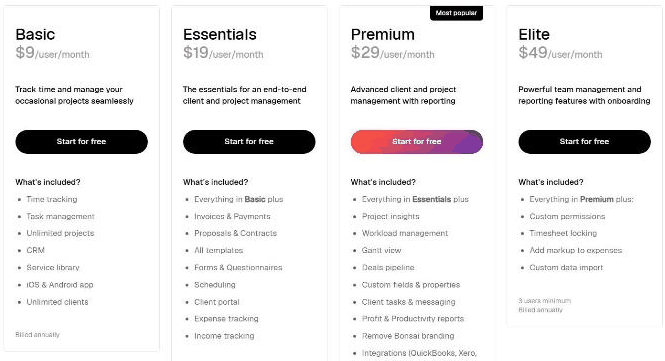
Screenshot of Bonsai's official pricing page (Bonsai by Zoom), read on November 5, 2026, yearly billing: Basic $9, Essentials $19, Premium $29, Elite $49 per user per month.
What Is Bonsai?
Bonsai is a client and project management platform for freelancers and small agencies, with contracts, proposals, invoices, time tracking and a CRM, now shown as Bonsai by Zoom. Its pricing page lists Basic, Essentials, Premium and Elite plans billed per user.
Key Features
Based on the feature set we reviewed, these are the highlights of Bonsai:
Basic: time tracking, task management, unlimited projects and clients, CRM, service library and iOS and Android apps
Essentials: invoices and payments, proposals and contracts, all templates, forms, scheduling, client portal, expense and income tracking
Premium: project insights, workload management, Gantt view, deals pipeline, custom fields, client tasks and messaging, profit and productivity reports, remove Bonsai branding and integrations such as QuickBooks, Xero, Zapier and Calendly
Elite: custom permissions, timesheet locking, markup on expenses and custom data import, 3 users minimum
Bonsai Pricing
Pricing: Basic $9, Essentials $19, Premium $29, Elite $49 per user/month billed annually (official page, Nov 5, 2026). Plans and promotions change, so always confirm current numbers on the official site before you buy.
Pros and Cons
Pros
✓ Invoicing and contracts praised by reviewers
✓ User-friendly interface according to G2 summary
✓ E-signatures and proposal templates
✓ Integrations with QuickBooks and Xero
✓ Yearly billing gives up to 4 months free
Cons
✗ Price is the most common complaint
✗ Accounting and tax tools aimed at US sole proprietors according to a competitor blog
✗ Client portal gaps and QuickBooks sync complaints in one review
✗ Elite needs 3 users minimum
✗ Limited public detail on contract disputes
Who Is Bonsai For?
Strong points: Invoicing and contracts praised by reviewers; User-friendly interface according to G2 summary. Weigh this before you commit: Price is the most common complaint; Accounting and tax tools aimed at US sole proprietors according to a competitor blog.
Best Bonsai Alternatives
Before committing, it is worth comparing Bonsai against a few other options in Productivity:
Mega HR — a widely used productivity option worth comparing if Bonsai does not check every box for your needs.
Nifty — a widely used productivity option worth comparing if Bonsai does not check every box for your needs.
Wallspace — a widely used productivity option worth comparing if Bonsai does not check every box for your needs.
Strengths and Trade-offs
The biggest point in favor of Bonsai: Invoicing and contracts praised by reviewers. The biggest thing to weigh against it: Price is the most common complaint. Consider both before you commit.
Pricing on the Official Page
On November 5, 2026, Bonsai's pricing page (branded "Bonsai by Zoom") was headed "Flexible pricing that scales with you" with a Monthly or Yearly (up to 4 months free) toggle and a note of 1,020+ reviews, which is the company's own display. With yearly billing, prices per user per month were Basic $9, Essentials $19, Premium (most popular) $29 and Elite $49 with a 3-user minimum, all billed annually.
Basic: time tracking, task management, unlimited projects, a CRM, a service library, iOS and Android apps and unlimited clients.
Essentials: everything in Basic plus invoices and payments, proposals and contracts, all templates, forms and questionnaires, scheduling, a client portal, expense tracking and income tracking.
Premium: adds project insights, workload management, a Gantt view, a deals pipeline, custom fields and properties, client tasks and messaging, profit and productivity reports, removing Bonsai branding and integrations such as QuickBooks, Xero, Zapier, Calendly and Google.
Elite: adds custom permissions, timesheet locking, adding markup to expenses and custom data import, with onboarding.
Invoices and contracts only arrive at Essentials, so freelancers who need them should start there rather than on Basic.
What Other Users Say About Bonsai
Public feedback from third-party sites as of November 5, 2026. Scores and counts change, and some figures come from summaries we could not check against the original pages.
Ratings:Capterra lists about 4.6 out of 5 from 95 reviews and G2 about 4.3 from roughly 101.
Praise: a user-friendly interface, streamlined invoicing and contracts, electronic signatures and proposal templates.
Price: the most common criticism, with one Capterra reviewer calling it somewhat expensive but worth it.
Gaps: one reviewer cites missing client portal features and no QuickBooks sync for clients, and G2 reviewers mention a love-hate relationship without detail.
Competitor view: an Agiled blog argues the accounting and tax tools are built for US sole proprietors. Agiled sells a competing tool, so verify this yourself.
How much does Bonsai cost? Basic $9, Essentials $19, Premium $29, Elite $49 per user/month billed annually (official page, Nov 5, 2026) Prices change, so confirm on the official site before buying.
What are the main drawbacks of Bonsai? Price is the most common complaint; Accounting and tax tools aimed at US sole proprietors according to a competitor blog.
What are the best alternatives to Bonsai? A few other Productivity tools worth putting side by side with Bonsai: Mega HR, Nifty, and Wallspace.
Final Thoughts
Our take: Bonsai earns its 4.3/5 rating by focusing on the fundamentals of Productivity rather than overreaching. Just keep in mind: Price is the most common complaint.
Based on Bonsai’s official website and pricing page. Third-party figures are marked as reported.
Customer Reviews
No reader reviews yet — be the first to share your experience.