✓ Collaboration and customization praised by reviewers
Cons
✗ Slow loading and lag reported in many G2 reviews
✗ Overwhelming number of features according to reviewers
✗ Some features are paywalled according to reviewers
✗ Learning curve for automations
✗ AI credits are limited by plan
Reviewed by the ToolReviewHub Editorial Team · Last tested/updated: November 5, 2026
Pricing: Free; Core $9 and Business $17 per user/month billed yearly; Enterprise custom (official page, Nov 5, 2026)
Category: AI
Official site: clickup.com
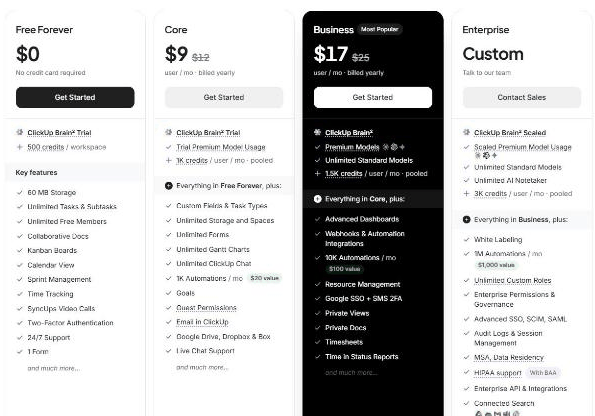
Screenshot of ClickUp's official pricing page, read on November 5, 2026, yearly billing: Free, Core $9, Business $17 per user per month, Enterprise custom.
What Is ClickUp?
ClickUp is a work management platform with tasks, docs, goals, dashboards, automations and an AI assistant called ClickUp Brain. Its pricing page lists Free Forever, Core, Business and Enterprise plans with a yearly discount of up to 33%.
Key Features
Based on the feature set we reviewed, these are the highlights of ClickUp:
Free Forever: unlimited tasks and free members, collaborative docs, kanban boards, calendar view, sprint management, time tracking and 60 MB storage
Core: custom fields, unlimited storage and spaces, unlimited forms and Gantt charts, 1K automations a month, goals and guest permissions
Business: advanced dashboards, 10K automations a month, resource management, Google SSO, private views and docs and timesheets
Enterprise: white labelling, custom roles, SSO, SCIM, SAML, audit logs and HIPAA support with BAA
ClickUp Brain with credits by plan
ClickUp Pricing
Pricing: Free; Core $9 and Business $17 per user/month billed yearly; Enterprise custom (official page, Nov 5, 2026). Plans and promotions change, so always confirm current numbers on the official site before you buy.
Pros and Cons
Pros
✓ Very flexible with many views
✓ Strong free plan
✓ 100% money-back guarantee stated
✓ High G2 and Capterra ratings
✓ Collaboration and customization praised by reviewers
Cons
✗ Slow loading and lag reported in many G2 reviews
✗ Overwhelming number of features according to reviewers
✗ Some features are paywalled according to reviewers
✗ Learning curve for automations
✗ AI credits are limited by plan
Who Is ClickUp For?
Strong points: Very flexible with many views; Strong free plan. Weigh this before you commit: Slow loading and lag reported in many G2 reviews; Overwhelming number of features according to reviewers.
Best ClickUp Alternatives
Before committing, it is worth comparing ClickUp against a few other options in AI:
Vapi — a widely used ai option worth comparing if ClickUp does not check every box for your needs.
MagiCrew — a widely used ai option worth comparing if ClickUp does not check every box for your needs.
Uwear.ai — a widely used ai option worth comparing if ClickUp does not check every box for your needs.
Strengths and Trade-offs
In our assessment, the main strength of ClickUp is this: Very flexible with many views. Its main drawback is this: Slow loading and lag reported in many G2 reviews. Weigh both against your own needs.
Pricing on the Official Page
On November 5, 2026, ClickUp's pricing page was headed "The best work solution, for the best price" with a 100% money-back guarantee badge and a Monthly or Yearly toggle (save up to 33% with yearly). With yearly billing, Free Forever was $0 with no credit card required, Core was $9 per user per month (regular price $12), Business (most popular) was $17 per user per month (regular price $25) and Enterprise was custom.
Free Forever: unlimited tasks and subtasks, unlimited free members, collaborative docs, kanban boards, calendar view, sprint management, time tracking, SyncUps video calls, two-factor authentication, 24/7 support, 1 form, 60 MB storage and a ClickUp Brain trial of 500 credits per workspace.
Core: custom fields and task types, unlimited storage and spaces, unlimited forms, Gantt charts and ClickUp Chat, 1K automations a month, goals, guest permissions, email in ClickUp and Google Drive, Dropbox and Box integrations.
Business: advanced dashboards, webhooks and automation integrations, 10K automations a month, resource management, Google SSO and SMS 2FA, private views and docs, timesheets and time in status reports, with 1.5K Brain credits per user per month pooled.
Enterprise: white labelling, 1M automations a month, unlimited custom roles, enterprise permissions and governance, advanced SSO, SCIM and SAML, audit logs, MSA and data residency, HIPAA support with BAA and connected search.
Brain credits and automations are monthly allowances, so heavy AI users should check the limits.
What Other Users Say About ClickUp
Public feedback from third-party sites as of November 5, 2026. Scores and counts change, and some figures come from summaries we could not check against the original pages.
Ratings:G2 shows about 4.6 out of 5 from over 13,000 reviews and Capterra about 4.6 from roughly 4,630 ratings with 95% positive sentiment. We found no Trustpilot results.
Praise: ease of use, collaboration and flexibility, task organization and customization.
Performance: slow loading is a recurring theme on G2 (about 1,155 reviews), and Capterra flags frequent lag and slowdowns.
Complexity: an "overwhelming features" theme appears in about 930 G2 reviews, and some find advanced customization and automation hard to understand.
Paywalls and missing features: G2's most frequent complaint, including tools restricted by paywalls and limits. Others praise the strong free tier.
How much does ClickUp cost? Free; Core $9 and Business $17 per user/month billed yearly; Enterprise custom (official page, Nov 5, 2026) Prices change, so confirm on the official site before buying.
What are the main drawbacks of ClickUp? Slow loading and lag reported in many G2 reviews; Overwhelming number of features according to reviewers.
What else should you compare ClickUp against? Depending on your exact needs, Vapi, MagiCrew, and Uwear.ai are worth comparing against ClickUp in the AI category.
Final Thoughts
ClickUp is not perfect, but few AI tools are. What it does well, it does consistently, which is why it holds a 4.3/5 in our book.
Based on ClickUp’s official website and pricing page. Third-party figures are marked as reported.
Customer Reviews
No reader reviews yet — be the first to share your experience.