daisyUI Review 2026: Features, Pricing, Pros & Cons
daisyUI is a Tailwind CSS plugin that provides pre-built, pure CSS components to reduce class names and development…
Figma is a browser-based collaborative design platform. Teams use it for interface design, prototyping, whiteboarding in FigJam, slides, developer handoff in Dev Mode and publishing simple sites, with pricing based on seat types rather than a flat team fee.
A few things stand out when you actually use Figma day to day:
Pricing: Starter free; Professional Full seat $16/mo, Dev seat $12/mo, Collab seat $3/mo; Organization Full $55, Dev $25, Collab $5; Enterprise Full $90, Dev $35, Collab $5 (per seat per month, annual billing view). Plans and promotions change, so always confirm current numbers on the official site before you buy.
Strong points: Free Starter plan with unlimited drafts; Seat types let reviewers and developers pay less than designers. Weigh this before you commit: Full seats on Organization and Enterprise cost $55 and $90 a month; Reviewers report slowdowns on very large files.
Other Design tools that come up often in comparisons with Figma:
In our assessment, the main strength of Figma is this: Free Starter plan with unlimited drafts. Its main drawback is this: Full seats on Organization and Enterprise cost $55 and $90 a month. Weigh both against your own needs.
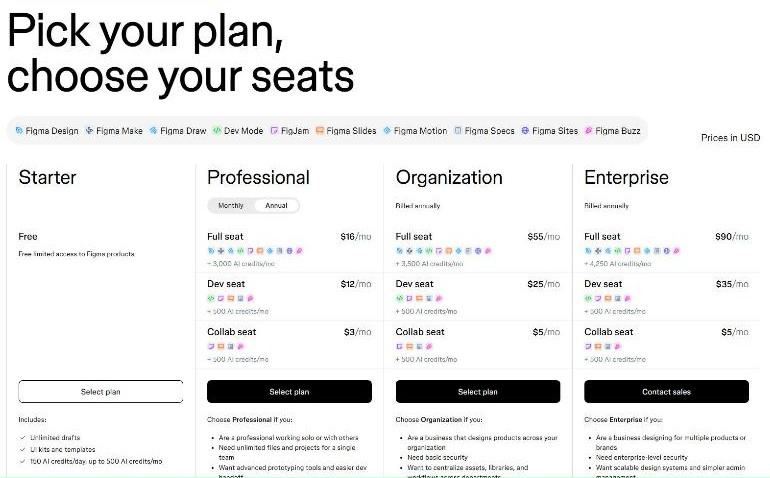
Figma prices by seat type instead of one team fee. With the annual toggle selected, Professional costs $16 a month for a Full seat, $12 for a Dev seat and $3 for a Collab seat. Organization, billed annually, is $55, $25 and $5, and Enterprise is $90, $35 and $5. Starter is free with unlimited drafts, UI kits and templates, and 150 AI credits a day up to 500 a month. Figma says AI add-ons are available on all plans, and each paid seat includes a monthly AI credit allowance. Because developers and reviewers can sit on cheaper seats, the real bill depends on how many people actually design.
We have not run a design team on Figma for this review. The points below summarise public user reviews as of November 2, 2026.
How much does Figma cost?
Starter free; Professional Full seat $16/mo, Dev seat $12/mo, Collab seat $3/mo; Organization Full $55, Dev $25, Collab $5; Enterprise Full $90, Dev $35, Collab $5 (per seat per month, annual billing view) Prices change, so confirm on the official site before buying.
What are the main drawbacks of Figma?
Full seats on Organization and Enterprise cost $55 and $90 a month; Reviewers report slowdowns on very large files.
What are the best alternatives to Figma?
A few other Design tools worth putting side by side with Figma: Mode Inspect, Pixpa, and DesignCrowd.
Figma is not perfect, but few Design tools are. What it does well, it does consistently, which is why it holds a 4.3/5 in our book.
Based on Figma’s official website and pricing page. Third-party figures are marked as reported.
daisyUI is a Tailwind CSS plugin that provides pre-built, pure CSS components to reduce class names and development…
Extensis (Monotype Connect) lets teams manage, license, and govern fonts across teams, partners, and production environments.
Beefree is a drag-and-drop email creation technology. Its email builder for marketing teams has been renamed RGE Studio,…
Customer Reviews
No reader reviews yet — be the first to share your experience.