✓ Easy to use and quick to set up according to G2 reviewers
✓ LinkedIn Chrome extension for importing leads
✓ Email, calendar and WhatsApp sync
✓ Yearly billing saves 20%
✓ Customer service rated well on Capterra
Cons
✗ No native mobile app according to reviewers
✗ Some reviewers cite missing features and weak enrichment
✗ Prices differ between third-party sites and the official page
✗ Gmail-only account connections noted by some users
✗ LinkedIn automation gaps noted by reviewers
Reviewed by the ToolReviewHub Editorial Team · Last tested/updated: November 5, 2026
Pricing: Standard 22 EUR, Premium 43 EUR per member/month billed annually; Enterprise from 67 EUR (official page, Nov 5, 2026)
Category: Productivity
Official site: folk.app
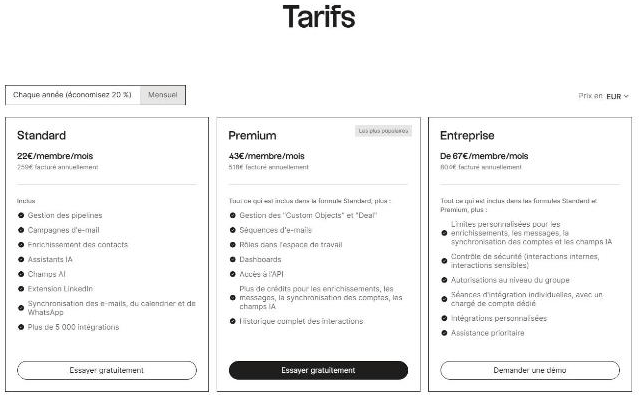
Screenshot of folk's official pricing page (French locale, euros), read on November 5, 2026: Standard 22 EUR, Premium 43 EUR per member per month, Enterprise from 67 EUR.
What Is folk?
folk is a CRM for people and relationships, with pipelines, email campaigns, contact enrichment, AI assistants and a LinkedIn extension. Its pricing page, shown in French and euros for our location, lists Standard, Premium and Enterprise plans with a yearly discount.
Key Features
Based on the feature set we reviewed, these are the highlights of folk:
Standard: pipeline management, email campaigns, contact enrichment, AI assistants and AI fields
LinkedIn extension and email, calendar and WhatsApp sync
5,000+ integrations
Premium: custom objects and deals, email sequences, workspace roles, dashboards and API access
More credits for enrichment, messaging and AI fields on Premium
Enterprise: custom limits, security controls, group permissions and priority support
folk Pricing
Pricing: Standard 22 EUR, Premium 43 EUR per member/month billed annually; Enterprise from 67 EUR (official page, Nov 5, 2026). Plans and promotions change, so always confirm current numbers on the official site before you buy.
Pros and Cons
Pros
✓ Easy to use and quick to set up according to G2 reviewers
✓ LinkedIn Chrome extension for importing leads
✓ Email, calendar and WhatsApp sync
✓ Yearly billing saves 20%
✓ Customer service rated well on Capterra
Cons
✗ No native mobile app according to reviewers
✗ Some reviewers cite missing features and weak enrichment
✗ Prices differ between third-party sites and the official page
✗ Gmail-only account connections noted by some users
✗ LinkedIn automation gaps noted by reviewers
Who Is folk For?
Strong points: Easy to use and quick to set up according to G2 reviewers; LinkedIn Chrome extension for importing leads. Weigh this before you commit: No native mobile app according to reviewers; Some reviewers cite missing features and weak enrichment.
Best folk Alternatives
Before committing, it is worth comparing folk against a few other options in Productivity:
BugHerd — a widely used productivity option worth comparing if folk does not check every box for your needs.
Miro — a widely used productivity option worth comparing if folk does not check every box for your needs.
TwinMind — a widely used productivity option worth comparing if folk does not check every box for your needs.
Strengths and Trade-offs
The biggest point in favor of folk: Easy to use and quick to set up according to G2 reviewers. The biggest thing to weigh against it: No native mobile app according to reviewers. Consider both before you commit.
Pricing on the Official Page
On November 5, 2026, folk's pricing page (headed "Tarifs", shown in French and in euros for our location) offered a yearly option (save 20%) or monthly billing. With yearly billing, Standard was 22 EUR per member per month (259 EUR billed annually), Premium (most popular) was 43 EUR per member per month (518 EUR billed annually) and Enterprise started from 67 EUR per member per month (804 EUR billed annually). Each plan has a free trial or a demo button.
Standard: pipeline management, email campaigns, contact enrichment, AI assistants, AI fields, the LinkedIn extension, email, calendar and WhatsApp sync and 5,000+ integrations.
Premium: everything in Standard plus custom objects and deals, email sequences, workspace roles, dashboards, API access, more credits for enrichment, messages, account sync and AI fields, and full interaction history.
Enterprise: everything in Standard and Premium plus custom limits for enrichment, messages, account sync and AI fields, security controls (internal and sensitive interactions), group-level permissions, individual onboarding sessions with a dedicated account manager, custom integrations and priority support.
Prices are per member and differ by currency, so check the page in your own currency.
What Other Users Say About folk
Public feedback from third-party sites as of November 5, 2026. Scores and counts change, and some figures come from summaries we could not check against the original pages.
Ratings: about 4.5 out of 5 on G2 and Capterra, though Hackceleration's own test averaged 3.8 across 15 reviews.
Praise: ease of use (the top G2 pro across 318 reviews) and quick setup for small teams, and a Capterra reviewer called the Chrome extension the easiest way to import leads.
Complaints: no native mobile app, which is the most repeated limitation, plus missing features, limited enrichment, gaps in LinkedIn automation and Gmail-only account connections.
Pricing: sources disagree on entry prices, with Capterra listing $30 for Standard and one blog listing $24 per seat, so use the official page.
Source quality: several sources are competitor or vendor content, such as Capsule, Prospeo and Hackceleration.
How much does folk cost? Standard 22 EUR, Premium 43 EUR per member/month billed annually; Enterprise from 67 EUR (official page, Nov 5, 2026) Prices change, so confirm on the official site before buying.
What are the main drawbacks of folk? No native mobile app according to reviewers; Some reviewers cite missing features and weak enrichment.
What are the best alternatives to folk? A few other Productivity tools worth putting side by side with folk: BugHerd, Miro, and TwinMind.
Final Thoughts
Our take: folk earns its 4/5 rating by focusing on the fundamentals of Productivity rather than overreaching. Just keep in mind: No native mobile app according to reviewers.
Based on folk’s official website and pricing page. Third-party figures are marked as reported.
Customer Reviews
No reader reviews yet — be the first to share your experience.