CustomGPT Review 2026: Features, Pricing, Pros & Cons
CustomGPT.ai lets organizations build AI assistants trained on their own documents and websites, with a RAG API, governance…
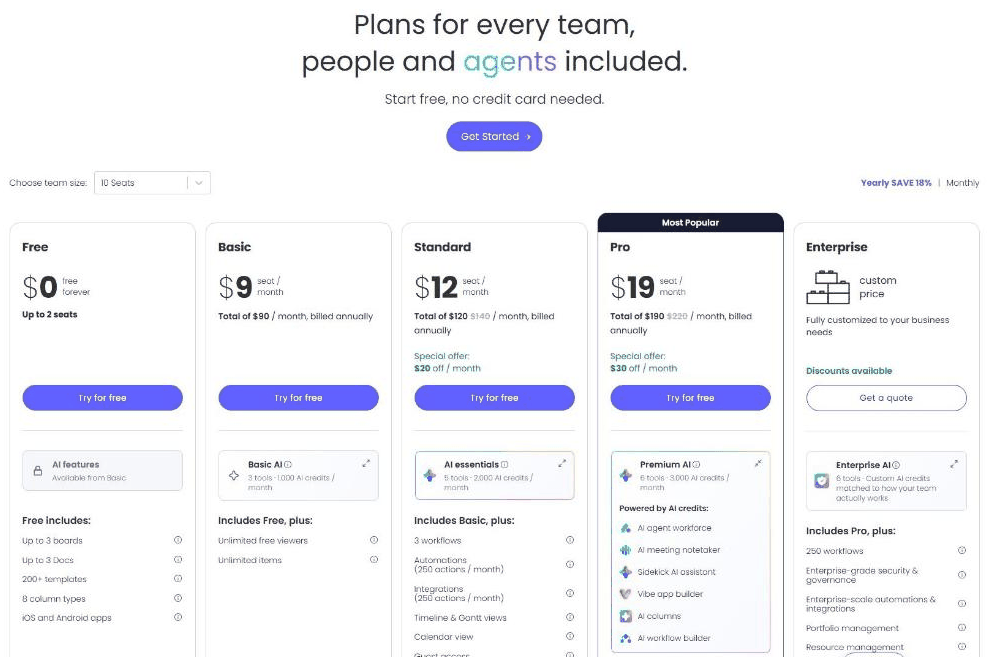
monday.com is a work management platform with boards, docs, automations, timelines and AI agents for teams. Its pricing page lists Free, Basic, Standard, Pro and Enterprise plans priced per seat with a team size selector and an 18% yearly saving.
A few things stand out when you actually use monday.com day to day:
Pricing: Free up to 2 seats; Basic $9, Standard $12, Pro $19 per seat per month billed annually for 10 seats; Enterprise custom (official page, Nov 5, 2026). Plans and promotions change, so always confirm current numbers on the official site before you buy.
Strong points: Visual boards and flexible views according to reviewers; High ratings on G2 and Capterra. Weigh this before you commit: Three-seat minimum on paid plans according to reviewers; Per-seat cost is high for small teams according to reviewers.
Other Productivity tools that come up often in comparisons with monday.com:
Based on its features and pricing, monday.com stands out for this: Visual boards and flexible views according to reviewers. The main caveat: Three-seat minimum on paid plans according to reviewers. Worth weighing both before you commit.
On November 5, 2026, monday.com's pricing page said "Plans for every team, people and agents included" and "Start free, no credit card needed". With a team size of 10 seats and Yearly selected ("save 18%"), Free was $0 for up to 2 seats with up to 3 boards, up to 3 docs, 200+ templates, 8 column types and iOS and Android apps. Basic was $9 per seat a month (total $90 a month billed annually) and adds unlimited free viewers and unlimited items, with 1,000 AI credits a month. Standard was $12 per seat (total $120, struck-through $140, with a special offer of $20 off a month) and adds 3 workflows, 250 automation and 250 integration actions a month, timeline and Gantt views, calendar view, guest access and 2,000 AI credits. Pro, marked Most Popular, was $19 per seat (total $190, struck-through $220, special offer $30 off) with premium AI including an AI agent workforce, AI meeting notetaker, Sidekick assistant, vibe app builder and 20 workflows. Enterprise is custom with discounts available, enterprise-grade security and governance, portfolio and resource management and 250 workflows.
Paid plans have a seat minimum, so check the total for your team size and the monthly price before you buy.
Public feedback from third-party sites as of November 5, 2026. Scores and counts change, and some figures come from summaries we could not check against the original pages.
Sources: Capterra, Trustpilot, Finder.
How much does monday.com cost?
Free up to 2 seats; Basic $9, Standard $12, Pro $19 per seat per month billed annually for 10 seats; Enterprise custom (official page, Nov 5, 2026) Prices change, so confirm on the official site before buying.
What are the main drawbacks of monday.com?
Three-seat minimum on paid plans according to reviewers; Per-seat cost is high for small teams according to reviewers.
What are the best alternatives to monday.com?
A few other Productivity tools worth putting side by side with monday.com: MinutesLink, Tadata, and Desktronic.
Overall, monday.com is a solid pick within Productivity if its core strengths line up with what you actually need. One thing to know upfront: Three-seat minimum on paid plans according to reviewers.
Based on monday.com’s official website and pricing page. Third-party figures are marked as reported.
CustomGPT.ai lets organizations build AI assistants trained on their own documents and websites, with a RAG API, governance…
DataSnipper is an audit and finance automation platform that began as an Excel add-in for document matching and…
Omi is a wearable AI pendant device that continuously records conversations and screens to automatically generate tasks, reminders,…
Customer Reviews
No reader reviews yet — be the first to share your experience.