✓ Flexible workspace that can replace several apps
✓ Free plan for individuals
✓ Strong real-time collaboration according to reviewers
✓ High G2 and Capterra ratings
✓ Templates and a large community
Cons
✗ Performance can slow on large pages and databases according to reviewers
✗ Offline mode is limited
✗ Permissions are limited for large teams according to reviewers
✗ Learning curve for databases
✗ Prices are per seat and AI features add cost
Reviewed by the ToolReviewHub Editorial Team · Last tested/updated: November 4, 2026
Pricing: Free $0; Plus $10 per seat/month; Business $20 per seat/month (yearly billing); Enterprise custom (official page, Nov 4, 2026)
Category: AI
Official site: notion.com
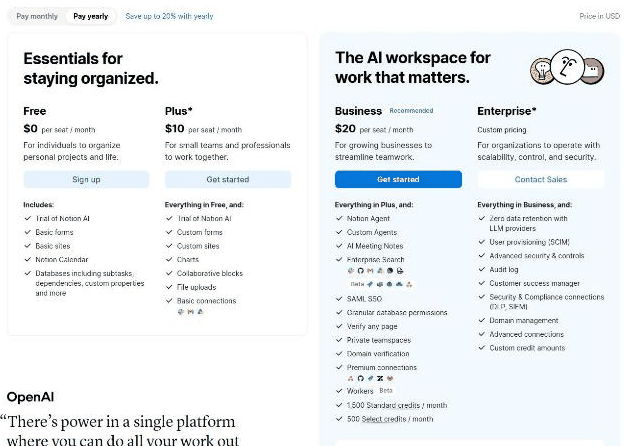
Screenshot of Notion's official pricing page, read on November 4, 2026, with yearly payment selected: Free, Plus $10, Business $20 per seat per month and Enterprise custom.
What Is Notion?
Notion is an all-in-one workspace for notes, documents, wikis, databases and projects, with AI features added in recent plans. Its pricing page describes it as one tool to run your company, with plans from a free tier for individuals up to Enterprise.
Key Features
Here is what tends to matter most to people evaluating Notion:
Pages, databases, sub-tasks, dependencies and custom properties
Forms, sites and Notion Calendar
Charts, collaborative blocks and file uploads
Notion AI with an agent, custom agents and AI meeting notes on Business
Enterprise search across connected apps on Business
SAML SSO, granular database permissions and private teamspaces on Business
Notion Pricing
Pricing: Free $0; Plus $10 per seat/month; Business $20 per seat/month (yearly billing); Enterprise custom (official page, Nov 4, 2026). Plans and promotions change, so always confirm current numbers on the official site before you buy.
Pros and Cons
Pros
✓ Flexible workspace that can replace several apps
✓ Free plan for individuals
✓ Strong real-time collaboration according to reviewers
✓ High G2 and Capterra ratings
✓ Templates and a large community
Cons
✗ Performance can slow on large pages and databases according to reviewers
✗ Offline mode is limited
✗ Permissions are limited for large teams according to reviewers
✗ Learning curve for databases
✗ Prices are per seat and AI features add cost
Who Is Notion For?
Strong points: Flexible workspace that can replace several apps; Free plan for individuals. Weigh this before you commit: Performance can slow on large pages and databases according to reviewers; Offline mode is limited.
Best Notion Alternatives
Not sold on Notion yet? Here are a few alternatives worth checking out:
BasedLabs — a widely used ai option worth comparing if Notion does not check every box for your needs.
Palabra.ai — a widely used ai option worth comparing if Notion does not check every box for your needs.
Vectorize — a widely used ai option worth comparing if Notion does not check every box for your needs.
Strengths and Trade-offs
In our assessment, the main strength of Notion is this: Flexible workspace that can replace several apps. Its main drawback is this: Performance can slow on large pages and databases according to reviewers. Weigh both against your own needs.
Pricing on the Official Page
On November 4, 2026, Notion's pricing page was headed "One tool to run your company" and showed prices in USD per seat per month, with a Pay monthly or Pay yearly toggle (yearly saves up to 20%). With yearly payment selected, Free was $0, Plus was $10, Business (marked Recommended) was $20, and Enterprise was custom with a Contact Sales button. Because prices are per seat, a team of ten on Business would be roughly $200 a month at those rates before any add-ons.
Free: for individuals; includes a trial of Notion AI, basic forms, basic sites, Notion Calendar and databases with sub-tasks, dependencies and custom properties.
Plus: for small teams and professionals; adds custom forms, custom sites, charts, collaborative blocks, file uploads and basic connections.
Business: described as the AI workspace for work that matters; adds a Notion Agent, custom agents, AI meeting notes, enterprise search, SAML SSO, granular database permissions, verify any page, private teamspaces, domain verification, premium connections and monthly credit allowances (1,500 standard and 500 select credits shown).
Enterprise: adds zero data retention with LLM providers, SCIM provisioning, advanced security and controls, an audit log, a customer success manager and custom credit amounts.
An asterisk on Plus and Enterprise indicates conditions on the page, so read the footnotes before buying. Older third-party pages list other starting prices such as $12 per user per month, which shows why the official page is the one to trust.
What Other Users Say About Notion
Public feedback from third-party sites as of November 4, 2026. Scores and counts change, and some figures come from summaries we could not check against the original pages.
Ratings:G2 lists about 4.6 out of 5 with review counts that vary by snapshot, and Capterra shows about 4.7 from roughly 2,750 reviews with an overwhelmingly positive sentiment summary.
Praise: real-time collaboration, having notes, tasks and projects in one place, and replacing several separate apps.
Performance: the most common complaint is slowdown on large pages and large databases.
How much does Notion cost? Free $0; Plus $10 per seat/month; Business $20 per seat/month (yearly billing); Enterprise custom (official page, Nov 4, 2026) Prices change, so confirm on the official site before buying.
What are the main drawbacks of Notion? Performance can slow on large pages and databases according to reviewers; Offline mode is limited.
What else should you compare Notion against? Depending on your exact needs, BasedLabs, Palabra.ai, and Vectorize are worth comparing against Notion in the AI category.
Final Thoughts
Notion is not perfect, but few AI tools are. What it does well, it does consistently, which is why it holds a 4.4/5 in our book.
Based on Notion’s official website and pricing page. Third-party figures are marked as reported.
Customer Reviews
No reader reviews yet — be the first to share your experience.