✗ Clip selection can be hit or miss and may need manual fixing
✗ Starter has fewer features and is monthly only
Reviewed by the ToolReviewHub Editorial Team · Last tested/updated: November 4, 2026
Pricing: Starter $15/month (monthly only, 150 credits); Pro $14.50/month billed yearly ($174 a year, $29 monthly, 300 credits); Business custom (official page, Nov 4, 2026)
Category: AI
Official site: opus.pro
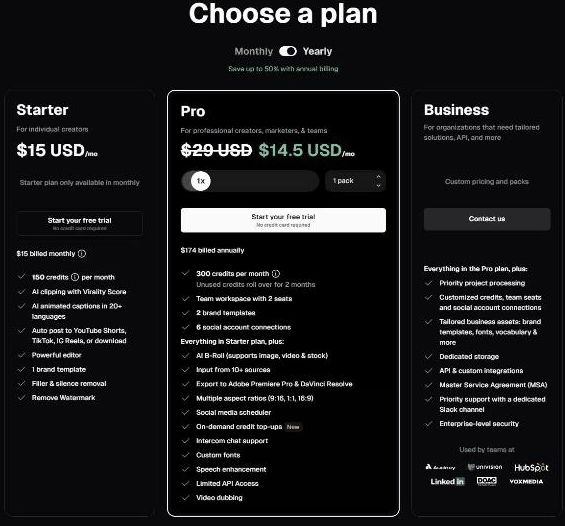
Screenshot of OpusClip's official pricing page, read on November 4, 2026: Starter $15 per month, Pro $14.50 per month on yearly billing, Business custom.
What Is Opus Clip?
OpusClip is an AI video clipping tool that turns long videos into short clips for TikTok, YouTube Shorts and Instagram Reels, with captions, a virality score, a built-in editor and auto-posting.
Key Features
The strongest parts of Opus Clip’s offering come down to a handful of core capabilities:
AI clipping with a Virality Score
AI animated captions in 20+ languages
Auto post to YouTube Shorts, TikTok and IG Reels
Brand templates and filler and silence removal
AI B-Roll, 10+ input sources and multiple aspect ratios on Pro
Export to Adobe Premiere Pro and DaVinci Resolve on Pro
Opus Clip Pricing
Pricing: Starter $15/month (monthly only, 150 credits); Pro $14.50/month billed yearly ($174 a year, $29 monthly, 300 credits); Business custom (official page, Nov 4, 2026). Plans and promotions change, so always confirm current numbers on the official site before you buy.
Pros and Cons
Pros
✓ Quick way to turn long videos into short clips
✓ Captions in 20+ languages
✓ Auto-posting to major short-video platforms
✓ Free trial with no credit card needed
✓ Unused Pro credits roll over for 2 months
Cons
✗ Reviewers report failed or very slow processing
✗ Failed jobs do not always return credits
✗ Some reviewers find cancellation complicated
✗ Clip selection can be hit or miss and may need manual fixing
✗ Starter has fewer features and is monthly only
Who Is Opus Clip For?
Strong points: Quick way to turn long videos into short clips; Captions in 20+ languages. Weigh this before you commit: Reviewers report failed or very slow processing; Failed jobs do not always return credits.
Best Opus Clip Alternatives
If Opus Clip is not quite right for you, a few other AI tools are worth a look:
TEXT2SQL.AI — a widely used ai option worth comparing if Opus Clip does not check every box for your needs.
Squibler — a widely used ai option worth comparing if Opus Clip does not check every box for your needs.
LobeHub — a widely used ai option worth comparing if Opus Clip does not check every box for your needs.
Strengths and Trade-offs
The biggest point in favor of Opus Clip: Quick way to turn long videos into short clips. The biggest thing to weigh against it: Reviewers report failed or very slow processing. Consider both before you commit.
Pricing on the Official Page
On November 4, 2026, OpusClip's page (announcing OpusClip 4.0) offered three plans with a Monthly/Yearly toggle (up to 50% off with annual billing). Starter was $15 per month, available monthly only, with 150 credits a month. Pro was $14.50 per month on yearly billing ($174 billed annually, struck through from $29) with 300 credits a month, and a selector for more credit packs. Business uses custom pricing. Both Starter and Pro list a free trial with no credit card required.
Starter: AI clipping with a Virality Score, animated captions in 20+ languages, auto-posting to YouTube Shorts, TikTok and Instagram Reels or download, an editor, 1 brand template, filler and silence removal, and watermark removal.
Pro: unused credits roll over for 2 months, a team workspace with 2 seats, 2 brand templates, 6 social account connections, AI B-Roll, input from 10+ sources, export to Adobe Premiere Pro and DaVinci Resolve, multiple aspect ratios, a social scheduler, on-demand credit top-ups, custom fonts, speech enhancement, limited API access and video dubbing.
Business: priority processing, customized credits and seats, tailored brand assets, dedicated storage, API and custom integrations, a Master Service Agreement, a dedicated Slack channel and enterprise-level security.
Credits decide how much you can process, so estimate how many long videos you clip a month before choosing a plan.
What Other Users Say About OpusClip
Public feedback from third-party sites as of November 4, 2026. Scores and counts change, and some figures come from summaries we could not check against the original pages.
Ratings:G2 listings are small samples with ratings of 4.6 to 4.8. One competitor write-up reports about 4.0 out of 5 from 302 Trustpilot reviews with 22% one-star; that source competes with OpusClip and we could not verify the figures.
Praise: reviewers say it saves editing time and finds key moments and adds captions.
Clip quality: selection can be hit or miss, and some clips are cut off before the idea ends, so manual adjustment is sometimes needed.
Reliability: Trustpilot reviewers describe videos that hang for hours or fail.
Credits and cancellation: failed tasks do not always refund credits, projects are reported to disappear after a subscription ends, and some users find cancelling complicated.
How much does Opus Clip cost? Starter $15/month (monthly only, 150 credits); Pro $14.50/month billed yearly ($174 a year, $29 monthly, 300 credits); Business custom (official page, Nov 4, 2026) Prices change, so confirm on the official site before buying.
What are the main drawbacks of Opus Clip? Reviewers report failed or very slow processing; Failed jobs do not always return credits.
What are the best alternatives to Opus Clip? A few other AI tools worth putting side by side with Opus Clip: TEXT2SQL.AI, Squibler, and LobeHub.
Final Thoughts
Our take: Opus Clip earns its 4.3/5 rating by focusing on the fundamentals of AI rather than overreaching. Just keep in mind: Reviewers report failed or very slow processing.
Based on Opus Clip’s official website and pricing page. Third-party figures are marked as reported.
Customer Reviews
No reader reviews yet — be the first to share your experience.