✗ Accuracy drops with accents, background noise and overlapping speakers
✗ Speaker identification and recording problems reported by reviewers
✗ Free plan limits are tight
✗ Some reviewers prefer other note-takers for action items
✗ Transcripts often need correction
Reviewed by the ToolReviewHub Editorial Team · Last tested/updated: November 5, 2026
Pricing: Basic free; Pro $8.33 per user/month billed annually; Business $19.99 per user/month billed annually; Enterprise custom (official page, Nov 5, 2026)
Category: AI
Official site: otter.ai
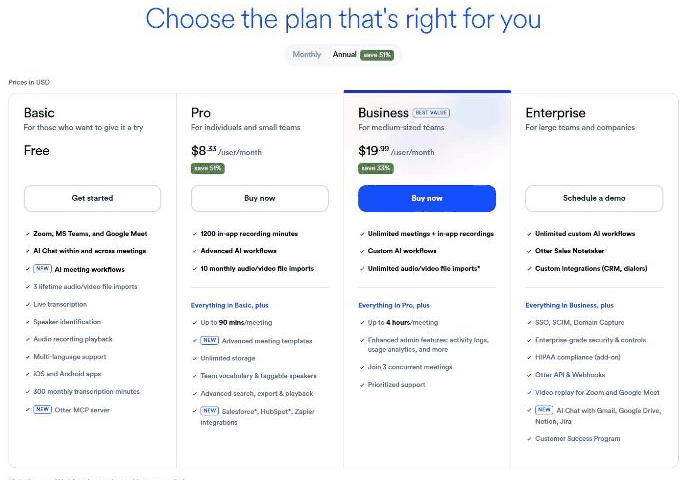
Screenshot of Otter.ai's official pricing page, read on November 5, 2026, annual billing: Basic free, Pro $8.33, Business $19.99 per user per month.
What Is Otter?
Otter.ai is an AI meeting assistant that records and transcribes meetings in Zoom, Microsoft Teams and Google Meet and generates summaries and action items. Its pricing page lists Basic, Pro, Business and Enterprise plans.
Key Features
Based on the feature set we reviewed, these are the highlights of Otter:
Live transcription and speaker identification
AI chat within and across meetings and AI meeting workflows
300 monthly transcription minutes on Basic
1,200 in-app recording minutes and up to 90 minutes per meeting on Pro
Unlimited meetings and up to 4 hours per meeting on Business
Salesforce, HubSpot and Zapier integrations on Pro
Otter Pricing
Pricing: Basic free; Pro $8.33 per user/month billed annually; Business $19.99 per user/month billed annually; Enterprise custom (official page, Nov 5, 2026). Plans and promotions change, so always confirm current numbers on the official site before you buy.
Pros and Cons
Pros
✓ Free plan to try it
✓ Works with the major meeting platforms
✓ Searchable transcripts and summaries
✓ High G2 and Capterra ratings
✓ IOS and Android apps
Cons
✗ Accuracy drops with accents, background noise and overlapping speakers
✗ Speaker identification and recording problems reported by reviewers
✗ Free plan limits are tight
✗ Some reviewers prefer other note-takers for action items
✗ Transcripts often need correction
Who Is Otter For?
Strong points: Free plan to try it; Works with the major meeting platforms. Weigh this before you commit: Accuracy drops with accents, background noise and overlapping speakers; Speaker identification and recording problems reported by reviewers.
Best Otter Alternatives
Before committing, it is worth comparing Otter against a few other options in AI:
LALAL.AI — a widely used ai option worth comparing if Otter does not check every box for your needs.
Corespeed — a widely used ai option worth comparing if Otter does not check every box for your needs.
HitPaw — a widely used ai option worth comparing if Otter does not check every box for your needs.
Strengths and Trade-offs
The biggest point in favor of Otter: Free plan to try it. The biggest thing to weigh against it: Accuracy drops with accents, background noise and overlapping speakers. Consider both before you commit.
Pricing on the Official Page
On November 5, 2026, Otter.ai's pricing page was headed "Choose the plan that's right for you" with a Monthly/Annual toggle (annual shown as saving up to 51%). With annual billing, Basic was free, Pro was $8.33 per user per month (labelled save 51%), Business (marked best value) was $19.99 per user per month (save 33%), and Enterprise was priced through a demo.
Basic: Zoom, Microsoft Teams and Google Meet support, AI chat, AI meeting workflows, 3 lifetime audio and video file imports, live transcription, speaker identification, multi-language support, mobile apps, 300 monthly transcription minutes and an Otter MCP server.
Pro: 1,200 in-app recording minutes, advanced AI workflows, 10 monthly file imports, up to 90 minutes per meeting, advanced meeting templates, unlimited storage, team vocabulary and Salesforce, HubSpot and Zapier integrations.
Business: unlimited meetings and in-app recordings, custom AI workflows, unlimited imports, up to 4 hours per meeting, admin features such as activity logs, 3 concurrent meetings and prioritized support.
Enterprise: unlimited custom AI workflows, Otter Sales Notetaker, SSO, SCIM, domain capture, HIPAA compliance add-on, API and webhooks.
Salesforce and HubSpot integrations are subject to usage limits per the page footnote.
What Other Users Say About Otter
Public feedback from third-party sites as of November 5, 2026. Scores and counts change, and some figures come from summaries we could not check against the original pages.
Ratings:G2 shows about 4.4 out of 5 from nearly 500 reviews and Capterra about 4.4 from roughly 100.
Praise: ease of use, note-taking help, summaries, searchable past transcripts and very accurate transcripts when audio is clear.
Accuracy: the recurring complaint. Accents, background noise and overlapping conversations cause errors, and some reviewers correct transcripts after meetings.
Other issues: recording problems when joining calls, speaker identification and language support, and some reviewers say other AI note-takers do better with action items and formatting.
Privacy and price: our search did not cover these, so read the privacy policy before recording sensitive meetings.
How much does Otter cost? Basic free; Pro $8.33 per user/month billed annually; Business $19.99 per user/month billed annually; Enterprise custom (official page, Nov 5, 2026) Prices change, so confirm on the official site before buying.
What are the main drawbacks of Otter? Accuracy drops with accents, background noise and overlapping speakers; Speaker identification and recording problems reported by reviewers.
What else should you compare Otter against? Depending on your exact needs, LALAL.AI, Corespeed, and HitPaw are worth comparing against Otter in the AI category.
Final Thoughts
Our take: Otter earns its 4.3/5 rating by focusing on the fundamentals of AI rather than overreaching. Just keep in mind: Accuracy drops with accents, background noise and overlapping speakers.
Based on Otter’s official website and pricing page. Third-party figures are marked as reported.
Customer Reviews
No reader reviews yet — be the first to share your experience.