✗ Third-party sources disagree on free export limits
✗ Performance can lag on long projects according to reviews
✗ Prices are per user and shown for yearly billing
✗ Professional editors may want more creative control
Reviewed by the ToolReviewHub Editorial Team · Last tested/updated: November 5, 2026
Pricing: Creator $10, Pro $21, Studio $35 per user/month billed yearly; Enterprise custom (official page, Nov 5, 2026)
Category: AI
Official site: veed.io
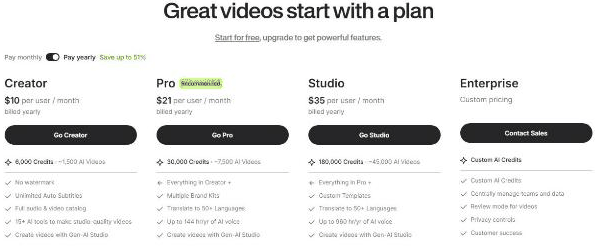
Screenshot of VEED's official pricing page, read on November 5, 2026, yearly billing: Creator $10, Pro $21, Studio $35 per user per month, Enterprise custom.
What Is VEED?
VEED is a browser-based video editor and AI video platform with auto subtitles, translation, AI voice and a Gen-AI Studio. Its pricing page lists Creator, Pro, Studio and Enterprise plans, with a credit allowance that scales by plan.
Key Features
A few things stand out when you actually use VEED day to day:
Creator: 6,000 credits (about 1,500 AI videos), no watermark, unlimited auto subtitles, full audio and video catalog and 15+ AI tools
Pro: 30,000 credits, multiple brand kits, translation to 50+ languages and up to 144 hours a year of AI voice
Studio: 180,000 credits, custom templates and up to 960 hours a year of AI voice
Enterprise: custom AI credits, central team and data management, review mode, privacy controls and customer success
Gen-AI Studio for creating videos
VEED Pricing
Pricing: Creator $10, Pro $21, Studio $35 per user/month billed yearly; Enterprise custom (official page, Nov 5, 2026). Plans and promotions change, so always confirm current numbers on the official site before you buy.
Pros and Cons
Pros
✓ Browser-based, nothing to install
✓ Auto subtitles on every paid plan
✓ Free tier to try the editor
✓ Translation and AI voice on higher plans
✓ Credits scale from solo to enterprise
Cons
✗ Free exports carry a watermark
✗ Third-party sources disagree on free export limits
✗ Performance can lag on long projects according to reviews
✗ Prices are per user and shown for yearly billing
✗ Professional editors may want more creative control
Who Is VEED For?
Strong points: Browser-based, nothing to install; Auto subtitles on every paid plan. Weigh this before you commit: Free exports carry a watermark; Third-party sources disagree on free export limits.
Best VEED Alternatives
Other AI tools that come up often in comparisons with VEED:
Ideamap — a widely used ai option worth comparing if VEED does not check every box for your needs.
Surfeo — a widely used ai option worth comparing if VEED does not check every box for your needs.
Solid — a widely used ai option worth comparing if VEED does not check every box for your needs.
Strengths and Trade-offs
In our assessment, the main strength of VEED is this: Browser-based, nothing to install. Its main drawback is this: Free exports carry a watermark. Weigh both against your own needs.
Pricing on the Official Page
On November 5, 2026, VEED's pricing page was headed "Great videos start with a plan" with a Pay monthly or Pay yearly toggle (yearly labelled save up to 51%). With yearly billing, prices were per user per month: Creator $10, Pro (recommended) $21 and Studio $35, with Enterprise custom.
Creator: 6,000 credits (about 1,500 AI videos), no watermark, unlimited auto subtitles, a full audio and video catalog, 15+ AI tools and Gen-AI Studio.
Pro: 30,000 credits (about 7,500 AI videos), multiple brand kits, translation to 50+ languages and up to 144 hours a year of AI voice.
Studio: 180,000 credits (about 45,000 AI videos), custom templates and up to 960 hours a year of AI voice.
Enterprise: custom AI credits, centrally managed teams and data, review mode for videos, privacy controls and customer success.
The page also says you can start for free, and a section of FAQs covers trials and cancellation. Because credits fund AI generations, check how many you need per month before choosing a tier.
What Other Users Say About VEED
Public feedback from third-party sites as of November 5, 2026. Scores and counts change, and some figures come from summaries we could not check against the original pages.
Independent evidence is mostly blogs: our search found no G2 or Trustpilot pages, so this summary rests on third-party review sites such as eWeek, Sonix and GetApp.
Praise: the browser-based workflow, quick auto-subtitles, an intuitive interface, AI features and a free tier.
Complaints: performance lag on long projects, high prices or upsells, weak customer support, and a view from professional editors that creative control is limited.
Watermark and limits: several sources say the free tier watermarks exports and that removing the watermark needs a paid plan. They disagree on free export length (5 or 10 minutes) and resolution.
Price differences: third-party sites quote very different prices, so rely on the official page above.
How much does VEED cost? Creator $10, Pro $21, Studio $35 per user/month billed yearly; Enterprise custom (official page, Nov 5, 2026) Prices change, so confirm on the official site before buying.
What are the main drawbacks of VEED? Free exports carry a watermark; Third-party sources disagree on free export limits.
What else should you compare VEED against? Depending on your exact needs, Ideamap, Surfeo, and Solid are worth comparing against VEED in the AI category.
Final Thoughts
VEED is not perfect, but few AI tools are. What it does well, it does consistently, which is why it holds a 4.7/5 in our book.
Based on VEED’s official website and pricing page. Third-party figures are marked as reported.
Customer Reviews
No reader reviews yet — be the first to share your experience.