✗ AI credits can be used up quickly according to reviewers
✗ The September 2025 pricing change replaced transcription hours with media minutes
✗ Crashes and slow performance reported in reviews
✗ Transcripts can need cleanup according to some users
✗ Trustpilot score is much lower than G2 according to one synthesis
Reviewed by the ToolReviewHub Editorial Team · Last tested/updated: November 5, 2026
Pricing: Hobbyist $16, Creator $24, Business $50 per person/month billed annually; Enterprise custom (official page, Nov 5, 2026)
Category: AI
Official site: descript.com
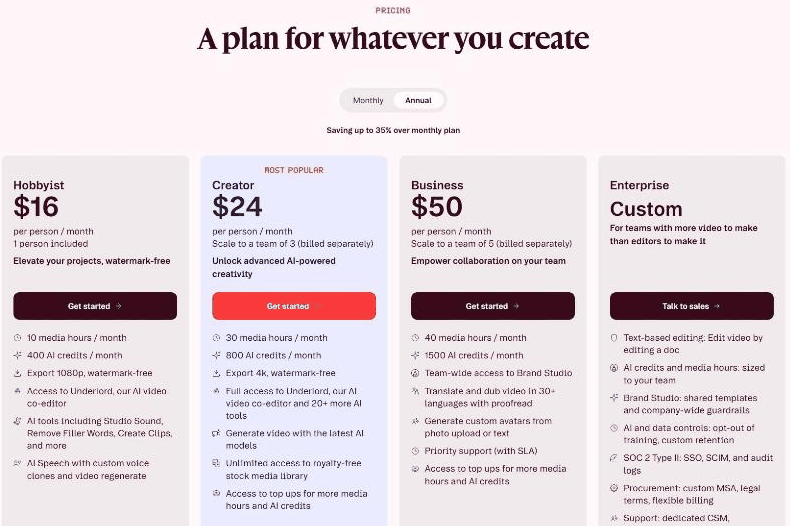
Screenshot of Descript's official pricing page, read on November 5, 2026, annual billing: Hobbyist $16, Creator $24, Business $50 per person per month.
What Is Descript?
Descript is an AI video and podcast editor that lets you edit media by editing text, with transcription, filler word removal, AI voices and an AI co-editor called Underlord. Its pricing page lists Hobbyist, Creator, Business and Enterprise plans billed per person with media hours and AI credits.
Key Features
The strongest parts of Descript’s offering come down to a handful of core capabilities:
Hobbyist: 10 media hours and 400 AI credits a month, 1080p watermark-free export and access to Underlord
Creator: 30 media hours and 800 AI credits, 4K export, video generation with the latest AI models and royalty-free stock media
Business: 40 media hours and 1,500 AI credits, team Brand Studio, translate and dub in 30+ languages, avatars and priority support with SLA
Enterprise: text-based editing, SOC 2 Type II with SSO and SCIM, custom MSA and a dedicated CSM
AI tools including Studio Sound, Remove Filler Words and Create Clips
Top-ups for more media hours and AI credits
Descript Pricing
Pricing: Hobbyist $16, Creator $24, Business $50 per person/month billed annually; Enterprise custom (official page, Nov 5, 2026). Plans and promotions change, so always confirm current numbers on the official site before you buy.
Pros and Cons
Pros
✓ Text-based editing is fast for spoken content
✓ Transcription and captions praised by reviewers
✓ Annual billing saves up to 35%
✓ Studio Sound and filler-word removal
✓ High G2 and Capterra ratings
Cons
✗ AI credits can be used up quickly according to reviewers
✗ The September 2025 pricing change replaced transcription hours with media minutes
✗ Crashes and slow performance reported in reviews
✗ Transcripts can need cleanup according to some users
✗ Trustpilot score is much lower than G2 according to one synthesis
Who Is Descript For?
Strong points: Text-based editing is fast for spoken content; Transcription and captions praised by reviewers. Weigh this before you commit: AI credits can be used up quickly according to reviewers; The September 2025 pricing change replaced transcription hours with media minutes.
Best Descript Alternatives
If Descript is not quite right for you, a few other AI tools are worth a look:
Squibler — a widely used ai option worth comparing if Descript does not check every box for your needs.
Tagshop AI — a widely used ai option worth comparing if Descript does not check every box for your needs.
Klap — a widely used ai option worth comparing if Descript does not check every box for your needs.
Strengths and Trade-offs
The biggest point in favor of Descript: Text-based editing is fast for spoken content. The biggest thing to weigh against it: AI credits can be used up quickly according to reviewers. Consider both before you commit.
Pricing on the Official Page
On November 5, 2026, Descript's pricing page was headed "A plan for whatever you create" with a Monthly or Annual toggle (annual saves up to 35%). With annual billing, prices were per person per month: Hobbyist $16 (against $24 monthly) with 1 person included, Creator (most popular) $24 (against $35) scaling to a team of 3 billed separately, Business $50 scaling to a team of 5, and Enterprise custom.
Hobbyist: 10 media hours and 400 AI credits a month, 1080p watermark-free export, access to Underlord (the AI video co-editor), AI tools such as Studio Sound, Remove Filler Words and Create Clips, and AI Speech with custom voice clones and video regenerate.
Creator: 30 media hours and 800 AI credits, 4K watermark-free export, full access to Underlord and 20+ more AI tools, video generation with the latest AI models, unlimited royalty-free stock media and top-ups for more media hours and credits.
Business: 40 media hours and 1,500 AI credits, team-wide Brand Studio, translate and dub video in 30+ languages with proofread, avatars from a photo or text, priority support with SLA and top-ups.
Enterprise: text-based editing, AI credits and media hours sized to your team, shared Brand Studio, AI and data controls, SOC 2 Type II with SSO, SCIM and audit logs, a custom MSA and a dedicated CSM.
Media hours and AI credits are monthly allowances, so estimate your recording hours and AI usage before choosing a tier.
What Other Users Say About Descript
Public feedback from third-party sites as of November 5, 2026. Scores and counts change, and some figures come from summaries we could not check against the original pages.
Ratings:G2 shows about 4.6 out of 5 from roughly 854 reviews and Capterra 4.6 from 183. One synthesis puts Trustpilot at about 3.0, with power users raising stability, AI credit costs and export limits.
Praise: transcription and captions, text-based editing and AI tools that make basic editing easy.
AI credits: users describe an AI avatar feature that failed while still deducting credits and a single-word voice clone fix costing 10 credits.
2025 pricing change: reviews say the September 2025 overhaul replaced transcription hours with media minutes, so every uploaded file counts toward the quota, and one user burned 400 credits in under 15 minutes.
Stability: crashes, slow performance and editing issues are recurring G2 cons, and some users spend a long time cleaning up transcripts and speaker labels.
How much does Descript cost? Hobbyist $16, Creator $24, Business $50 per person/month billed annually; Enterprise custom (official page, Nov 5, 2026) Prices change, so confirm on the official site before buying.
What are the main drawbacks of Descript? AI credits can be used up quickly according to reviewers; The September 2025 pricing change replaced transcription hours with media minutes.
What else should you compare Descript against? Depending on your exact needs, Squibler, Tagshop AI, and Klap are worth comparing against Descript in the AI category.
Final Thoughts
Our take: Descript earns its 4.5/5 rating by focusing on the fundamentals of AI rather than overreaching. Just keep in mind: AI credits can be used up quickly according to reviewers.
Based on Descript’s official website and pricing page. Third-party figures are marked as reported.
Customer Reviews
No reader reviews yet — be the first to share your experience.