E
Empacer Review 2026: Features, Pricing, Pros & Cons
Empacer is a voice-first AI assistant for small business owners that drafts posts, replies and documents. We read…
Hands-on: The ToolReviewHub team has used Klap ourselves. Pricing, limits and features below come from the vendor’s official pages on the date shown, so confirm them before you buy.
Disclosure: the Klap links on this page are affiliate links. If you sign up through them we may earn a commission at no extra cost to you. It does not change our verdict; see our affiliate disclosure.
Quick verdict: Klap is a focused AI tool that turns long videos into TikTok, Instagram Reels and YouTube Shorts clips in one click. It is simple, priced by clip volume rather than by feature, and cheapest per clip on the higher plans. The catch: you can only try it on one video for free, and downloading clips needs a paid plan. Try Klap free on one video to see whether its clip picks suit your content.
Klap (klap.app, operated by ZIGG SAS) is an AI video clipping tool. You paste a YouTube link or upload a file, and Klap finds the most interesting topics, cuts them into short vertical clips, reframes the picture around the speaker, adds captions and scores each clip for its potential to go viral. The site says 3.5 million creators have made 8.5 million clips with it, and lists Google, Netflix, Red Bull and Harvard among teams that use it.

Klap sells clips, not seats. All plans include AI clipping, unlimited social accounts and analytics; what changes is the monthly clip allowance. Yearly billing is roughly half the monthly price (the site advertises “Save 50%”).
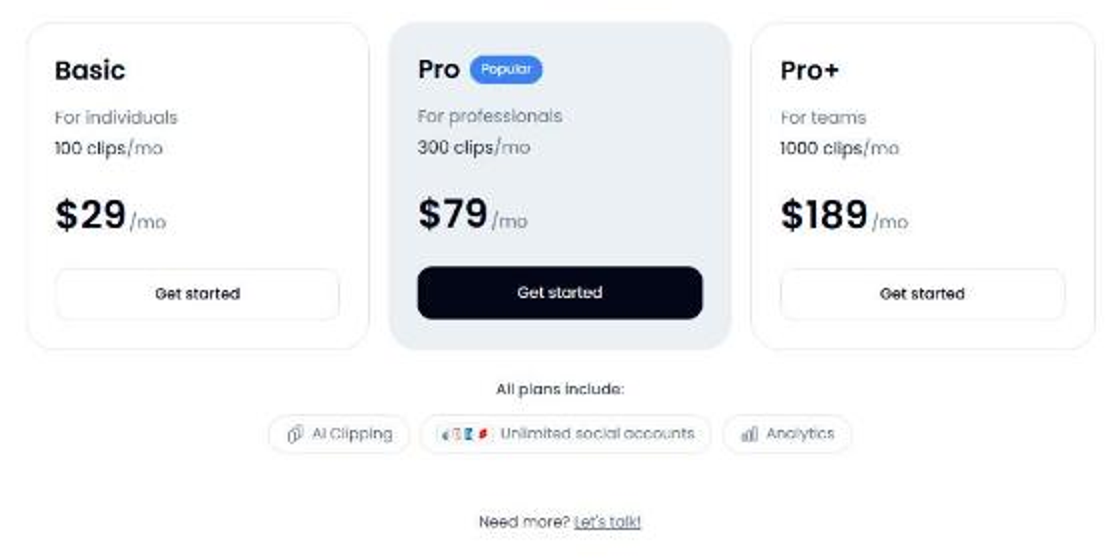
| Plan | Clips per month | Billed yearly | Billed monthly |
|---|---|---|---|
| Basic (individuals) | 100 | $14/mo | $29/mo |
| Pro (professionals, most popular) | 300 | $39/mo | $79/mo |
| Pro+ (teams) | 1,000 | $94/mo | $189/mo |
Cost per clip. Dividing the price by the clip allowance (our own arithmetic from the published prices) gives about $0.14, $0.13 and $0.09 per clip on yearly billing for Basic, Pro and Pro+, and about $0.29, $0.26 and $0.19 per clip on monthly billing. Heavy users get the best rate on Pro+; occasional users should not pay for clips they will not use. Need more than 1,000 clips? The page invites you to contact Klap.
Is Klap free? Partly. According to Klap’s FAQ you can try it on 1 video with no credit card: Klap creates clips you can preview and edit, but downloading and posting clips needs a paid plan. Paid exports carry no Klap branding.
Klap’s own site lists many competitors, including Opus Clip, Vizard AI, Munch, Submagic, Spikes Studio, Vidyo and Ssemble. When comparing, check four things: the free allowance, the price per clip or per minute, caption quality, and whether you can post directly to your channels. We cover Munch on this site, and you can read our full Klap vs Munch comparison.
Klap costs $14/mo (Basic, 100 clips), $39/mo (Pro, 300 clips) or $94/mo (Pro+, 1,000 clips) when billed yearly. Month-to-month the same plans cost $29, $79 and $189.
Klap lets you try one video for free with no credit card. Downloading and posting clips requires a paid plan.
Yes, podcasts and interviews are what it is built for. Klap says it works best on videos with speech, such as podcasts, interviews, educational videos and trainings.
Klap’s rule of thumb is about 5 clips per minute of source video, so a long podcast can produce a large batch to choose from.
Yes. You can publish and schedule to TikTok, YouTube, Instagram and LinkedIn from inside the tool.
Both. The site links to an API, an MCP server and an affiliate program.
If you publish long, speech-based videos and want a fast way to fill TikTok, Reels and Shorts, Klap is a straightforward, fairly priced option, especially on the yearly Pro and Pro+ plans. Use the free video to check clip quality on your own content before paying. Start with Klap’s free video.
Method: our team has used Klap hands-on. The pricing, limits and features in this review come from Klap’s public pricing page, homepage and FAQ as read on October 31, 2026, and we have not published benchmark measurements. Prices change, so confirm them on the official site.
Empacer is a voice-first AI assistant for small business owners that drafts posts, replies and documents. We read…
YouArt is an AI creative platform with a video agent, workflows and top image and video models, with…
LiveReview from Hexmos is a risk-aware AI code review tool that can auto-approve low-risk pull requests. We read…
Customer Reviews
No reader reviews yet — be the first to share your experience.