Thinkbuddy Review 2026: Features, Pricing, Pros & Cons
Thinkbuddy is an AI chat and productivity app that brings several AI models into one interface, with chats,…
Hands-on: The ToolReviewHub team has used Submagic ourselves. Pricing, limits and features below come from the vendor’s official pages on the date shown, so confirm them before you buy.
Disclosure: the Submagic links on this page are affiliate links. If you sign up through them we may earn a commission at no extra cost to you. It does not change our verdict; see our affiliate disclosure.
Quick verdict: Submagic is a short-form video editor built around animated captions, with AI B-roll, auto zooms, silence removal and clipping layered on top. It is priced per member by number of videos and by maximum video length, so the right plan depends mostly on how long your videos are. If you mainly want polished captions and fast edits, it is a strong fit (start a Submagic free trial); if you mainly want to cut a two-hour podcast into dozens of clips, compare it with a clip-first tool such as Klap or Opus Clip.
Submagic is an AI video editor made in France. You upload a video or paste a link (podcasts, YouTube videos or phone footage), and it adds captions, removes silences, inserts B-roll and finds key moments. Its homepage says more than 4 million businesses use it, and shows ratings of 4.8/5 on Google (1,200+ reviews), 4.6 on Trustpilot (857 reviews) and 4.7 on G2 (80+ reviews). Those are the vendor’s own figures, as shown on the site on October 31, 2026.

Submagic prices per member per month, billed monthly or yearly (yearly saves up to 41%). Every paid plan exports without a watermark. The plans differ by monthly credits, maximum video length and export quality.
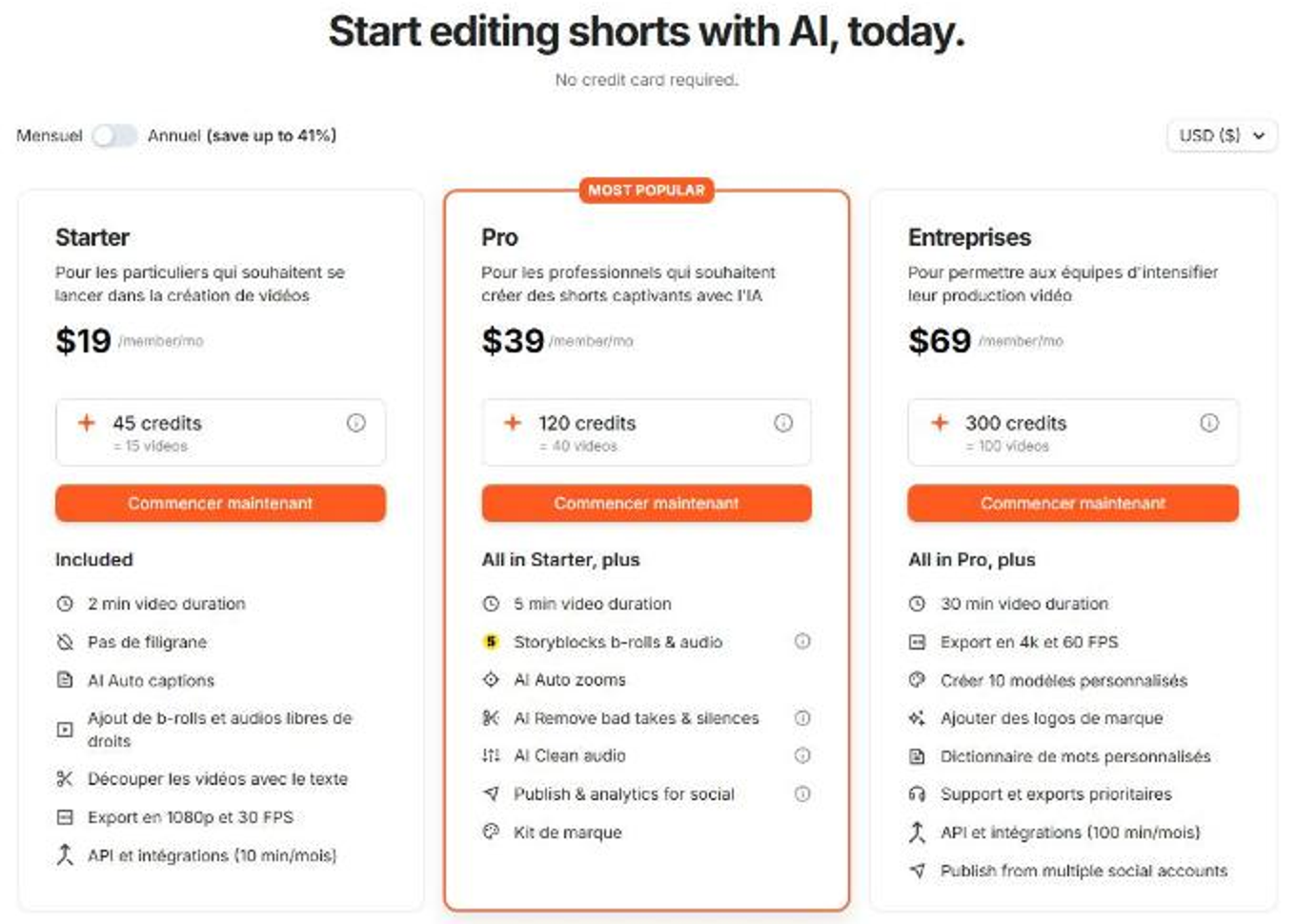
| Plan | Monthly | Billed yearly | Credits (videos) | Max length | Export |
|---|---|---|---|---|---|
| Starter | $19 | $12 | 45 (15 videos) | 2 min | 1080p, 30 FPS |
| Pro (most popular) | $39 | $23 | 120 (40 videos) | 5 min | 1080p or 2K, 30 FPS |
| Business | $69 | $41 | 300 (100 videos) | 30 min | up to 4K, 60 FPS |
Cost per video. Dividing price by the video allowance (our own arithmetic) gives about $0.80, $0.58 and $0.41 per video on yearly billing for Starter, Pro and Business, and about $1.27, $0.98 and $0.69 on monthly billing. Prices are per member, so a team of five multiplies the bill. A custom plan is available through sales for higher volumes.
Watch the length caps. The 2-minute (Starter) and 5-minute (Pro) limits are per video. A 10-minute video does not fit on Pro, and a 30-minute podcast needs Business.
Submagic’s own comparison pages list Opus Clip, Zubtitle, Quso, Veed, CapCut, Descript and Kapwing. On this site you can read our reviews of Opus Clip, Klap and Vizard. When comparing, check the free allowance, price per video or clip, caption quality, maximum video length and whether you can publish directly.
Submagic costs $19/mo (Starter), $39/mo (Pro) or $69/mo (Business) per member on monthly billing, or about $12, $23 and $41 per month billed yearly.
Yes. The pricing page promotes a free trial with no credit card required.
No. The plan comparison lists no watermark on Starter, Pro and Business.
2 minutes on Starter, 5 minutes on Pro and 30 minutes on Business.
Yes, through Magic Clips, which extracts key moments from long videos and cuts them into shorts.
Yes. Starter and Pro include 10 API minutes a month and Business includes 100, with extra API credit packs available.
Submagic is one of the more polished caption-first editors for short-form video. Pro is the sweet spot for most creators if your videos stay under five minutes; Business makes sense for teams, longer videos and 4K exports. If your main need is turning very long recordings into many clips, test a clip-first alternative on the same footage before you commit.
Method: our team has used Submagic hands-on. The pricing, limits and features in this review come from Submagic’s public pricing page, homepage and FAQ as read on October 31, 2026, and we have not published benchmark measurements. Prices change, so confirm them on the official site.
Thinkbuddy is an AI chat and productivity app that brings several AI models into one interface, with chats,…
Obscurify.ai is an anonymous AI chat service that gives access to many models without an email, with random…
AI Directories is a service that manually submits AI startups and tools to 30 to 100 plus AI…
Customer Reviews
No reader reviews yet — be the first to share your experience.